
AX55 and C1200 packet loss, big one
 This thread has been locked for further replies. You can start a new thread to share your ideas or ask questions.
Hello,
I have problems with both of my routers, i found out that both of them are having packets losses. No matter which router i connect, how i configure them if I use pingplotter 5 and try to ping login.p2.worldoftanks.eu on first hop my packet losses are pretty much 50% or higher.
If I connect my PC straight to my modem packet loss is 0-1% to that ip. What can I change on both of them that will make them 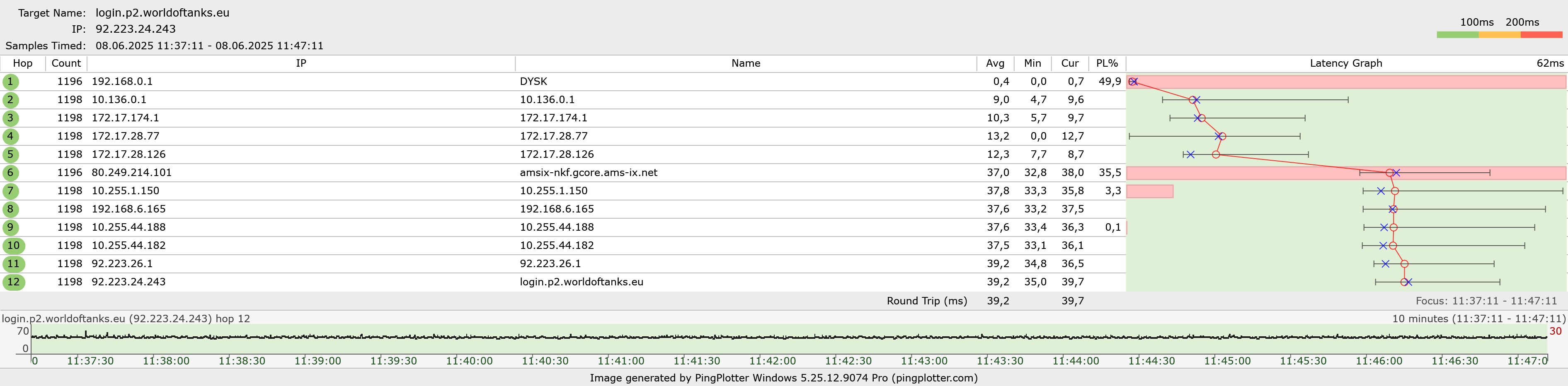 dont block soo much traffic?
- Copy Link
- Subscribe
- Bookmark
- Report Inappropriate Content


Hi@devgron,
Thank you for getting back to me.
Do you mean that changing the packet interval to more than 2 seconds can improve the problem?
There are several possible reasons for packet loss, which may be caused by the aging of the Ethernet cable or incorrect switch settings.
Therefore, you need to replace different cables, remove the switch, and test the router alone, that is, remove the other router and test it.
Is there a switch between the router and the modem? If so, please remove the switch and test again.
If the issue persists, it is recommended that you contact local support for further help.
- Copy Link
- Report Inappropriate Content
Hi@devgron,
Thank you for contacting our community.
May I know if your network topology diagram is as follows:
ISP modem—router—the second router )))((( client devices
(Note: — stands for wired connection,)))((( stands for wireless connection )
The packet loss on wireless connection or wired connection? If it lost on wireless connection, please try a different cable.
Please test each router separately to see if the problem still occurs? Does it happen on a specific router or on both routers?
Please turn off functions that may interfere: for example, temporarily disable QoS and other advanced functions, and observe the changes in packet loss rate.
In addition, please hard reset both routers to see if the issue can be resolved.
Best Regards~
- Copy Link
- Report Inappropriate Content
modem—router—PC
Now I made an upgrade,
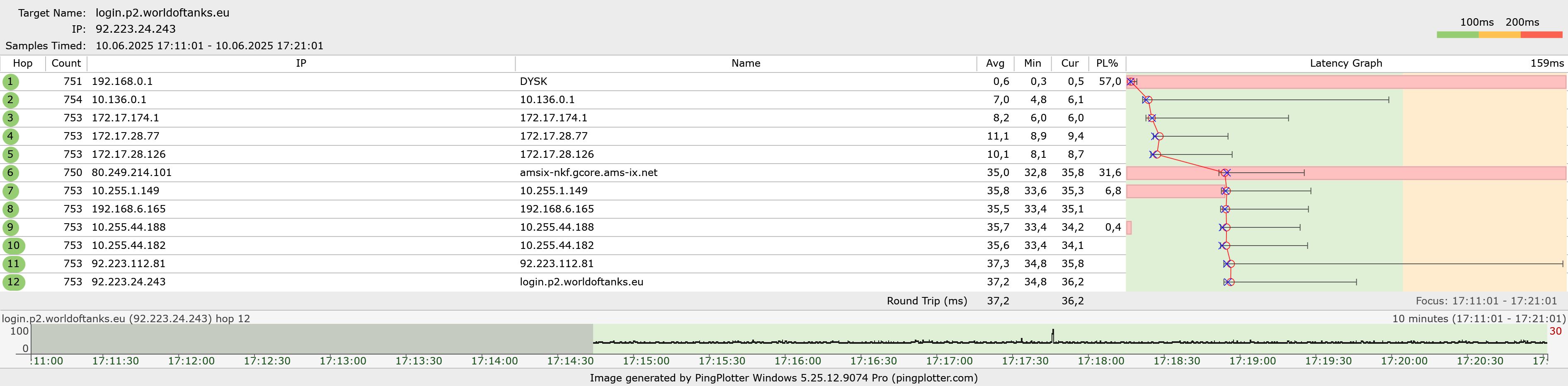
PciE Tp-link TX201 connected with cat8 flat cabble rj45—AX55 connected with modem cat8 cabble—modem
AX55 hard reset, stock settings, nothing changed in settings, only that it will work with my modem (quick setup)
- Copy Link
- Report Inappropriate Content
Hi@devgron,
Thank you for getting back to me.
Did you test the Archer C1200 separately? Did the issue reoccur on the Archer C1200?
If serious packet loss occurs only when testing Archer AX55 alone, it may be a problem with Archer AX55. You can contact local support for further help.
In addition, have you tested both wired clients and wireless clients to see if there is packet loss?
Thank you.
- Copy Link
- Report Inappropriate Content
Not as much on c1200 but yes both of them are lossing packets.
I tested only wired PC, wireless dont bother me soo much.
I tested them much more and got something interesting,
Most of packet loses occurs when i change interval of packets to under 2 seconds, worst case is 0,5 seconds
- Copy Link
- Report Inappropriate Content
Hi@devgron,
Thank you for getting back to me.
Do you mean that changing the packet interval to more than 2 seconds can improve the problem?
There are several possible reasons for packet loss, which may be caused by the aging of the Ethernet cable or incorrect switch settings.
Therefore, you need to replace different cables, remove the switch, and test the router alone, that is, remove the other router and test it.
Is there a switch between the router and the modem? If so, please remove the switch and test again.
If the issue persists, it is recommended that you contact local support for further help.
- Copy Link
- Report Inappropriate Content
Information
Helpful: 0
Views: 544
Replies: 5
Voters 0
No one has voted for it yet.