
Cannot connect to extender wifi and lan

This thread has been locked for further replies. You can start a new thread to share your ideas or ask questions.

Cannot connect to extender wifi and lan

This thread has been locked for further replies. You can start a new thread to share your ideas or ask questions.

Cannot connect to extender wifi and lan
2025-06-10 04:49:20 - last edited 2025-07-07 01:19:48
Model: RE200  
Hardware Version: V2
Firmware Version: dint know

Ive got this secondhanded

When plugged powerlight showup


for a few second wifi light showed too but no 2.4 5g light


no extender wifi seen on every device


tether app dint work either


tried plugged ethernet light showed up pc said no internet and connot connect to 192.168.0.254 / tplinkrepeater.net errorcode :unreachable 


try wps no wps light showed up however how long pressed


try to reset all light showed up assume the reset work


all suggestions welcome 


thankyou

  0      
  0      
#1
Options
1 Accepted Solution
Re:Cannot connect to extender wifi and lan-Solution
2025-06-12 07:53:26 - last edited 2025-07-07 01:19:48

Hi@Chaipat,


Please refer to page 4 of RE200(EU)_V2_User Guide, the LED status is abnormal. 

That is why I recommended you to contact local support for further help.

Nice to Meet You in Our TP-Link Community. Check Out the Latest Posts: △Pre-release Firmware for Archer AX50 Introduces New Parental Control Features and Enhancements △Introducing AI QoS: Elevate Your Gaming Experience on the Archer GE800 Gaming Router △Connect TP-Link Archer BE550 to Germany's DS-Lite (Dual Stack Lite) Internet via WAN △Tether KidShield Test Recruitment - Safeguarding Children's Online Experience If you found the post or response helpful, please click Helpful. If an answer solves your problem, click "Recommended Solution" so that others can benefit from it.
Recommended Solution
  0  
  0  
#6
Options
5 Reply
Re:Cannot connect to extender wifi and lan
2025-06-11 08:29:08

Hi@Chaipat,

Welcome to our community.


If the extender is a second hand device, please correctly reset it firstly:

With the power on, Use a pin to press the button for 1 second to reset the extender.
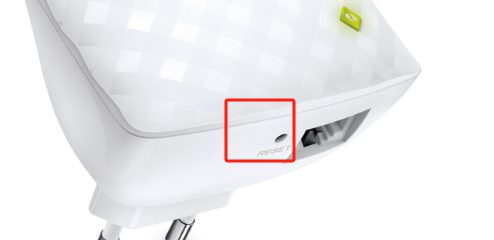


When you can see TP-Link_Extender on the Wi-Fi list, that means you have reset the extender correctly. Please configure it as below:How to set up a TP-Link Range Extender

Nice to Meet You in Our TP-Link Community. Check Out the Latest Posts: △Pre-release Firmware for Archer AX50 Introduces New Parental Control Features and Enhancements △Introducing AI QoS: Elevate Your Gaming Experience on the Archer GE800 Gaming Router △Connect TP-Link Archer BE550 to Germany's DS-Lite (Dual Stack Lite) Internet via WAN △Tether KidShield Test Recruitment - Safeguarding Children's Online Experience If you found the post or response helpful, please click Helpful. If an answer solves your problem, click "Recommended Solution" so that others can benefit from it.
  0  
  0  
#2
Options
Re:Cannot connect to extender wifi and lan
2025-06-11 14:28:29

  @Joseph-TP device is already reset ( every light include wps lit up ) still cant see device wifi. 

  0  
  0  
#3
Options
Re:Cannot connect to extender wifi and lan
2025-06-12 02:30:58 - last edited 2025-06-12 02:39:11

Hi @Chaipat,

Thank you for your reply.

All LED lights on, meaning the RE200 can access internet from the main router.

If you used the WPS button to configure the network, you should see a WiFi name of ‘XXXX_EXT’, where ‘XXXX’ is the WiFi name of the main router.
Or, the extender may have copied the WiFi name of the main router. You can turn off the router to see if you can see a wireless same as the main router's.

If no, please contact local support for further help.


Nice to Meet You in Our TP-Link Community. Check Out the Latest Posts: △Pre-release Firmware for Archer AX50 Introduces New Parental Control Features and Enhancements △Introducing AI QoS: Elevate Your Gaming Experience on the Archer GE800 Gaming Router △Connect TP-Link Archer BE550 to Germany's DS-Lite (Dual Stack Lite) Internet via WAN △Tether KidShield Test Recruitment - Safeguarding Children's Online Experience If you found the post or response helpful, please click Helpful. If an answer solves your problem, click "Recommended Solution" so that others can benefit from it.
  0  
  0  
#4
Options
Re:Cannot connect to extender wifi and lan
2025-06-12 07:42:02
it lit up and turn off I think it a indiacte of reset , another thing is device is showing only power for a while until signal light lit up is it normal ?
  0  
  0  
#5
Options
Re:Cannot connect to extender wifi and lan-Solution
2025-06-12 07:53:26 - last edited 2025-07-07 01:19:48

Hi@Chaipat,


Please refer to page 4 of RE200(EU)_V2_User Guide, the LED status is abnormal. 

That is why I recommended you to contact local support for further help.

Nice to Meet You in Our TP-Link Community. Check Out the Latest Posts: △Pre-release Firmware for Archer AX50 Introduces New Parental Control Features and Enhancements △Introducing AI QoS: Elevate Your Gaming Experience on the Archer GE800 Gaming Router △Connect TP-Link Archer BE550 to Germany's DS-Lite (Dual Stack Lite) Internet via WAN △Tether KidShield Test Recruitment - Safeguarding Children's Online Experience If you found the post or response helpful, please click Helpful. If an answer solves your problem, click "Recommended Solution" so that others can benefit from it.
Recommended Solution
  0  
  0  
#6
Options
