
Future Time Machine Support on TP-Link Routers (macOS 27 Compatibility)

Hi there,
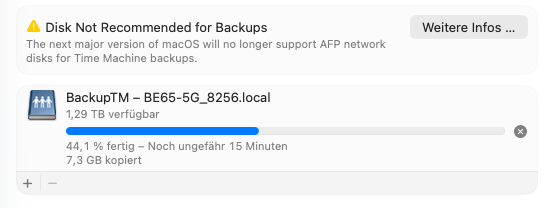
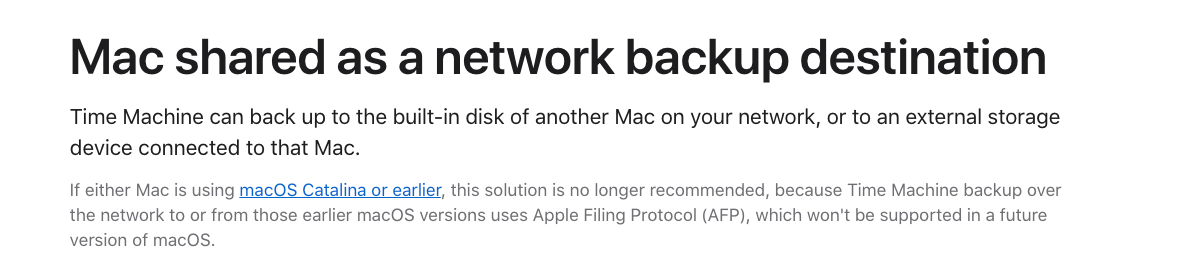
I just noticed that with the latest macOS 26 Tahoe beta, Apple has announced that AFP network volumes will no longer be supported for Time Machine backups starting with macOS 27.
Since I primarily use my Deco BE65 for Time Machine backups, I wanted to ask if there are any plans to support this functionality in the future – for example, by improving SMB support for Time Machine.
Currently, no TP-Link routers support the APFS file format required for Time Machine disks, and formats like exFAT or NTFS aren’t compatible with Time Machine over SMB either. So simply switching to SMB doesn’t work unless the router is explicitly designed to support Time Machine via SMB with a compatible backend (e.g., sparsebundle support and proper service advertisement).
Or maybe I’m just missing something – I haven’t found any additional Time Machine-specific settings in the Deco app besides the simple on/off toggle.
I’ve attached some screenshots from the current beta for context.
Thanks in advance and best regards!
- Copy Link
- Subscribe
- Bookmark
- Report Inappropriate Content
Today I received an e-mail from Spectrum that the recent Russian hackers may have breached some TP-Link routers,
so says the FBI
Spectrum further claimed that some TP-Link router are susceptible to hacking and that it is very advisable to update the firmware
and change your password.
I have had my AX55 router up and working now since May of 2025 and still not one firmware update of any kind.
Does TP-Link monitor these posts ? I assume they are aware of this ongoing post and the furture and now present problem
Now would be a great time for an firmware update and even solve the possible hacking concern.
- Copy Link
- Report Inappropriate Content

Hello @DEROS ,
Thanks for contacting our community.
We understand your concerns regarding device security. Please rest assured that the list of affected devices included in this security advisory is highly specific. Since your AX55 router is not on this list, there is no cause for concern, and you may continue to use your device with peace of mind.
Routers generally receive updates for the following reasons: 1. To fix bugs, 2. to add or enhance features, and 3. to resolve security concerns. If a router has not received an update for some time its not an indication of anything bad. It simply means that there are no features to add or enhance and that there are no bugs or security concerns that have been identified. If there are any concerns with your product you would like to discuss in detail, we would be happy to review and escalate if required.
Additionally, for Spectrum users, we can say "If you received a notice from Spectrum and your router is not listed in the product list on Security Advisory for CVE-2023-50224 – Impact on Legacy TP-Link Router and Access Point Products , then your router is not affected by the conditions in CVE-2023-50224.
- Copy Link
- Report Inappropriate Content

If there's any way you could address the issue in the subject, that would also be helpful. Many of us have been waiting for a solution to the Time Machine issue for a year--and no one from TP-Link has posted here since January. Has there been any forward progress in allowing Time Machine backups over SMB on TP-Link routers?
- Copy Link
- Report Inappropriate Content
@Joseph-TP @david_tp Chiming in with another request for an update on the ability to perform Time Machine backups over SMB to a Deco unit. As others have said, this is a critical feature for me and the main reason why I purchased a Deco system to replace my trusty Apple Airport Extremes. Thanks in advance for any update
- Copy Link
- Report Inappropriate Content
- Copy Link
- Report Inappropriate Content
Just chiming in to bump the thread - I bought an AX73 partly because of the support for Time Machine backups over the network and really eager to hear if there's an update from TP-Link on supporting the appropriate SMB extensions to resume using my USB drive for TM backups.
- Copy Link
- Report Inappropriate Content
Just chiming in to bump the thread - I bought an AX73 partly because of the support for Time Machine backups over the network and really eager to hear if there's an update from TP-Link on supporting the appropriate SMB extensions to resume using my USB drive for TM backups.
bump !
- Copy Link
- Report Inappropriate Content
Information
Helpful: 34
Views: 33163
Replies: 67
Voters 34


















