
Problem with connecting to Tempest Base Station

This thread has been locked for further replies. You can start a new thread to share your ideas or ask questions.

Problem with connecting to Tempest Base Station

This thread has been locked for further replies. You can start a new thread to share your ideas or ask questions.

Problem with connecting to Tempest Base Station
2025-06-10 22:19:50 - last edited 2025-07-07 01:48:28
Model: TL-WPA4220  
Hardware Version:
Firmware Version:

I just installed a new set of TP-Link extenders, previous non TP-Link extenders had stopped working.


Trying to reconfigure a Tempest Base Station to use the extended Wifi.
Have two devices and get same result with both.

On trying to configure the Tempest Base Station the Tempest App give network error 1024-07.


One post in a tempest forum suggests that the error maybe due to channel being used.
This post in TP-Link forum https://community.tp-link.com/en/home/forum/topic/97039
Suggests that channel can be changed but does not give details.

I see that the two extenders are using channels 2 and 9
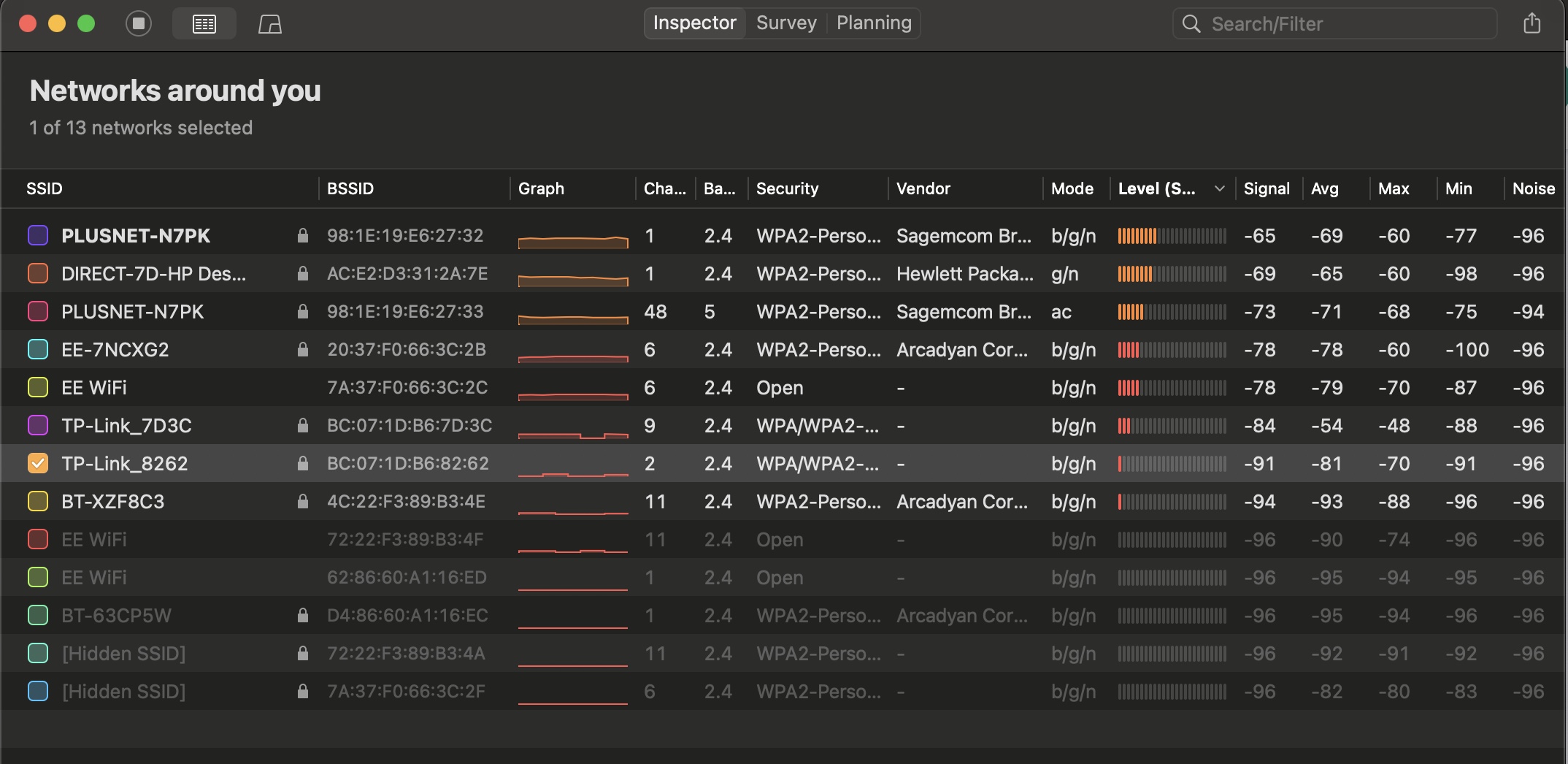


Note: Mac where I ran NetSpot is in a different part of the house but I am sure netwok signal strength is not the issue.


0
0
#1
1 Accepted Solution
Re:Problem with connecting to Tempest Base Station-Solution
2025-06-12 09:34:33 - last edited 2025-07-07 01:48:28

Hi@alktbh,

Welcome to our community.


Could I know, is the powerline network working normally? Can other clients work with the powerline network?

If you want to change channel of the extender, please refer to How to customize Powerline ac Extender's wireless settings via web-based management interface (new logo)


If the Tempest Base Station was connected the previous network, it is recommended that you can hard reset it and configure it with the powerline network.


Thank you.

Welcome to Community! Get the latest posts: △New Firmware for Archer GE550/GE650 V1 Introduces AI-QoS, EasyMesh IoT Expansion, and More! △New Firmware Releases for Archer BE805 V1/BE450 V1 to Support VPN Merge, New ECO Mode, and More! More posts, please see: △ Get the Ongoing Pre-release Firmware for Wi-Fi Routers Here— Subscribe for Updates! Urgent problems with your Wi-Fi Router, Range Extender, or DSL Modem? Please reach out via private Messages or @Joesph-TP in your new thread directly. Click Or ☆Recommended Solution if the post/answer helps.
Recommended Solution
0
0
#2
1 Reply
Re:Problem with connecting to Tempest Base Station-Solution
2025-06-12 09:34:33 - last edited 2025-07-07 01:48:28

Hi@alktbh,

Welcome to our community.


Could I know, is the powerline network working normally? Can other clients work with the powerline network?

If you want to change channel of the extender, please refer to How to customize Powerline ac Extender's wireless settings via web-based management interface (new logo)


If the Tempest Base Station was connected the previous network, it is recommended that you can hard reset it and configure it with the powerline network.


Thank you.

Welcome to Community! Get the latest posts: △New Firmware for Archer GE550/GE650 V1 Introduces AI-QoS, EasyMesh IoT Expansion, and More! △New Firmware Releases for Archer BE805 V1/BE450 V1 to Support VPN Merge, New ECO Mode, and More! More posts, please see: △ Get the Ongoing Pre-release Firmware for Wi-Fi Routers Here— Subscribe for Updates! Urgent problems with your Wi-Fi Router, Range Extender, or DSL Modem? Please reach out via private Messages or @Joesph-TP in your new thread directly. Click Or ☆Recommended Solution if the post/answer helps.
Recommended Solution
0
0
#2
