
Different setup screen than all videos
 This thread has been locked for further replies. You can start a new thread to share your ideas or ask questions.
im very new and not familiar on extender setup so i watch a video ... They all used their mobiles and they joined without network to that number adreess and they was to familiar page with that tpt link logo and they just had to put password and again the password..Tthat i was see it was an old deisnged page and i ahd to type admin admin to be inside the tplink with some wied option ... i didnt manage to do it
- Copy Link
- Subscribe
- Bookmark
- Report Inappropriate Content

Hi,
If you see a login webpage that asks for username and password "admin", then you have an older version of the TL-WA860RE, like V1 or V2.
I suggest you download the "Quick Installation Guide" or the "User Guide" for the correct version from here https://www.tp-link.com/en/support/download/tl-wa860re/v1/ and follow the instructions written in the those guides.
- Copy Link
- Report Inappropriate Content


Hi @Pankoula,
Welcome to our community.
If you have tried to set up the extender but failed, it is recommended that you reset the extender back to factory firstly:
With the Range Extender powered on, press and hold the RESET button (about 6 seconds) until all the LEDs turn on momentarily, then release the button and wait the Range Extender to reboot to its factory default settings.
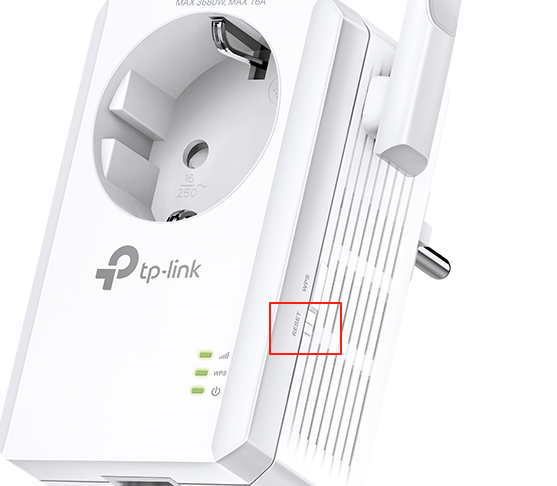
As woozle said, you can refer to page 6 of TL-WA860RE(EU)_V1_User Guide to configure the extender again.
- Copy Link
- Report Inappropriate Content
Hi,
If you see a login webpage that asks for username and password "admin", then you have an older version of the TL-WA860RE, like V1 or V2.
I suggest you download the "Quick Installation Guide" or the "User Guide" for the correct version from here https://www.tp-link.com/en/support/download/tl-wa860re/v1/ and follow the instructions written in the those guides.
- Copy Link
- Report Inappropriate Content
Hi @Pankoula,
Welcome to our community.
If you have tried to set up the extender but failed, it is recommended that you reset the extender back to factory firstly:
With the Range Extender powered on, press and hold the RESET button (about 6 seconds) until all the LEDs turn on momentarily, then release the button and wait the Range Extender to reboot to its factory default settings.
As woozle said, you can refer to page 6 of TL-WA860RE(EU)_V1_User Guide to configure the extender again.
- Copy Link
- Report Inappropriate Content
Information
Helpful: 0
Views: 511
Replies: 2
Voters 0
No one has voted for it yet.