AX73 router keeps disconnecting

AX73 router keeps disconnecting

AX73 router keeps disconnecting
2025-07-03 06:22:06 - last edited 2025-08-07 06:38:53
Model: Archer AX73  
Hardware Version: V2
Firmware Version:

My new AX73 router keeps disconnecting. I've change the DNS to 1.1.1.1 and 8.8.8.8 also changed my ISP modem. The PON signal is also strong. This is so frustrating as it impacts my ability to take work calls from home. Please help.


2025-07-03 13:47:03 3G4G DEBUG [10641] backup: switch network to WIRED.

2025-07-03 13:46:56 Led Controller INFO [1627] Start to run WAN1_ON

2025-07-03 13:46:56 Led Controller INFO [1627] Start to run WAN0_OFF

2025-07-03 13:46:56 Led Controller INFO [1627] Start to run LAN_ON

2025-07-03 13:46:11 Led Controller INFO [1627] Start to run WAN1_OFF

2025-07-03 13:46:11 Led Controller INFO [1627] Start to run WAN0_ON

2025-07-03 13:46:11 Led Controller INFO [1627] Start to run LAN_ON

2025-07-03 13:17:33 QoS INFO [19711] Service start

2025-07-03 13:17:33 QoS INFO [19711] Function disabled

2025-07-03 13:17:33 QoS INFO [19711] Service stop

2025-07-03 13:17:27 NAT NOTICE [17903] Virtual server created succeeded[ex-port:5000 ip:192.168.1.80 in-port:5000 protocol:all]

2025-07-03 13:17:26 NAT NOTICE [17903] Virtual server created succeeded[ex-port:5001 ip:192.168.1.80 in-port:5001 protocol:all]

2025-07-03 13:17:24 NAT DEBUG [17903] Flush conntrack

2025-07-03 13:17:24 NAT INFO [17903] Function enabled

2025-07-03 13:17:24 NAT NOTICE [17903] Create NAT chain succeeded

2025-07-03 13:17:23 NAT INFO [17903] Initialization succeeded

2025-07-03 13:17:23 NAT INFO [17903] Initialization succeeded

2025-07-03 13:17:23 Parental Controls INFO [17656] Service start

2025-07-03 13:17:22 Parental Controls INFO [17656] Function enabled

2025-07-03 13:17:22 Parental Controls INFO [17656] Service stop

2025-07-03 13:17:22 Parental Controls INFO [17656] Function disabled

2025-07-03 13:17:21 Basic Security INFO [17414] Service start

2025-07-03 13:17:21 Basic Security NOTICE [17414] Flush conntrack table succeeded

2025-07-03 13:17:20 Access Control INFO [17353] Service start

2025-07-03 13:17:20 Access Control INFO [17353] Function disabled

2025-07-03 13:17:19 Firewall INFO [16554] Service start

2025-07-03 13:17:15 Firewall INFO [16554] Service stop

2025-07-03 13:17:13 UPnP INFO [16430] Service start

2025-07-03 13:17:12 UPnP INFO [16430] Service stop

2025-07-03 13:17:10 NAT NOTICE [15153] Virtual server created succeeded[ex-port:5000 ip:192.168.1.80 in-port:5000 protocol:all]

2025-07-03 13:17:10 NAT NOTICE [15153] Virtual server created succeeded[ex-port:5001 ip:192.168.1.80 in-port:5001 protocol:all]

2025-07-03 13:17:09 Remote Management INFO [15669] Service stop

2025-07-03 13:17:07 NAT INFO [15153] Initialization succeeded

2025-07-03 13:17:07 NAT INFO [15153] Initialization succeeded

2025-07-03 13:17:04 QoS INFO [14706] Service start

2025-07-03 13:17:04 QoS INFO [14706] Function disabled

2025-07-03 13:17:04 QoS INFO [14706] Service stop

2025-07-03 13:16:58 NAT NOTICE [12847] Virtual server created succeeded[ex-port:5000 ip:192.168.1.80 in-port:5000 protocol:all]

2025-07-03 13:16:57 NAT NOTICE [12847] Virtual server created succeeded[ex-port:5001 ip:192.168.1.80 in-port:5001 protocol:all]

2025-07-03 13:16:56 NAT DEBUG [12847] Flush conntrack

2025-07-03 13:16:56 NAT INFO [12847] Function enabled

2025-07-03 13:16:56 NAT NOTICE [12847] Create NAT chain succeeded

2025-07-03 13:16:55 NAT INFO [12847] Initialization succeeded

2025-07-03 13:16:54 NAT INFO [12847] Initialization succeeded

2025-07-03 13:16:54 Parental Controls INFO [12614] Service start

2025-07-03 13:16:54 Parental Controls INFO [12614] Function enabled

2025-07-03 13:16:53 Parental Controls INFO [12614] Service stop

2025-07-03 13:16:53 Parental Controls INFO [12614] Function disabled

2025-07-03 13:16:53 Basic Security INFO [12358] Service start

2025-07-03 13:16:53 Basic Security NOTICE [12358] Flush conntrack table succeeded

2025-07-03 13:16:51 Access Control INFO [12297] Service start

2025-07-03 13:16:51 Access Control INFO [12297] Function disabled

2025-07-03 13:16:51 Firewall INFO [11531] Service start

2025-07-03 13:16:50 3G4G DEBUG [10641] backup: switch network to WIRED.

2025-07-03 13:16:46 Firewall INFO [11531] Service stop

2025-07-03 13:16:43 NAT NOTICE [10537] Virtual server created succeeded[ex-port:5000 ip:192.168.1.80 in-port:5000 protocol:all]

2025-07-03 13:16:43 NAT NOTICE [10537] Virtual server created succeeded[ex-port:5001 ip:192.168.1.80 in-port:5001 protocol:all]

2025-07-03 13:16:42 3G4G DEBUG [10641] backup: switch network to WIRED.

2025-07-03 13:16:42 PPP INFO [10661] ppp receive IPCP ACK

2025-07-03 13:16:42 PPP INFO [10661] ppp send IPCP Req options(addr=124.82.20.90;dns1=202.188.18.188;dns2=1.9.1.9;)

2025-07-03 13:16:42 PPP INFO [10661] ppp receive IPCP NAK options(addr=124.82.20.90;dns1=202.188.18.188;dns2=1.9.1.9;)

2025-07-03 13:16:42 PPP INFO [10661] ppp send IPCP Req options(addr=0.0.0.0;dns1=0.0.0.0;dns2=0.0.0.0;)

2025-07-03 13:16:42 PPP INFO [10661] ppp receive PAP AuthAck Authentication success,Welcome!

2025-07-03 13:16:42 PPP INFO [10661] ppp send PAP AuthReq user=()

2025-07-03 13:16:42 PPP INFO [10661] ppp send LCP ACK

2025-07-03 13:16:42 PPP INFO [10661] ppp receive LCP Request options(mru=1492;authtype=PPP_PAP;magic=0xebc66fcc;)

2025-07-03 13:16:41 NAT INFO [10537] Initialization succeeded

2025-07-03 13:16:41 NAT INFO [10537] Initialization succeeded

2025-07-03 13:16:39 Led Controller INFO [1627] Start to run WAN1_ON

2025-07-03 13:16:39 Led Controller INFO [1627] Start to run WAN0_OFF

2025-07-03 13:16:39 Led Controller INFO [1627] Start to run LAN_ON

2025-07-03 13:16:39 PPP INFO [10661] ppp receive LCP ACK

2025-07-03 13:16:39 PPP INFO [10661] ppp send LCP Request options(mru=1480;magic=0x2094d416;)

2025-07-03 13:16:39 PPP INFO [10661] pppoe receive PADS sess-id(52471)

2025-07-03 13:16:39 PPP INFO [10661] pppoe send PADR Host-Uniq(29a5)

2025-07-03 13:16:39 PPP INFO [10661] pppoe receive PADO form AC-MAC(00:00:5e:00:01:8f)

2025-07-03 13:16:39 PPP INFO [10661] pppoe receive PADO AC-Name(ibse06.klg)

2025-07-03 13:16:39 PPP INFO [10661] pppoe send PADI Host-Uniq(29a5)

2025-07-03 13:16:39 PPP INFO [10661] pppoe send PADT due to(resending PADI)

2025-07-03 13:16:39 PPP INFO [17728] pppoe receive PADT

2025-07-03 13:16:39 PPP INFO [17728] ppp receive LCP TermReq

2025-07-03 13:16:24 Led Controller INFO [1627] Start to run WAN1_OFF

2025-07-03 13:16:24 Led Controller INFO [1627] Start to run WAN0_ON

2025-07-03 13:16:24 Led Controller INFO [1627] Start to run LAN_ON

  0      
  0      
#1
Options
1 Accepted Solution
Re:AX73 router keeps disconnecting-Solution
2025-07-04 07:11:22 - last edited 2025-08-07 06:38:53

 Hello@BryanH,


Welcome to our community.


May I know if your network topology diagram is as follows:

ISP modem—router)))((( client devices

(Note: — stands for wired connection,)))((( stands for wireless connection )                


For a WAN connection that is unstable, please try the following suggestions:

1) Connect a PC or old router directly to your modem to verify if your ISP's Internet is stable. If the PC or old router can access a stable internet, please try to do a Mac clone for the AX72: How do I configure MAC Address Clone

2) Ensure the Ethernet cable connecting your modem to the Router is properly connected, and replace old wires with new ones.

3) Go to Advanced > System > Firmware Update to upgrade the router's firmware. How to Upgrade the Firmware on the TP-Link Wi-Fi Routers?


Nice to Meet You in Our TP-Link Community. Check Out the Latest Posts: △Pre-release Firmware for Archer AX50 Introduces New Parental Control Features and Enhancements △Introducing AI QoS: Elevate Your Gaming Experience on the Archer GE800 Gaming Router △Connect TP-Link Archer BE550 to Germany's DS-Lite (Dual Stack Lite) Internet via WAN △Tether KidShield Test Recruitment - Safeguarding Children's Online Experience If you found the post or response helpful, please click Helpful. If an answer solves your problem, click "Recommended Solution" so that others can benefit from it.
Recommended Solution
  0  
  0  
#2
Options
8 Reply
Re:AX73 router keeps disconnecting-Solution
2025-07-04 07:11:22 - last edited 2025-08-07 06:38:53

 Hello@BryanH,


Welcome to our community.


May I know if your network topology diagram is as follows:

ISP modem—router)))((( client devices

(Note: — stands for wired connection,)))((( stands for wireless connection )                


For a WAN connection that is unstable, please try the following suggestions:

1) Connect a PC or old router directly to your modem to verify if your ISP's Internet is stable. If the PC or old router can access a stable internet, please try to do a Mac clone for the AX72: How do I configure MAC Address Clone

2) Ensure the Ethernet cable connecting your modem to the Router is properly connected, and replace old wires with new ones.

3) Go to Advanced > System > Firmware Update to upgrade the router's firmware. How to Upgrade the Firmware on the TP-Link Wi-Fi Routers?


Nice to Meet You in Our TP-Link Community. Check Out the Latest Posts: △Pre-release Firmware for Archer AX50 Introduces New Parental Control Features and Enhancements △Introducing AI QoS: Elevate Your Gaming Experience on the Archer GE800 Gaming Router △Connect TP-Link Archer BE550 to Germany's DS-Lite (Dual Stack Lite) Internet via WAN △Tether KidShield Test Recruitment - Safeguarding Children's Online Experience If you found the post or response helpful, please click Helpful. If an answer solves your problem, click "Recommended Solution" so that others can benefit from it.
Recommended Solution
  0  
  0  
#2
Options
Re:AX73 router keeps disconnecting
2025-07-04 08:08:25

  @Joseph-TP 


Yes, you are correct. Fiber --> ISP Modem --> Ax73 Router.


1. ISP internet is stable. I've changed my ISP modem twice, did a test on the fiber signal. I can't clone my old router because it is faulty and that is the reason I changed to AX73. 


2. All cables are new. I've done this multiple times.


3. My current firmware is 1.1.2 Build 20250210 rel.53421(5553). It is the latest firmware.

I've also proceed to reformat my router today. It was stable for a while and then the following message appeared again and when it does, my internet connection goes out. Why is this happening? it is very disappointing that this is happening. Also, I reboot my device daily. I think a new firmware is required


2025-07-04 16:01:19 3G4G DEBUG [10618] backup: switch network to WIRED.

2025-07-04 15:53:42 3G4G DEBUG [10618] backup: switch network to WIRED.

  0  
  0  
#3
Options
Re:AX73 router keeps disconnecting
2025-07-04 08:38:45

Hi@BryanH,

Thank you for getting back to me.


Do you have a wired PC to test the internet of the modem directly? If the PC can get a stable internet, you can also try to do Mac clone for the router.

In addition, when did you buy the router?  The unstable factor may also be a hardware problem of the router. It is recommended that you contact local support for further help.


Nice to Meet You in Our TP-Link Community. Check Out the Latest Posts: △Pre-release Firmware for Archer AX50 Introduces New Parental Control Features and Enhancements △Introducing AI QoS: Elevate Your Gaming Experience on the Archer GE800 Gaming Router △Connect TP-Link Archer BE550 to Germany's DS-Lite (Dual Stack Lite) Internet via WAN △Tether KidShield Test Recruitment - Safeguarding Children's Online Experience If you found the post or response helpful, please click Helpful. If an answer solves your problem, click "Recommended Solution" so that others can benefit from it.
  0  
  0  
#4
Options
Re:AX73 router keeps disconnecting
2025-07-04 09:20:40

 Hi @Joseph-TP 


I use a PPPoe connection and configure it from my router. So I can't link to my PC directly.


I bought it this year from TP-LINk and have contacted the local support but no one responded to me. Pretty frustrating. 

  0  
  0  
#5
Options
Re:AX73 router keeps disconnecting
2025-07-04 09:30:00

  @BryanH 

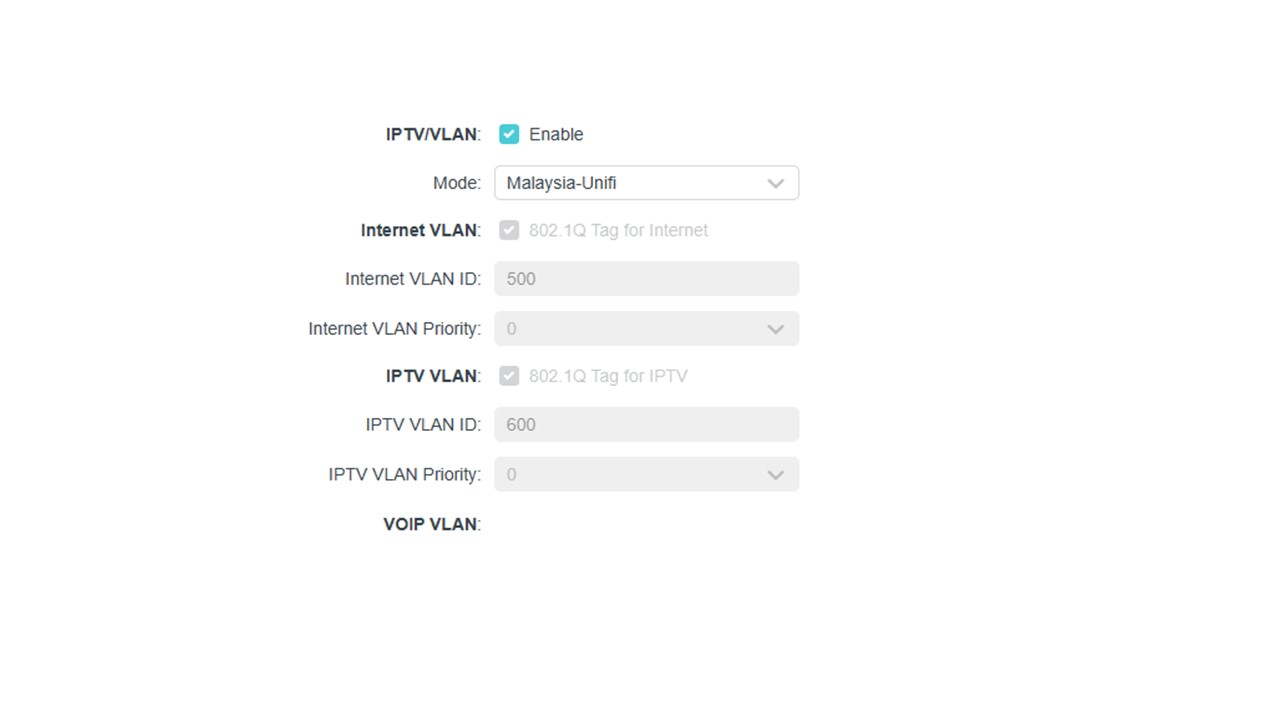
Do you need to input the VLAN ID? If not, you can set PPPOE on the wired PC: 

How to set up a PPPoE connection on Windows 8&10

How to configure PPPoE connection on Mac pro

Nice to Meet You in Our TP-Link Community. Check Out the Latest Posts: △Pre-release Firmware for Archer AX50 Introduces New Parental Control Features and Enhancements △Introducing AI QoS: Elevate Your Gaming Experience on the Archer GE800 Gaming Router △Connect TP-Link Archer BE550 to Germany's DS-Lite (Dual Stack Lite) Internet via WAN △Tether KidShield Test Recruitment - Safeguarding Children's Online Experience If you found the post or response helpful, please click Helpful. If an answer solves your problem, click "Recommended Solution" so that others can benefit from it.
  0  
  0  
#6
Options
Re:AX73 router keeps disconnecting
2025-07-04 09:33:22

  @Joseph-TP 


Hi


Yes. As per below.


  0  
  0  
#7
Options
Re:AX73 router keeps disconnecting
2025-07-04 09:39:01

  @Joseph-TP 


  0  
  0  
#8
Options
Re:AX73 router keeps disconnecting
2025-07-07 02:34:34

Hi @BryanH,

If you have other routers for comparison, you will be more aware of the source of instability. If not, it is recommended that you contact local support again to inquire about warranty information.
Click here to navigate to the local official support center contact information.

Nice to Meet You in Our TP-Link Community. Check Out the Latest Posts: △Pre-release Firmware for Archer AX50 Introduces New Parental Control Features and Enhancements △Introducing AI QoS: Elevate Your Gaming Experience on the Archer GE800 Gaming Router △Connect TP-Link Archer BE550 to Germany's DS-Lite (Dual Stack Lite) Internet via WAN △Tether KidShield Test Recruitment - Safeguarding Children's Online Experience If you found the post or response helpful, please click Helpful. If an answer solves your problem, click "Recommended Solution" so that others can benefit from it.
  0  
  0  
#9
Options