
Static routes broken in Archer C1200

This thread has been locked for further replies. You can start a new thread to share your ideas or ask questions.

Static routes broken in Archer C1200

This thread has been locked for further replies. You can start a new thread to share your ideas or ask questions.

Static routes broken in Archer C1200
2025-07-11 11:53:00 - last edited 2025-08-07 07:17:06
Tags: #Network Connectivity #Static Routing
Model: Archer C1200  
Hardware Version: V2
Firmware Version: 2.0.3 Build 20211219 Rel. 67401 (EU)

Hello,


I have my own server with its own gateway and bridges configured. I want to create a static route so it can be reached through its own subnet on my LAN. However, when I add it, it doesn't get added to the system route table. I even restarted, and it didn't help a thing.
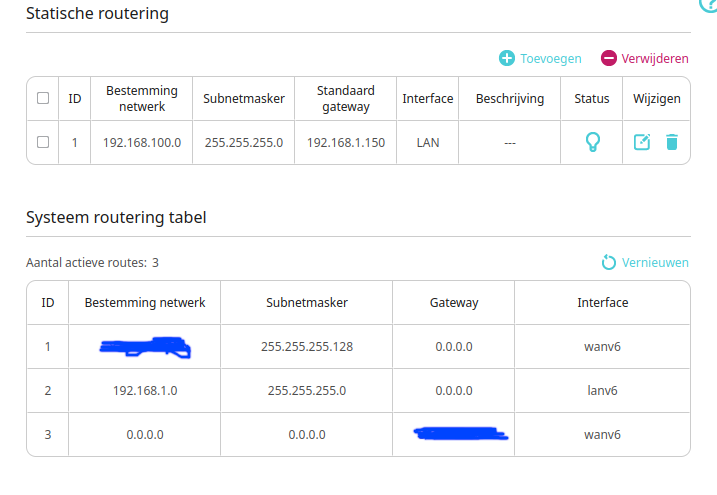
 

I have refreshed the table already but it doesn't help. Come on TP-Link, why are you leaving a device this bugged? No more security updates sure, but this should just function!

0
0
#1
1 Accepted Solution
Re:Static routes broken in Archer C1200-Solution
2025-07-15 11:40:19 - last edited 2025-08-07 07:17:06

Hello@Minionguyjpro ,

Welcome to our community.


Please let me know if your network topology diagram is as follows:

ISP modem—router—main deco )))((( client devices

(Note: — stands for wired connection,)))((( stands for wireless connection )


Please confirm that you have correctly configured Static Routing: How to configure Static Routing on wireless routers.

Could you please take screenshots with static route settings after you save them?  


Welcome to Community! Get the latest posts: △New Firmware for Archer GE550/GE650 V1 Introduces AI-QoS, EasyMesh IoT Expansion, and More! △New Firmware Releases for Archer BE805 V1/BE450 V1 to Support VPN Merge, New ECO Mode, and More! More posts, please see: △ Get the Ongoing Pre-release Firmware for Wi-Fi Routers Here— Subscribe for Updates! Urgent problems with your Wi-Fi Router, Range Extender, or DSL Modem? Please reach out via private Messages or @Joesph-TP in your new thread directly. Click Or ☆Recommended Solution if the post/answer helps.
Recommended Solution
0
0
#3
2 Reply
Re:Static routes broken in Archer C1200
2025-07-11 11:55:14
Oh and I know the route works, since it did function when I manually added it in the network settings on my laptop and then try to ping clients from the subnet.
0
0
#2
Re:Static routes broken in Archer C1200-Solution
2025-07-15 11:40:19 - last edited 2025-08-07 07:17:06

Hello@Minionguyjpro ,

Welcome to our community.


Please let me know if your network topology diagram is as follows:

ISP modem—router—main deco )))((( client devices

(Note: — stands for wired connection,)))((( stands for wireless connection )


Please confirm that you have correctly configured Static Routing: How to configure Static Routing on wireless routers.

Could you please take screenshots with static route settings after you save them?  


Welcome to Community! Get the latest posts: △New Firmware for Archer GE550/GE650 V1 Introduces AI-QoS, EasyMesh IoT Expansion, and More! △New Firmware Releases for Archer BE805 V1/BE450 V1 to Support VPN Merge, New ECO Mode, and More! More posts, please see: △ Get the Ongoing Pre-release Firmware for Wi-Fi Routers Here— Subscribe for Updates! Urgent problems with your Wi-Fi Router, Range Extender, or DSL Modem? Please reach out via private Messages or @Joesph-TP in your new thread directly. Click Or ☆Recommended Solution if the post/answer helps.
Recommended Solution
0
0
#3
