How to configure IPv6 primary and secondary DNSs

This thread has been locked for further replies. You can start a new thread to share your ideas or ask questions.

How to configure IPv6 primary and secondary DNSs

This thread has been locked for further replies. You can start a new thread to share your ideas or ask questions.

How to configure IPv6 primary and secondary DNSs
2025-08-03 16:32:36 - last edited 2025-08-27 03:45:49
Tags: #IPv6 #DNS
Model: Archer AX72  
Hardware Version: V1
Firmware Version: 1.2.6 Build 20240619 rel.72016(5553)

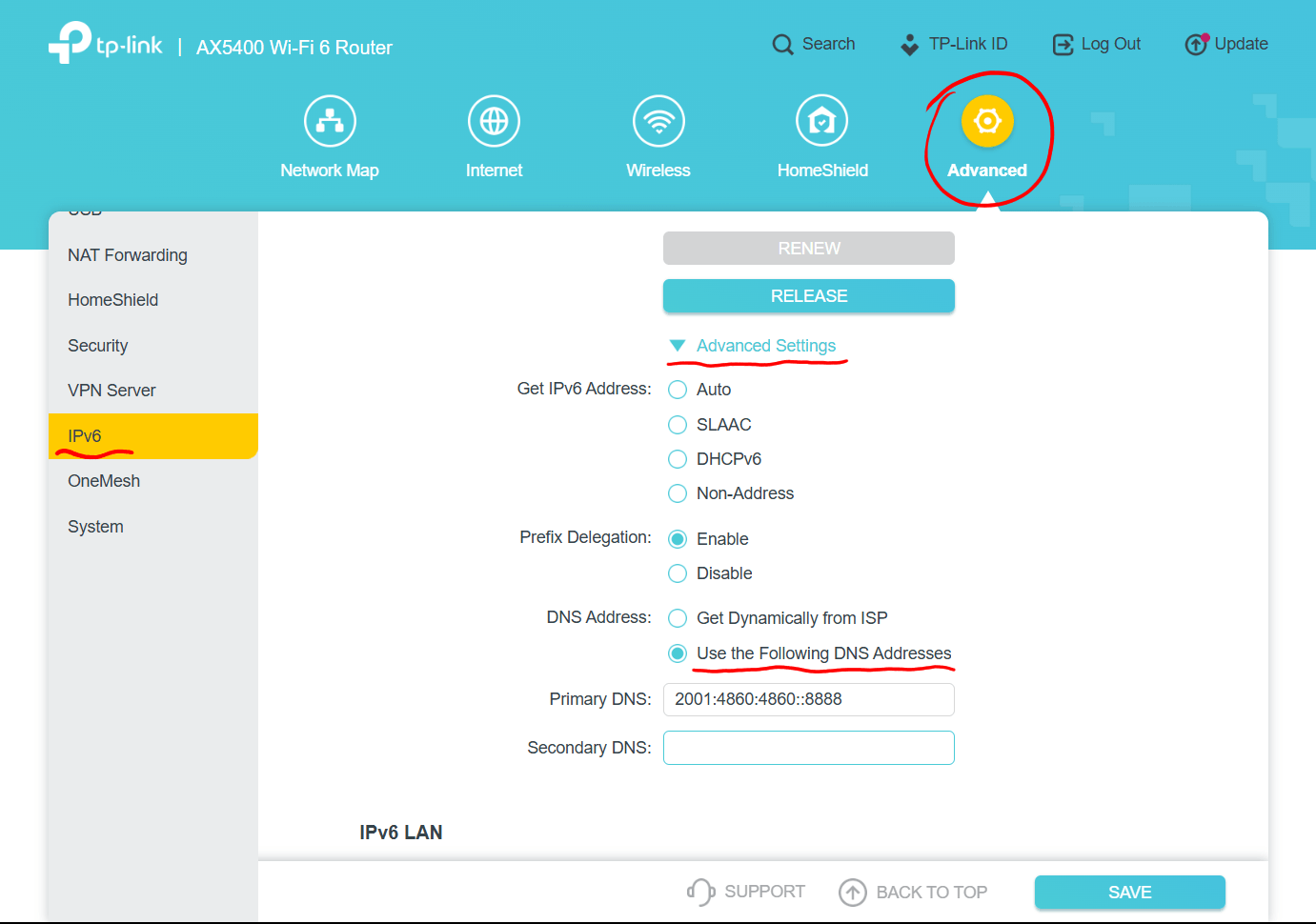
I have configured 8.8.8.8 and 8.8.4.4 as IPv4 primary and secondary routers, but I cannot see where to configure the corresponding IPv6 primary and secondary DNSs.

Could somebody advise please?

Many thanks.

 

  0      
  0      
#1
Options
1 Accepted Solution
Re:How to configure IPv6 primary and secondary DNSs-Solution
2025-08-03 17:02:44 - last edited 2025-08-04 05:50:46

  @CRBB 


Hi,


According to TP-Link's AX72 Emulator webpage the IPv6 DNS servers can be entered like indicated in the screenshot below.


Recommended Solution
  1  
  1  
#3
Options
3 Reply
Re:How to configure IPv6 primary and secondary DNSs
2025-08-03 16:50:49
The problem is that when I do a "nslookup google.com" I get a timeout and the message "Server: UnKnown Address: fe80::1". Would appreciate help.
  0  
  0  
#2
Options
Re:How to configure IPv6 primary and secondary DNSs-Solution
2025-08-03 17:02:44 - last edited 2025-08-04 05:50:46

  @CRBB 


Hi,


According to TP-Link's AX72 Emulator webpage the IPv6 DNS servers can be entered like indicated in the screenshot below.


Recommended Solution
  1  
  1  
#3
Options
Re:How to configure IPv6 primary and secondary DNSs
2025-08-03 17:11:55
Thank you! I had not actually found that despite looking many times at that screen :(
  0  
  0  
#4
Options