0
Votes

Wireless LED Turns Off After ADSL Config on TD-W9970

This thread has been locked for further replies. You can start a new thread to share your ideas or ask questions.

 
0
Votes

Wireless LED Turns Off After ADSL Config on TD-W9970

This thread has been locked for further replies. You can start a new thread to share your ideas or ask questions.
Wireless LED Turns Off After ADSL Config on TD-W9970
2025-08-10 21:11:56
Model: TD-W9970  
Hardware Version: V1
Firmware Version:


Hello,

I recently purchased a new TP-Link TD-W9970 modem. After completing the ADSL configuration using my home telephone line, the wireless LED immediately turns off. The modem works fine when connected via LAN cable, but I cannot connect wirelessly. Could you please assist me in resolving this issue?
Thank you in advance.


Best regards,
MiliCeline

#1
Options
1 Reply
Re:Wireless LED Turns Off After ADSL Config on TD-W9970
2025-08-13 08:23:55

Hello@MiliCeline ,

Welcome to our community.


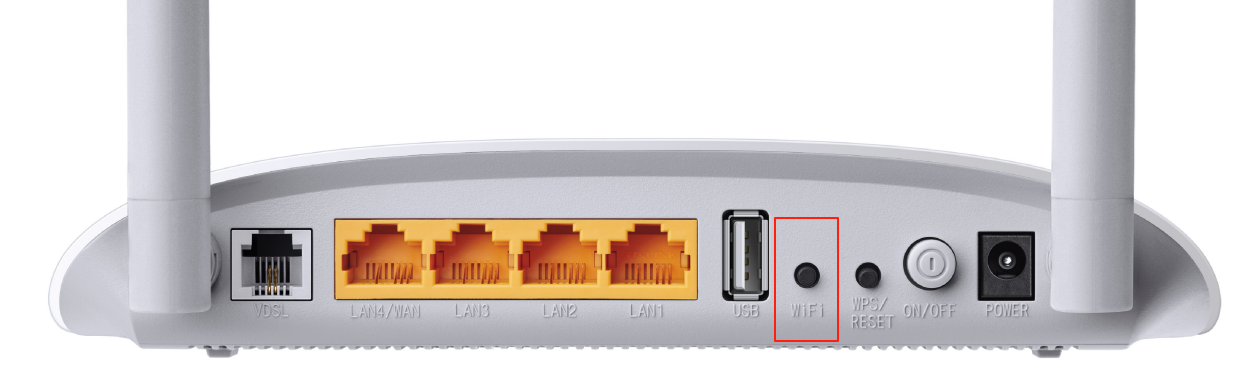
For your case, please check the WiFi button:

The switch for the WiFi function. Press the button to enable/disable the WiFi function.

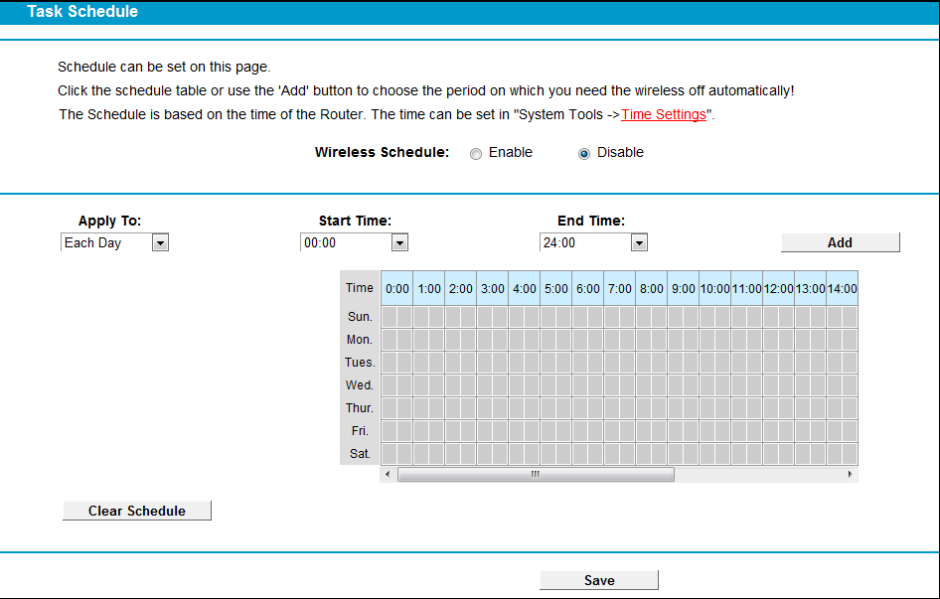
Please also check the Wireless Schedule:

Choose menu “Wireless”→“Wireless Schedule”, you can configure the Task Schedule.

Welcome to Community! Get the latest posts: △New Firmware for Archer GE550/GE650 V1 Introduces AI-QoS, EasyMesh IoT Expansion, and More! △New Firmware Releases for Archer BE805 V1/BE450 V1 to Support VPN Merge, New ECO Mode, and More! More posts, please see: △ Get the Ongoing Pre-release Firmware for Wi-Fi Routers Here— Subscribe for Updates! Urgent problems with your Wi-Fi Router, Range Extender, or DSL Modem? Please reach out via private Messages or @Joesph-TP in your new thread directly. Click Or ☆Recommended Solution if the post/answer helps.
#2
Options