
VX800v set different DNS-Server for IPv6 on LAN

Hi,
we use a different DNS-Solution for our Network.
This Solution provides an DHCP-Server too, so IPv4 ist completely managed by this Server.
We want to use this Server for IPv6 too. It supports IPv6 completely, but there is a Problem with the Router (VX800x).
If I set the Router to activate IPv6, it can only start RADVD or DHCPv6 to generate it's own IPv6 for the Network.
There are no Settings to manage the local IPv6-Connection.
If I activate this, I can reach the Router by IPv6, but it advertises itself on LAN with itself as DNS-Server, and that's a big Problem.
All DNS-Requests on IPv6 will ignore our Primary-DNS-Solution, so it doesn't work anymore.
How do I have to configure the Router getting an IPv6 without Advertisment?
- Copy Link
- Subscribe
- Bookmark
- Report Inappropriate Content


Hello@Hawk18x,
VX800v is a customized device specifically designed for local Service Providers. Its software is tailored to meet the unique requirements of these providers, ensuring alignment with their specific needs. Due to the specialized nature of the firmware on your device, our ability to provide troubleshooting may be limited.
We can certainly offer some troubleshooting tips that may help resolve your issue. Please consider the following:
Take our modem for an example, you may follow the steps below to manually set up an IPv6 connection:
1. Ensure the IPv4 connection is up and running.
2. Visit tplinkmodem.net and log in with your TP-Link ID or the local password you created for the modem router.
3. Go to Advanced > Network > Internet page, click the "Edit" button of the Connected WAN Interface Name.
4. Scroll down the page, tick the "Enable" box for the IPv6, select the Addressing Type provided by your IPv6 service provider, and keep "Current Connection" as the IPv6 Default Gateway.
5. Scroll down to the bottom and click on "Save" to apply the settings.
If the problem persists after trying these steps, we recommend contacting the technical support of your Service Provider who supplied the device, as they are best suited to provide the necessary assistance for your device.
- Copy Link
- Report Inappropriate Content
Hello@Hawk18x,
VX800v is a customized device specifically designed for local Service Providers. Its software is tailored to meet the unique requirements of these providers, ensuring alignment with their specific needs. Due to the specialized nature of the firmware on your device, our ability to provide troubleshooting may be limited.
We can certainly offer some troubleshooting tips that may help resolve your issue. Please consider the following:
Take our modem for an example, you may follow the steps below to manually set up an IPv6 connection:
1. Ensure the IPv4 connection is up and running.
2. Visit tplinkmodem.net and log in with your TP-Link ID or the local password you created for the modem router.
3. Go to Advanced > Network > Internet page, click the "Edit" button of the Connected WAN Interface Name.
4. Scroll down the page, tick the "Enable" box for the IPv6, select the Addressing Type provided by your IPv6 service provider, and keep "Current Connection" as the IPv6 Default Gateway.
5. Scroll down to the bottom and click on "Save" to apply the settings.
If the problem persists after trying these steps, we recommend contacting the technical support of your Service Provider who supplied the device, as they are best suited to provide the necessary assistance for your device.
- Copy Link
- Report Inappropriate Content
Hi,
thanks for your Answer.
But I mean the Settings for DNS Advertisement on IPv6 on my local Network.
IPv6 from my Local Provider is enabled and working.
In IPv4-Settings for Local Network I can configure a different DNS-Server, which is used by the Router and would be advertised on LAN by DHCP.
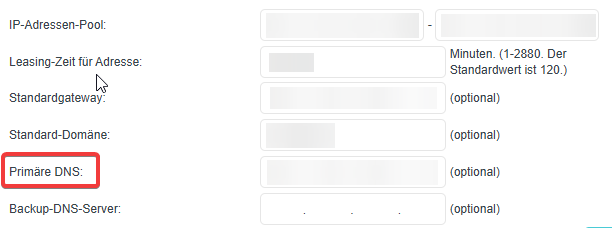
(Settings on IPv4 contains Primary DNS)
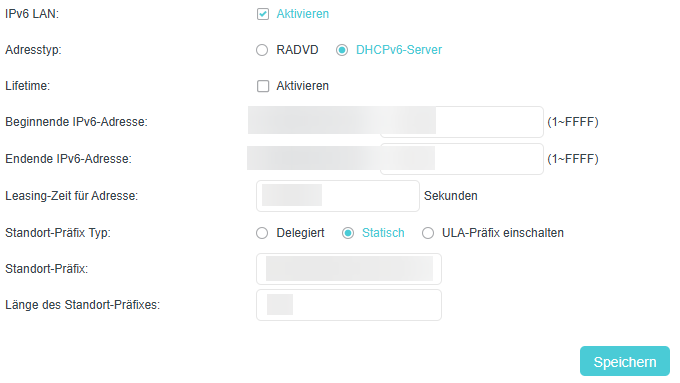
(IPv6-Settings for DHCPv6 - DNS-Settings missing)
I use an own DNS-Server on my LAN, which can't be used anymore if IPv6 ist activated because the Router advertises itself as Prmary IPv6-DNS-Server.
I don't understand, why I can set the DNS in IPv4, but not on IPv6 :/
- Copy Link
- Report Inappropriate Content
Hello @Hawk18x ,
Thanks for getting back to me.
As mentioned earlier, the VX800v's software is tailored to the unique needs of these providers, ensuring they meet their specific requirements.
Since I couldn't find more information on the product's specifications, I recommend contacting your ISP for a quicker response.
Best Regards.
- Copy Link
- Report Inappropriate Content

I have the same problem with VX800v. I simply cannot set a custom DNS for IPv6.
And it is really not an ISP issue. It is that the current router firmware simply doesn't support that.
I always get the ISP's standard gateway as DNS server.
And that means, VX800v is not a fully Dual-Stack router, no matter what product sheets or advertising are saying.
I've tried to setup an own DHCPv6 server, but that doesn't work too.
Clients always get the routers standard gateway DNS, even when using RADVD without activating RDNSS.
I ask you to add this feature in near future, since otherwise VX800v is not recommended for those who want fine grain control of IPv6 management in their home networks.
- Copy Link
- Report Inappropriate Content
Hi@Martin-B ,
Is this a modem provided by your ISP? The VX800v is not a standard model; it is a customized device. So its functionality may be limited. I suggest you contact your ISP to confirm if the settings can be modified, or contact local support.
- Copy Link
- Report Inappropriate Content
Joseph-TP wrote
No, it is the standard model, that I've purchased in local electronics store.
I have found a possible solution by providing an own RADVD in my home network (RPi) and it advertises my IPv6 DNS.
But nevertheless, the ISP or router always and ever advertises its IPv6 DNS, even when disabling RDNSS. Hence I have to set that in my client devices individually.
At the moment I have IPV6 LAN disabled at the router to have no DNS leaks at all.
- Copy Link
- Report Inappropriate Content
Hi, a few days ago, I found a solution that works well. Even when "IPv6 LAN" is disabled, the router always provides a local IPv6 address via "fe80::". (You can find this IP on "Extendes Settings -> Overview -> IPv6-Standardgateway")If you use this IPv6 address and, for example, use "PiHole" as the DNS server on the network, you can use RADVD in PiHole, provided the gateway of the computer running PiHole is set to this "fe80" IP address and the computer itself has IPv6 addresses. In Pihole, this Values needs to be filled:
If IPv4 and IPv6 is filled and an "fe80"-IP is included, set (Settings -> DHCP):
Using the built-in RADVD function, Pi-hole provides its own IPv4 and IPv6 addresses to the clients as primary DNS server. Therefore, an active "IPv6 LAN" on the router is no longer necessary. Since then, I have a significantly faster network and no longer any problems with communication between devices on the network.
- Copy Link
- Report Inappropriate Content
Hi @Joseph-TP
this router (TP-Link VX800v) cannot be obtained through an ISP in Germany. They typically offer Fritz! products.
This router is only available here through electronics stores, Amazon, or other online retailers.

Therefore, it is clear that the router's software is either faulty or that the option to assign DNS server IP address via RA (router advertisements) has not been implemented.

As far as I know, other routers are indeed capable of providing an alternative DNS server via RA (e.g., Fritz!Box).
I bought this router precisely so I could access all settings and configure my network myself.
This wasn't the case with other routers, or they were simply far too expensive.
It's a shame that this router also doesn't support everything you need for a home lab.
Apparently, I have to spend a lot of money on business-grade equipment to get the range of features I want and need.
- Copy Link
- Report Inappropriate Content
Hawk18x wrote
Hi,

a few days ago, I found a solution that works well.

Even when "IPv6 LAN" is disabled, the router always provides a local IPv6 address via "fe80::".
(You can find this IP on "Extendes Settings -> Overview -> IPv6-Standardgateway")

If you use this IPv6 address and, for example, use "PiHole" as the DNS server on the network, you can use RADVD in PiHole, provided the gateway of the computer running PiHole is set to this "fe80" IP address and the computer itself has IPv6 addresses.

Using the built-in RADVD function, Pi-hole provides its own IPv4 and IPv6 addresses to the clients as primary DNS server.

Therefore, an active "IPv6 LAN" on the router is no longer necessary.

Since then, I have a significantly faster network and no longer any problems with communication between devices on the network.
Hi,
that's an interesting finding.
But I have to adapt it to my setting. I don't have PiHole, I switched to AdguardHome (on my Raspberry Pi) some years ago.
Since I had problems with AdguardHome DHCPv6 regarding RA, I used radvd for that purpose.
When "IPv6 LAN" is disabled, my Pi has some fe80:: address (SLAC based I think).
So when I understand your solution right, then I have to assign Pi the fixed IPv6-Standardgateway fe00:: address that is noted in the routers overview panel.
I.e. that will be my local IPv6 DNS address to provide by radvd.
But I also need GUA IPv6 addresses that can be routed by the router from/to the internet.
The router provides a (dynamic/changeable) IPv6 prefix 2001:: which I see below the IPv6-Standardgateway you've mentioned.
That would result in adding an additional GUA address range by radvd.
The problem with that is, how to identify that prefix automatically when changed. By the way, I've noticed, that it is not available via SNMP (when enabled).
Just an additional note: M-Net ISP in Germany now has TP-Link VX800v as standard router for their customers. But these devices have firmware that is more than a year old.
And as said, I don't know whether that functionality is limited.
- Copy Link
- Report Inappropriate Content
Information
Helpful: 0
Views: 1333
Replies: 9
Voters 0
No one has voted for it yet.