AX10 can't see hostname from devices

AX10 can't see hostname from devices

AX10 can't see hostname from devices
2025-08-20 21:06:57
Model: Archer AX10  
Hardware Version: V1
Firmware Version: 1.3.11 Build 20250325 Rel. 24737(5553)

Hi,

I have a router-Wifi TPLINK Router AX10 (AX1500)

I have a problem.

On the DHCP client list, I don't see the name of many devices connected.


For example, my Echodot Alexa, on the TPLINK Router AX10, it shows as Empty when IP is DHCP automatic.


But when I set IP static, the router shows now "none"


Example:
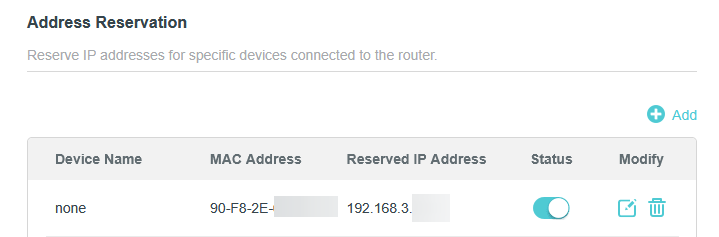


Here's another examples:
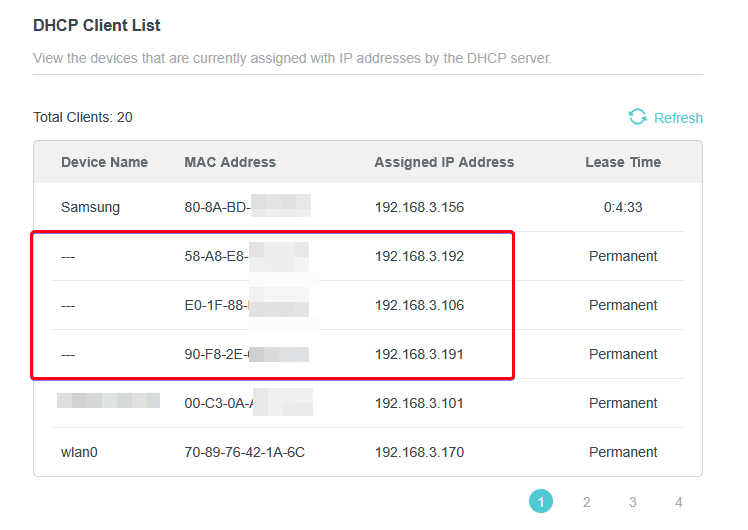


What can I do to see the hostnames of the devices?


Firmware:  1.3.11 Build 20250325 Rel. 24737(5553)

Hardware Version Archer AX10 v1.20
 
 
Thanks.
  0      
  0      
#1
Options
5 Reply
Re:AX10 can't see hostname from devices
2025-08-21 06:48:46

Hello @SergioMC22 ,

Welcome to our community.


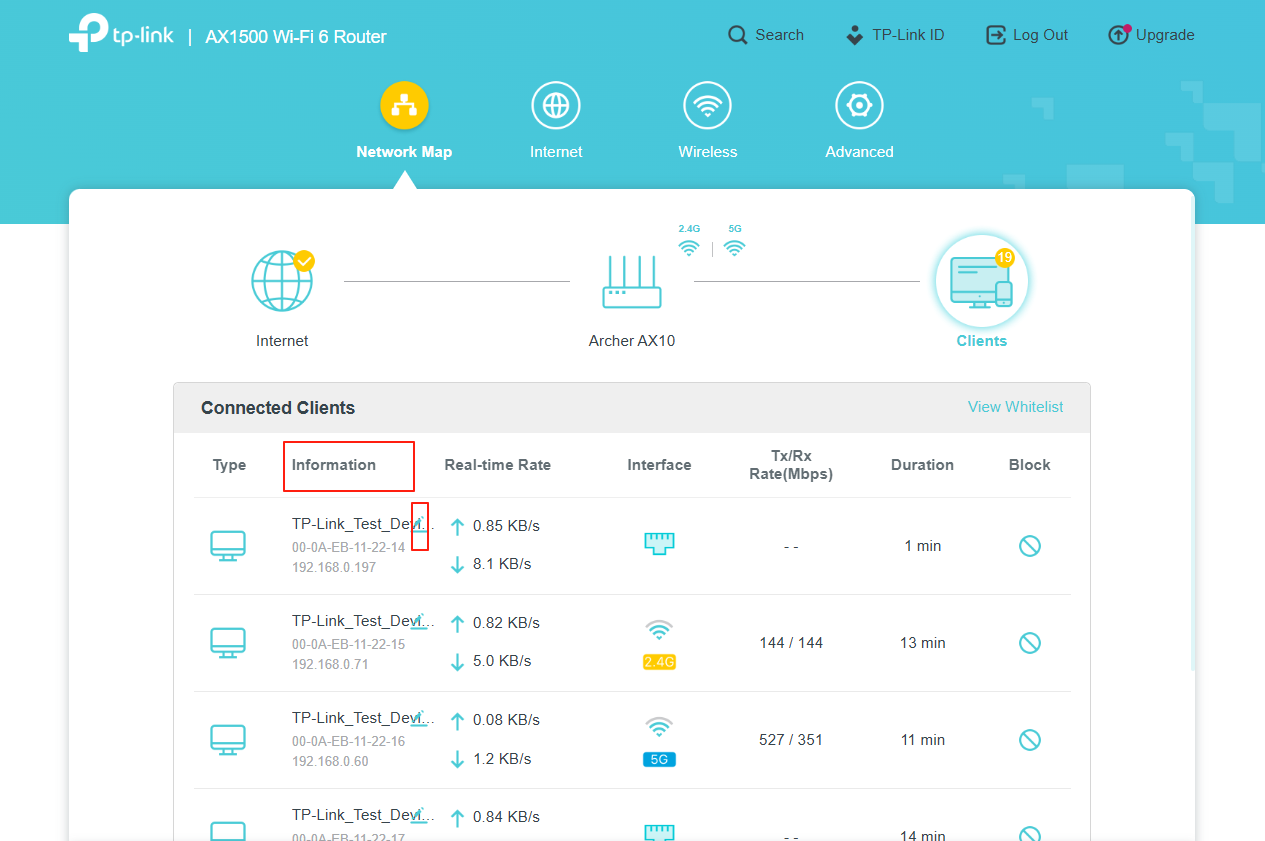
It is recommended that you check the device name under 'Connected Clients' as below:


You can also change the device name here.


Best Regards.

Nice to Meet You in Our TP-Link Community. Check Out the Latest Posts: △Pre-release Firmware for Archer AX50 Introduces New Parental Control Features and Enhancements △Introducing AI QoS: Elevate Your Gaming Experience on the Archer GE800 Gaming Router △Connect TP-Link Archer BE550 to Germany's DS-Lite (Dual Stack Lite) Internet via WAN △Tether KidShield Test Recruitment - Safeguarding Children's Online Experience If you found the post or response helpful, please click Helpful. If an answer solves your problem, click "Recommended Solution" so that others can benefit from it.
  0  
  0  
#2
Options
Re:AX10 can't see hostname from devices
2025-08-21 16:03:03 - last edited 2025-08-21 16:58:36

  @Joseph-TP 

Hello, thank you for your reply.

Following the steps you indicated, I was able to change the names of the devices.

However, I still have some questions:


- Why is there no way to change the names in advanced mode?

- Why does the router not automatically recognize the names of the devices via DHCP?

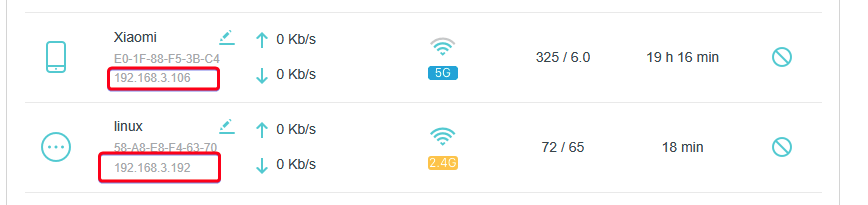
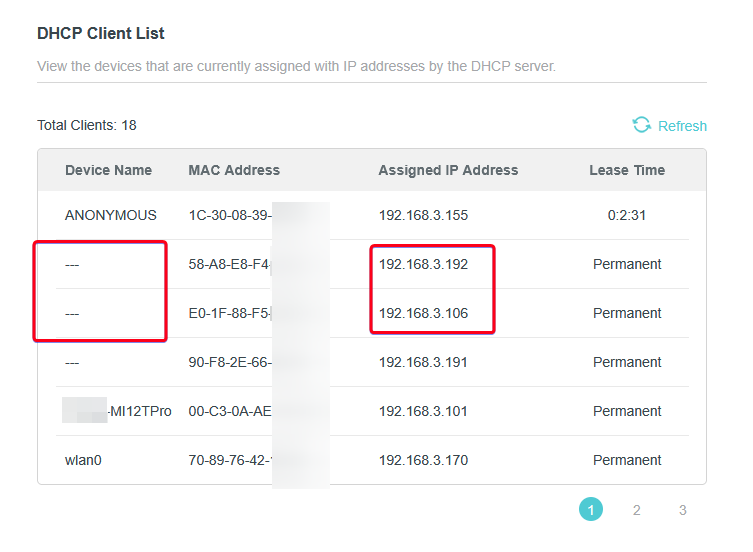
- Why do I have two devices with blank names in advanced mode, but they have names in normal mode?


I have attached a screenshot.


Standard mode


Advanced mode:


Thanks!!


  0  
  0  
#3
Options
Re:AX10 can't see hostname from devices
2025-08-22 09:56:08

  @SergioMC22 ,

The tech team has been made aware of your case; they will likely reach out to you via email to continue troubleshooting. Please check your email inbox and confirm.

Nice to Meet You in Our TP-Link Community. Check Out the Latest Posts: △Pre-release Firmware for Archer AX50 Introduces New Parental Control Features and Enhancements △Introducing AI QoS: Elevate Your Gaming Experience on the Archer GE800 Gaming Router △Connect TP-Link Archer BE550 to Germany's DS-Lite (Dual Stack Lite) Internet via WAN △Tether KidShield Test Recruitment - Safeguarding Children's Online Experience If you found the post or response helpful, please click Helpful. If an answer solves your problem, click "Recommended Solution" so that others can benefit from it.
  0  
  0  
#4
Options
Re:AX10 can't see hostname from devices
2025-08-24 22:56:50

  @Joseph-TP HI, thanks.


I have already received the email, and I have replied with the information they requested.

  0  
  0  
#5
Options
Re:AX10 can't see hostname from devices
2025-08-25 01:00:43

  @SergioMC22 I have one device that always appear as UNKNOWN. I believe it's not sending its name therefore router don't know it and don't show it.

  0  
  0  
#6
Options