How do I connect a device to a to link re315 via wpsw

How do I connect a device to a to link re315 via wpsw

How do I connect a device to a to link re315 via wpsw
2025-09-06 08:42:15 - last edited 2025-10-16 11:17:49
Model: RE315  
Hardware Version: V1
Firmware Version: 1.0.30 build 230919 tel.52342n

Hi all 

I am not very techie so apologies for terminology etc. 

I have successfully installed the tp link range finder re315. However I have a controller for my solar pv electric hot water heater that only connects to wif via the wps system. I have tried pushing the wps buttons on both the re315 and Eddie controller and they do not connect? I have a strong enough signal checked on my phone so I think it should work . The Solar Eddie controller did work fine until I had to move my router ? 
I can connect my phones etc with the password but I don't have the option to use a password on the Eddie 

hope this makes sense .

any ideas anyone . 
thanks Jeff 

  0      
  0      
#1
Options
1 Accepted Solution
Re:How do I connect a device to a to link re315 via wpsw-Solution
2025-09-06 15:30:26 - last edited 2025-10-16 11:17:49

  @JeffB1 


Thanks!


For this model you should be able to connect to the Wi-Fi of the RE315 without WPS by using the method described on the following website


https://support.myenergi<dot>com/hc/en-gb/articles/5209609055377-How-to-Reset-and-Re-Connect-Your-myenergi-Device-to-Wi-Fi      (need to replace <dot> with . )


which uses authentication by Wi-Fi credentials. (unfold the sections "iOS Setup" or "Android Setup")


Since the method shown for iOS and Android involves using a web browser, I don't see any reason why it shouldn't also work with a Windows computer.


As it says on that webpage, since your Eddi was previously connected to another Wi-Fi router, you will first need to reset its Wi-Fi connection (i.e. perform the section "How to Reset Wi-Fi on a myenergi Screen-Based Device").


Recommended Solution
  1  
  1  
#5
Options
5 Reply
Re:How do I connect a device to a to link re315 via wpsw
2025-09-06 14:51:23

  @JeffB1 


Hi,


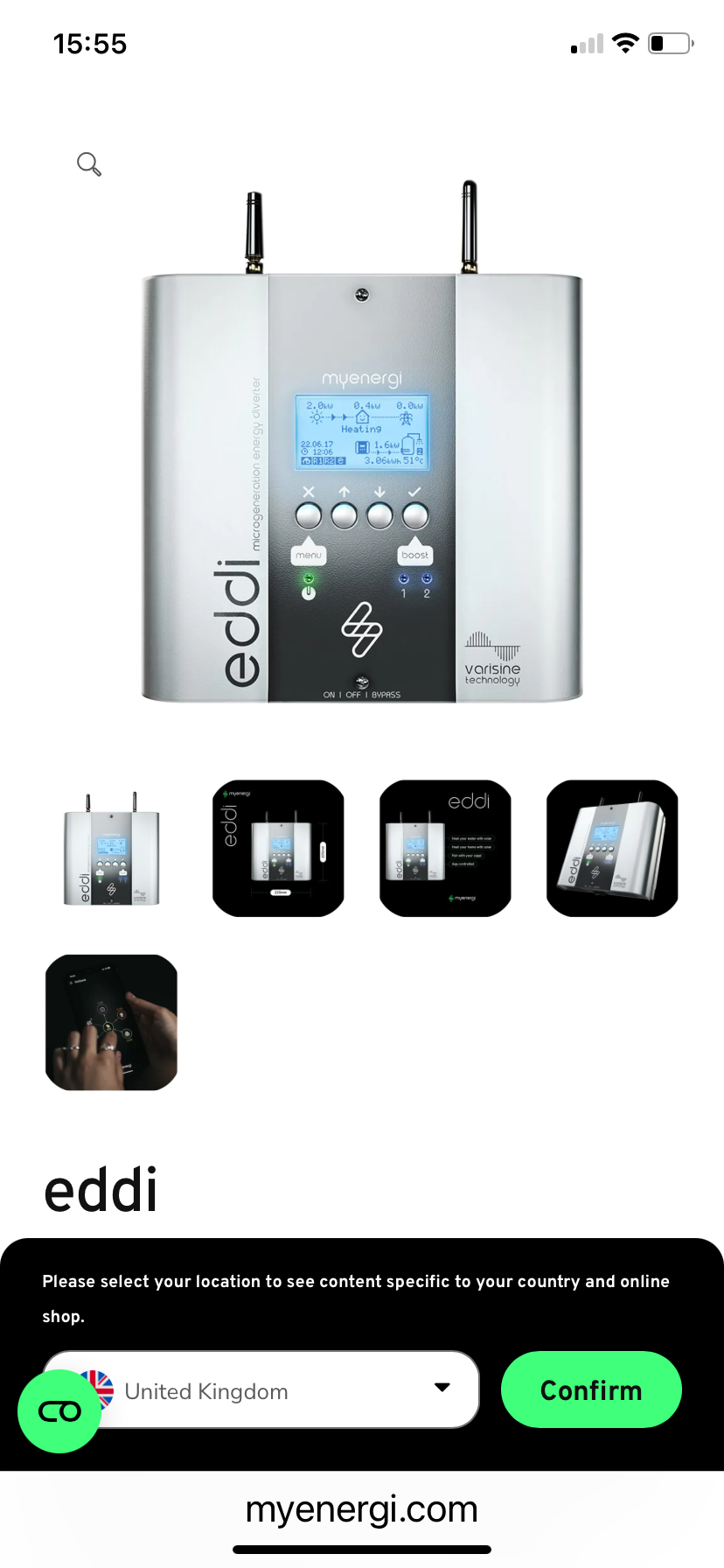
Are you able to provide a model number for that Eddie controller? Or in case you can't find one, then perhaps post a photo of the device here?

  0  
  0  
#2
Options
Re:How do I connect a device to a to link re315 via wpsw
2025-09-06 15:02:29

  @JeffB1 

  0  
  0  
#3
Options
Re:How do I connect a device to a to link re315 via wpsw
2025-09-06 15:04:13
Model EDDI-16A1P02H I think
  0  
  0  
#4
Options
Re:How do I connect a device to a to link re315 via wpsw-Solution
2025-09-06 15:30:26 - last edited 2025-10-16 11:17:49

  @JeffB1 


Thanks!


For this model you should be able to connect to the Wi-Fi of the RE315 without WPS by using the method described on the following website


https://support.myenergi<dot>com/hc/en-gb/articles/5209609055377-How-to-Reset-and-Re-Connect-Your-myenergi-Device-to-Wi-Fi      (need to replace <dot> with . )


which uses authentication by Wi-Fi credentials. (unfold the sections "iOS Setup" or "Android Setup")


Since the method shown for iOS and Android involves using a web browser, I don't see any reason why it shouldn't also work with a Windows computer.


As it says on that webpage, since your Eddi was previously connected to another Wi-Fi router, you will first need to reset its Wi-Fi connection (i.e. perform the section "How to Reset Wi-Fi on a myenergi Screen-Based Device").


Recommended Solution
  1  
  1  
#5
Options
Re:How do I connect a device to a to link re315 via wpsw
2025-09-09 09:15:24

Hello@JeffB1 ,

Welcome to our community.

As Woozle points out, smart devices often need to be reset before they can reconnect to a new network.

Best Regards.

Nice to Meet You in Our TP-Link Community. Check Out the Latest Posts: △Pre-release Firmware for Archer AX50 Introduces New Parental Control Features and Enhancements △Introducing AI QoS: Elevate Your Gaming Experience on the Archer GE800 Gaming Router △Connect TP-Link Archer BE550 to Germany's DS-Lite (Dual Stack Lite) Internet via WAN △Tether KidShield Test Recruitment - Safeguarding Children's Online Experience If you found the post or response helpful, please click Helpful. If an answer solves your problem, click "Recommended Solution" so that others can benefit from it.
  0  
  0  
#6
Options