
VPN Client configuration on M8550
VPN Client configuration on M8550

Hi there,
I recently bought an M8550 to replace my defective GL.iNet Mudi. Mobile radio and Wi-Fi configuration worked out of the box.
But I need the router as a VPN client to connect to my AVM Fritz!Boxes. I configured a new WireGuard connection on each Fritz!Box, downloaded the config files, and uploaded them to the M8550. The result was an error: "invalid format". I figured out that something with the allowed IP addresses was not accepted. I had to remove the IPv6 addresses; afterwards, it worked.
However, I do not want to keep the VPN switched on all the time. It is pretty easy to switch it on and off in the web GUI.
I have three different VPN servers. Therefore, it would be great if there were a possibility to switch the VPN on and off, and also change VPNs, directly via the touchscreen. Unfortunately, I did not find any option for that.
Is there a way to switch VPNs via the touchscreen?
Thank you in advance.
Best regards,
Maxx2112
- Copy Link
- Subscribe
- Bookmark
- Report Inappropriate Content


Hi, thank you very much for the feedback.
Unfortunately, the Touch Screen currently does not support toggling the VPN connection on/off or switching between VPN servers.
I'll forward this feature request to the senior engineers for further evaluation first.
Thanks a lot.
Best regards.
- Copy Link
- Report Inappropriate Content
Hi, thank you very much for the feedback.
Unfortunately, the Touch Screen currently does not support toggling the VPN connection on/off or switching between VPN servers.
I'll forward this feature request to the senior engineers for further evaluation first.
Thanks a lot.
Best regards.
- Copy Link
- Report Inappropriate Content

Maxx2112 wrote
I configured a new WireGuard connection on each Fritz!Box, downloaded the config files, and uploaded them to the M8550. The result was an error: "invalid format". I figured out that something with the allowed IP addresses was not accepted. I had to remove the IPv6 addresses; afterwards, it worked.
Hello @Maxx2112
I have the same Issue, kindly could you give me some details how you did it,
Thank you and very best regards
GW56
- Copy Link
- Report Inappropriate Content
Hello @CW56,
I am sorry for my late reply.
I imported a configfile, which was created by my home router completely. In order to get the configuration accepted by the M8550 I had to delete
0.0.0.0/0 and ::/0 and all IPv6 adresses whithin the allowed IP field within the peers tab and the adressfield in the Interface tab.
Afterwards I could save the configuration and use it. The drawback is, the it is not possible to access other private networks which are connected to my home network via another VPN directly. I solved that with an VM running in my homenetwork.
I did not try to import anything after the last firmware update, maybe something was already changed.
I hope this will help you.
Best regards
Maxx2112
- Copy Link
- Report Inappropriate Content
So I checked again. it is still working in this way but in addition I had to set the MTU to 1500 (should be the default value) and I had to correct the DNS servers. Afterwards the M8550 accepted my VPN configuration.
@David-TP , @TP-Link Maybe it would be good if you could document how the VPN (wireguard) configuration in M8550 is working, indeed it is not following the standard. My former GLiNet Mudi was accepting the config file without any changes. Maybe you should overwork the VPN configuration within the next firmware update. At least, rework the error messages. "invalid format" is not helping in any way. The message should be a bit more precise by naming the field, where the error occurd, and the allowed values!
Thank you in advance.
@David-TP , @TP-Link never mind, I found the beta firmware thread. I am sorry for seeing it too late.
@CW56 please have a look here: https://community.tp-link.com/en/home/forum/topic/856216
- Copy Link
- Report Inappropriate Content
Hello @Maxx2112
Thank you for your replies, I installed the Beta FW already a few days ago. I was browsing trough all the treads but still was not able to establish a VPN to my Fritzbox. I even could not setup a VPN from 2 different Android phones and one Windows Laptop straight to my M8550. All those Devices have no Problem to establish a VPN to my Fritzbox. I use "myfritz" for the Public IP4 Address, which works fine with all my devices.
Today I changed the SIm Card in my 8550 to a different ISP, it's still the same.
You wrote you had to remove the IP6 Address in your config file, in my config file are no IP6 addresses at all.
May I ask which Model of the Fritzbox you have? my one is a 7490.
How did you do the configuration in the FB? If you do the WG-Assistent in the FB there is the first question if you have a single Device or a network on the other side. I tried both, but could never import the File in the M8550.
On the M8550, did you use the VPN Server or the VPN Client section to connect to the FB. Somewhere I read the M8550 does not support site-to-site connection, so properly I need to use the M8550 as a client. However I tried both. I tried also to set up the the VPN on the M8550 and tried to import the config at the Fritzbox, which failed too.
I got this Mobile Router for my camper to connect to my home network. I made some good experience with a few Wifi Cams from Tapo and I was surprised how easy it was to setup and connect those Cam's to my NAS. I don't really need 5G, but that I can use the mobile router without the battery installed and I still can easily bring it with me everywhere else made my decision for the M8550, even if its not really a bargain. But now I'm somehow frustrated. And if I read the treads I'm not the only one. :-(
maybe someone can enlight me how to make this work,
best Regards
- Copy Link
- Report Inappropriate Content
Hello @CW56 ,
I tried it with three different models a 7590, a 7590AX and a 6690, for all of them it works in the same way. In your fritzbox you have to generate a configfile for a single client. In order to get my Wiregurad connections working, within advanced settings under VPN-Client I added a new server in the serverlist. I imported the configfile which I generated in my fritzbox beforehand and modified the values according to the sceme in the following picture:
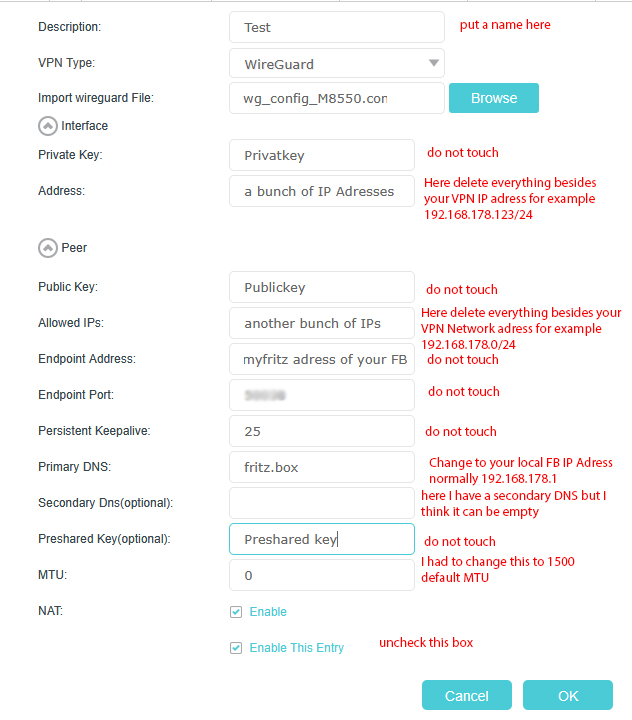
In the end I was able to save the config and establish a wireguard connection to my fritzbox. Hopefully it is working in this way for you as well.
Maybe I should mention, that I am not able to upgrade to the mentioned beta firmware. My M8550 was bought from O2 and is somehow branded. I am locked to a 1.2.0 firmware.
Best regards
Maxx2112
- Copy Link
- Report Inappropriate Content
Hello @Maxx2112
Thank you for your help and your fast reply.
The short Story is I think I know now which way I have to go, but this way gives me some headache.
The Long story, I played again with the IP Numbers, but what ever I did, I got a Error code or a invalid format.
Somewhere in a thread someone was only sucessfull if he typed all by hand, I tried also wih cut & Past, still the same problem. For testing I used the (default) IP numbers in your example, just to see if I can safe the config. .... I could save that config.
As I configured my first FB, I don't know how many years back, the 7490 ist not my first FB, I went away from the default numbers.
Instead of 178 I used 0 and it looks like the M8550 don't like that. I can safe the config with other numbers too, just not with 192.168.0.x It properly means I have to change my IP Adresses in my home network. Since I use a couple of fixed IP's I have to think a while over this first.
- Copy Link
- Report Inappropriate Content
I tried changing the configuration to 192.168.0.0/24 network. You are right, I could not save the configuration with an unknown error. Error Code: 7824.
Seems that there are some more difficulties with the WireGurad client configuration.
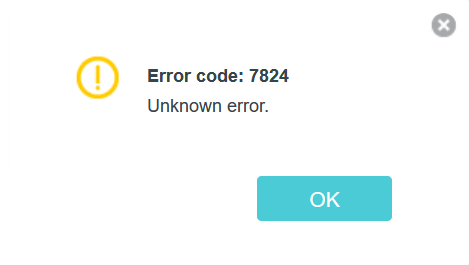
Therefore, I would try changing the network address. The fritzbox default configuration is working for me as well as 192.168.2.0/24.
Best Regards.
Maxx2112
- Copy Link
- Report Inappropriate Content
Hello @Maxx2112
Thanks for the confirmation; I was already having some doubts about myself. Unfortunately, I can't change the address quickly, as it's too much work behind. At least I can access my home network via my laptop. What's really bothering me right now is that I can't access the M8550 via VPN, neither with the WG client on my laptop nor with the WG client on various Android devices. I urgently need to open a ticket with TP-Link about this. @David-TP , @TP-Link
very best regards
CW56
- Copy Link
- Report Inappropriate Content
Hi, thank you very much for the feedback.
I saw the local DE support already opened a ticket # TKID260221657 for you. You can mention that you already tried the beta firmware here(856216) and asked for an escalation.
By the way, do you wish the VPN clients on M8550 could only access certain local servers on the Fritzbox, not the whole LAN network or external internet connection?
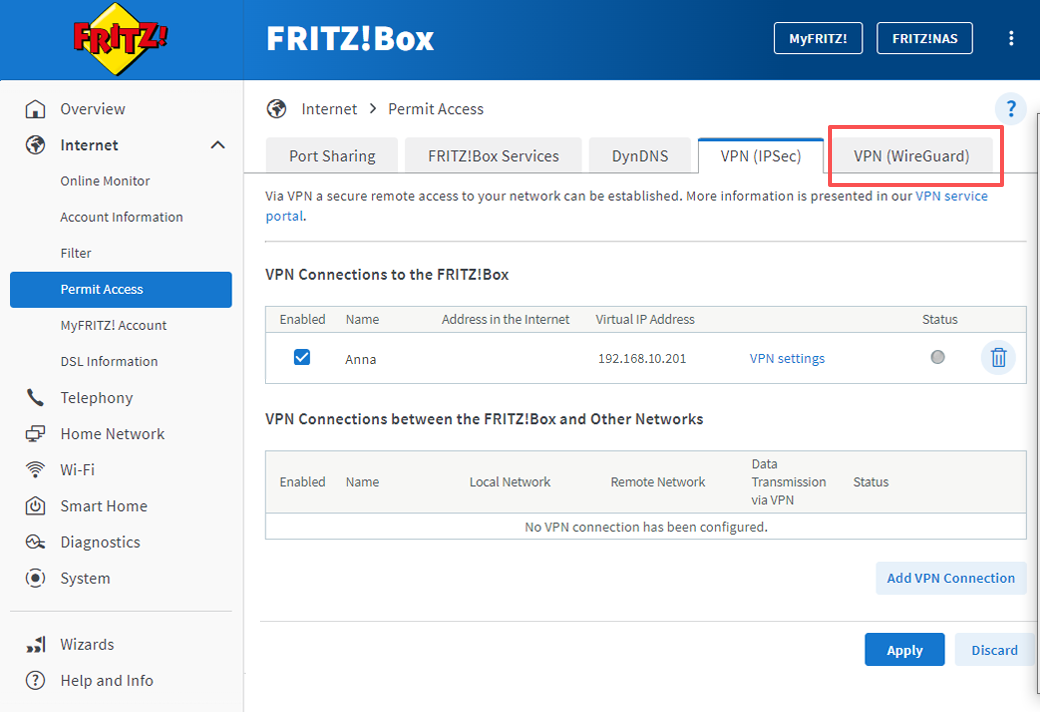
It would also be very helpful if you could add a screenshot of the WireGuard VPN server settings on the Fritzbox, as well as a copy of the WireGuard VPN Client config file, to the email.
Thanks a lot.
Best regards.
- Copy Link
- Report Inappropriate Content
Information
Helpful: 1
Views: 5211
Replies: 15
Voters 1