
1
Votes

How to turn off 01/36 cameras text in the Tapo App?

 
1
Votes

How to turn off 01/36 cameras text in the Tapo App?

How to turn off 01/36 cameras text in the Tapo App?
2025-10-18 12:14:29 - last edited a week ago
Model: Tapo D235  
Hardware Version:
Firmware Version:


Hi,


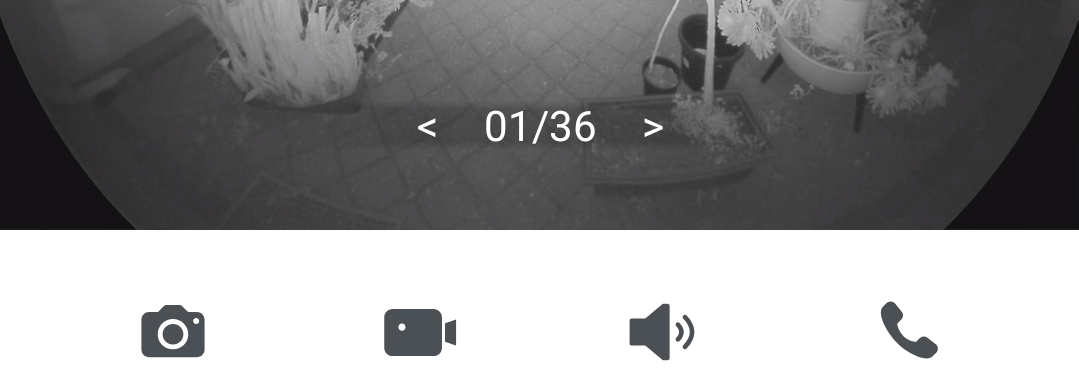
It is really annoying to have this < 01/36 > text at the bottom of my camera image. I only have one Tapo camera so trying to browse through other cameras is pointless. This text is a distraction and it covers the image for no reason. How can I turn it OFF?


This text should only appear if there are two or more cameras, and it should tell me the amount of cameras I have installed (like 1/2), not the total amount possible.


#1
Options
1 Accepted Solution
Re:How to turn off 01/36 cameras text in the Tapo App?-Solution
2025-10-21 15:51:42 - last edited a week ago

  @Prizm4 


As i understand this cannot be turned off. Thank you for your feedback, we will make sure to keep a record of it and pass it to our relevant team for evaluation.

CES 2026 Meet TP-Link AI Assistant and More New Products!
Recommended Solution
#2
Options
2 Reply
Re:How to turn off 01/36 cameras text in the Tapo App?-Solution
2025-10-21 15:51:42 - last edited a week ago

  @Prizm4 


As i understand this cannot be turned off. Thank you for your feedback, we will make sure to keep a record of it and pass it to our relevant team for evaluation.

CES 2026 Meet TP-Link AI Assistant and More New Products!
Recommended Solution
#2
Options
Re:How to turn off 01/36 cameras text in the Tapo App?
a week ago - last edited a week ago

  @Wayne-TP 


i hate that annoying 1/36 text too. Please make it an option or completely remove from live view screen. Even though i have more than one camera, it is just useless and obstructing the view. 

#3
Options



