
Time Operations problems with my RE700X device when configured EasyMesh

I have these two devices forming one EasyMesh network. Both are SW updated.
ID Device Name Model Name Firmware Version Latest Firmware
1 Archer NX600_A027 Archer NX600 1.1.0 3.0.0 v60c8.0 Build 240822 Rel.78050n --
-2- RE700x V1.0_8395 RE700X V1.0 1.3.10 Build 20250817 Rel. 63070 --
I am detecting a problem with the Time Synchronization or Time operations in my Extender.
According Note: This device is in an EasyMesh network. It automatically synchronizes time settings from your host router.
But:
1.- My extender is taking many minutes to be synchronized with the host router. The probability after its restart, to have 10-20-30 minutes less, is quite high. And i have still not detected when the procedudure
and the periodicity of synchronization is launched. Every 30 min? Every hour? Once per day?
2.- Maybe not related with previous point, other problem that i am detecting is the Night Mode for LEDs or Power Off schedule are not working at all. These two operation are working when i configure my device as simple repeater or duplicating my wifis.But when i configure my repeater in the EasyMesh network, those two operations don't work at all. I have tested them several times, i have resetted configurations again from factory, and the situation is the same. They don't work in EasyMesh configuration, neither LED Synchronized with the host router nor not synchronized for LED Night Mode.
Do you have reference of these behaviours?
Thanks.
- Copy Link
- Subscribe
- Bookmark
- Report Inappropriate Content

- Copy Link
- Report Inappropriate Content
I tested yesterday with that 1.3.0 20251017 Beta Release, and the behaviors were the same...
1.- My extender is taking many minutes to be synchronized with the host router. The probability after its restart, to have 10-20-30 minutes less, is quite high. And i have still not detected when the procedure and the periodicity of synchronization is launched. Every 30 min? Every hour? Once per day?
2.- Maybe not related with previous point, other problem that i am detecting is the Night Mode for LEDs or Power Off schedule are not working at all. These two operation are working when i configure my device as simple repeater or duplicating my wifis.But when i configure my repeater in the EasyMesh network, those two operations don't work at all. I have tested them several times, i have resetted configurations again from factory, and the situation is the same. They don't work in EasyMesh configuration, neither LED Synchronized with the host router nor not synchronized for LED Night Mode.
Even one point more...
3.- I have scheduled the power off of my RE700X at certain time in the night, but it was not powered off. I have tested this feature before EasyMesh, but now when i have configured with EasyMesh, i would say that it is not working.
I could see also yesterday that a new firmware 1.3.10 was available. Is it the same that the beta but only now made official? Should i test it?
At least i think i should update my device with it, because the beta SW is plenty of messages Only for testing.
Thanks.
- Copy Link
- Report Inappropriate Content
Is this problem with Night Mode for LEDs or Power Off schedule a known issue? Is it a reported issue to be solved?
Because with the latest update, the problem is still present.
Thanks,
Javi
- Copy Link
- Report Inappropriate Content

Hello @Jabato ,
Thanks for getting back to us.
Currently, after setting up an EasyMesh network between the Range extender and the router, the extender cannot synchronize some router functions, including reboot schedule.
Also, some existing extender functions may temporarily become unavailable after the EasyMesh network is established. We will gradually fix these anomalies in subsequent firmware updates.
So, your current situation is that after restarting the main router Archer NX600 and RE700X, they cannot quickly reconnect to restore the EasyMesh network, is that right?
Could I know why you need to frequently restart the devices? If you don't restart the network system, is the network connection on the NX600 and RE700X consistently stable?
As for the new firmware, it would be best for you to update to it. Since you can enjoy the improvements and new features introduced in the latest firmware more quickly, our analysis is also based on that firmware.
- Copy Link
- Report Inappropriate Content
No, no, that problem is not what is happening or i am trying to express. Restart both devices and EasyMesh network establishment is quite ok and fast. No problem here.
The problems are with some Time Operations related: Night Mode for LEDs or Power Off schedule. After for example one restart of both devices:
1.- My extender is taking many minutes to be synchronized in time with the host router. The probability after its restart, to have 10-20-30 minutes less, is quite high. And i have still not detected when the procedure and the periodicity of synchronization is launched. Every 30 min? Every hour? Once per day? After some time/hours they both finish synchronized in time.
2.- Maybe not related with previous point, other problem that i am detecting is the Night Mode for LEDs or Power Off schedule are not working at all. These two operation are working when i configure my device as simple repeater or duplicating my wifis. But when i configure my repeater in the EasyMesh network, those two operations don't work at all. I have tested them several times, i have reset configurations again from factory, and the situation is the same. They don't work in EasyMesh configuration, neither LED Synchronized with the host router nor not synchronized for LED Night Mode.
And yes, i have usually my devices with the firmware updated.
Thanks,
Javi
- Copy Link
- Report Inappropriate Content
Any feedback about these denounced problems?
When my repeater should work with these time operations when configured on EasyMesh? I am specially interested on Night Mode for LEDs or Power Off schedule.
Thanks,
Javi
- Copy Link
- Report Inappropriate Content
Any idea if denounced problems are being investigated?
Any idea if they will be solved?
Thanks!
- Copy Link
- Report Inappropriate Content
I am testing the recent February 2026 SW updates, and the problem with time operations persist when it is on Mesh configuration.
Maybe the time synchronization is good enough, but Night Mode for LEDs or Power Off schedule are not working at all when configifured/synchronized with the main router.
So still waiting for the solution.
Thanks.
- Copy Link
- Report Inappropriate Content
Hi @Jabato ,
Thanks for contacting our community.
May I know if your network topology diagram is as follows:
ISP modem—NX600 )))((( RE700X )))((( client devices
(Note: — stands for wired connection,)))((( stands for wireless connection )
Did you update RE700X to 1.3.15 Build 20251124? So, the RE700X can properly sync the network with the NX600 now, right?
For the ' Night Mode for LEDs or Power Off schedule', are you saying that after setting Night mode on the NX600, the RE700X did not synchronize the setting and still kept the LED light on for the set time?
- Copy Link
- Report Inappropriate Content
Hello @Joseph-TP
Yes, my ISP is 4G/5G, where is connected my main router Archer NX600. And my Extender RE700X is connected through wifi 2.4GHz/5GHz to the main router.
4G/5G )))((( NX600 )))((( RE700X )))((( client devices
Yes, i have updated my RE700X->1.3.15 Build 20251124 Rel. 43984 (also NX600 to 1.3.0 3.0.0 v60c8 Build 251125) to the latest SW drops some days ago in February, looking for a solution.
Acting as pure extender, RE700X has two functionalities that are Night Mode for LEDs and Power Off schedule, that i used, and they were working fine.
Like Mesh should have more advantages, i tried to configure EasyMesh between my two devices. In some moments, i could see time synchronization between them was taking much time after their restarts. But latelly, with these latest SW, time synchronization is quite fast and good.
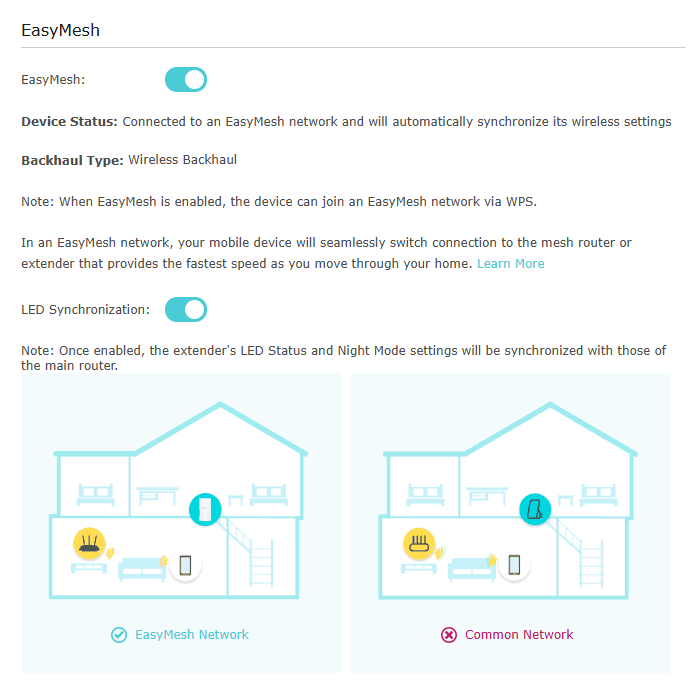
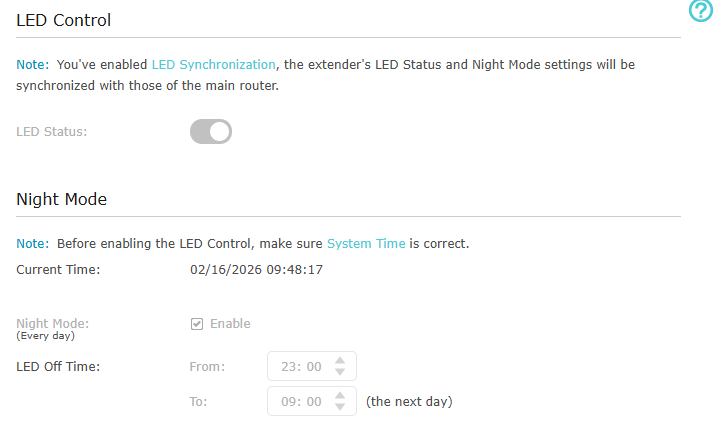
But now in the moment that i have integrated NX600 and RE700X with EasyMesh, with the option LED synchronization on my RE700X, the funtion Night Mode for LEDs doesn't work and LEDs are not synchronized with the NX600 LEDs at all (the configuration arrives from the NX600, it's visible on RE700X but it's not working).
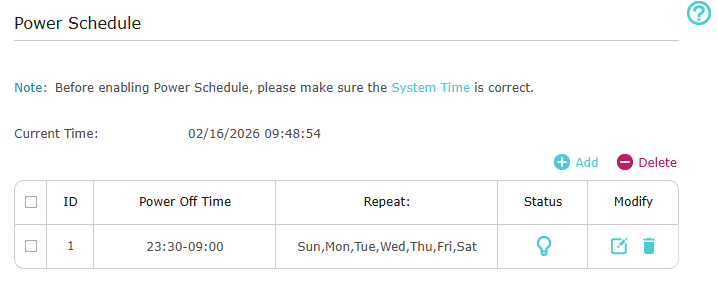
And function Power Off schedule is not powering off the extender at the indicated time.
Thanks!
- Copy Link
- Report Inappropriate Content
Information
Helpful: 0
Views: 2056
Replies: 10
Voters 0
No one has voted for it yet.