
No updates for Archer AX12 US version firmware
 This thread has been locked for further replies. You can start a new thread to share your ideas or ask questions.
Why there is no update after 1.1.22 version for US firmware??
- Copy Link
- Subscribe
- Bookmark
- Report Inappropriate Content

You already have it. The EU is the same as US version - that's why you succeded installing the EU version on a US region device,
To be sure what is your router FW region double check your router bottom sticker - details.
- Copy Link
- Report Inappropriate Content


Hi@Manas4938 ,
If you search in the firmware update interface, can you find new firmware?
- Copy Link
- Report Inappropriate Content
@Joseph-TP No when i try to search for update in the interface it shows no update is available.
can i get the latest US firmware if possible. i can update it manually.
- Copy Link
- Report Inappropriate Content
- Copy Link
- Report Inappropriate Content
@terziyski in desperation I yesterday before your reply upated it manually to v1.2.1(EU) but now facing disconnection issue in many intervals. Is there any way to downgrade from that as it is not allowing me to downgrade.
- Copy Link
- Report Inappropriate Content
From where did you get the v1.2.1(EU) FW ? You mentioned that you are with a US region FW.
This firmware release (v1.2.1) cannot be degraded to the previous version.
Follow this thread regarding the 1.2.1 (EU) release issues.
- Copy Link
- Report Inappropriate Content
@terziyski I got that from tp link nordic website. Is there anyway possible to downgrade from 1.2.1 . I really want to downgrade it
- Copy Link
- Report Inappropriate Content
You can't downgrade from v1.2.1:
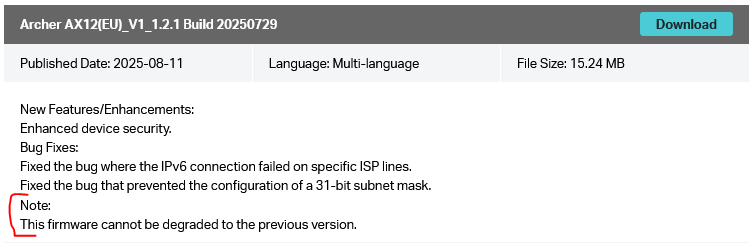
Your only option for now is to follow the link I posted in my previous post and use the beta FW release (v1.2.2).
- Copy Link
- Report Inappropriate Content
@terziyski can i get the link of us version of 1.2.1
- Copy Link
- Report Inappropriate Content
You already have it. The EU is the same as US version - that's why you succeded installing the EU version on a US region device,
To be sure what is your router FW region double check your router bottom sticker - details.
- Copy Link
- Report Inappropriate Content
Information
Helpful: 1
Views: 951
Replies: 9
Voters 1
