
AX73 v1 + AX55 Pro ethernet backhaul problem

I have a problem with these routers. I have them connected in EasyMesh using Ethernet backhaul. The main router is AX73 connected via LAN to WAN in AX55Pro.
Both routers have the latest FW version.
The symptom is that sometimes everything works, and sometimes I have to disconnect the Ethernet backhaul from the router to connect to the WiFi network.
- Copy Link
- Subscribe
- Bookmark
- Report Inappropriate Content


Hello @Solak ,
So, are all satellites now connected wirelessly to the main router?
When you try create wired connection, is there a switch between the satellite units and the main router? If so, what is its model? Please remove the switch and connect satellite units to the main router again.
Here is a beta firmware for RE700X: RE700X Shows Offline in the EasyMesh Device List After Updating to New Firmware
Please test if it can resolve the abnormal display.
- Copy Link
- Report Inappropriate Content
Hello @Solak ,
Welcome to our community.
For EasyMesh Ethernet Backhaul, it is recommended to connect your main router’s LAN port to the satellite’s LAN port via an Ethernet cable. More details, please refer to How to Build an Ethernet Backhaul Using Two EasyMesh Routers.
When your clients don't connect to WiFi, could you please tell me what error message appears on the clients? Please also check the connection status on the EasyMesh List. Is it still Ethernet Backhaul between the main router and satellite router?
If there is a switch between the main router and satellite router, please remove it for comparison.
- Copy Link
- Report Inappropriate Content
@Joseph-TP
Hi Joseph,
I also tried connecting to the LAN first i satelitte, but it only made things worse.
In this situation, WiFi devices cannot connect to my WiFi network. The network is visible, but the devices do not receive IP addresses from the DHCP server.
I don't know exactly what is happening at the moment because I cannot log into the router.
- Copy Link
- Report Inappropriate Content
Hello@Solak ,
Thanks for getting back to me.
Would you mind trying to hard reset the satellite unit and configure it again? How to reset: Press and hold the button until all LEDs turn on to reset the router to its factory default settings.
Then try to set EasyMesh network via Ethernet Backhaul again: How to Build an Ethernet Backhaul Using Two EasyMesh Routers?
- Copy Link
- Report Inappropriate Content
@Joseph-TP
Hello Joseph.
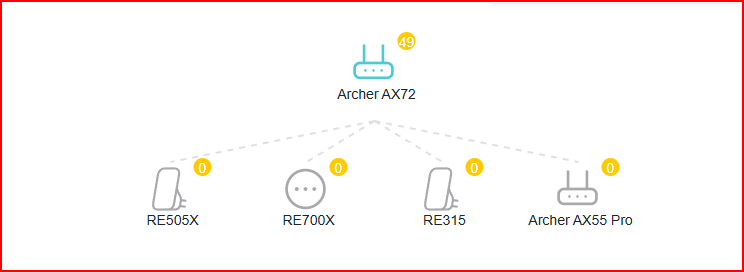
Yes, I've already reset the satellites and it helps for a few days. I also have other devices on the network as satellites.
Today I verified and the main router sees all satellites as Offline :/.
- Copy Link
- Report Inappropriate Content
Hi @Solak ,
All four satellite units are still operational, and some clients are connected to them, correct?
Please reboot the whole Mesh Network, and wait for them to reconnect.
If it still shows as offline, it's possible that the Mesh component for these devices hasn't been synchronized yet. We recommend waiting for the next firmware update.
- Copy Link
- Report Inappropriate Content
@Joseph-TP
Hi Joseph
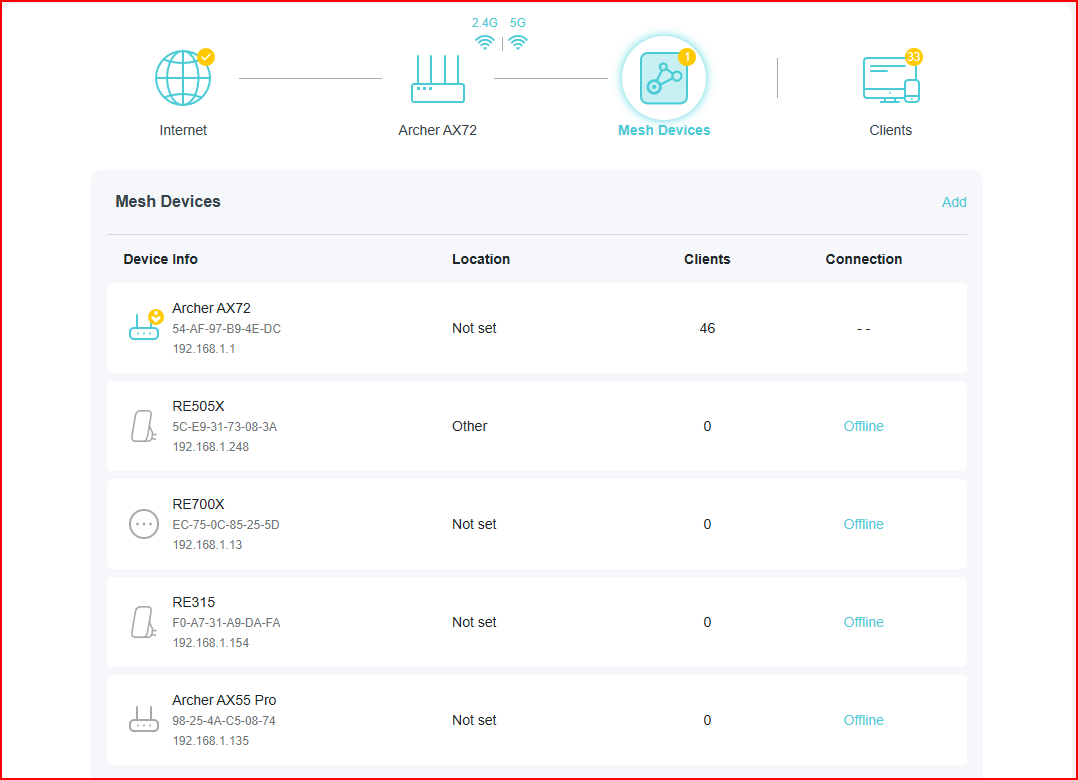
The entire network is functioning correctly, i.e., the WiFi devices connect to the Mesh network, and I can manage the satellites via their web interface, but the main router continues to show me that all satellites are offline.
I still don't use Ethernet backhaul.
- Copy Link
- Report Inappropriate Content
Hello @Solak ,
So, are all satellites now connected wirelessly to the main router?
When you try create wired connection, is there a switch between the satellite units and the main router? If so, what is its model? Please remove the switch and connect satellite units to the main router again.
Here is a beta firmware for RE700X: RE700X Shows Offline in the EasyMesh Device List After Updating to New Firmware
Please test if it can resolve the abnormal display.
- Copy Link
- Report Inappropriate Content
Information
Helpful: 0
Views: 545
Replies: 7
Voters 0
No one has voted for it yet.