
My Archer BE 805 wifi 7 only work on main router, all other nodes/sub router not working on 6 GHZ

I using 4 x same model BE 805
3 of them all using cable backlink
only 1 is wireless mesh.
However all unable to you 6 GHZ except the main router able to provide 6 GHZ.
So just to know all sub router mesh don't support 6ghz even using cable linked to main?
- Copy Link
- Subscribe
- Bookmark
- Report Inappropriate Content

Hello @AndrewLoke ,
Welcome to our community.
What are the hardware and firmware versions of your routers now? Please refer to How to find the hardware and firmware version of my TP-Link device.
Please try changing the channel to 69 (PSC) on the main router. Also, try different channel width options for the 6GHz band.
In addition, could you connect all satellite units to the main router via Ethernet Backhaul and see if they can expand the 6GHz network?
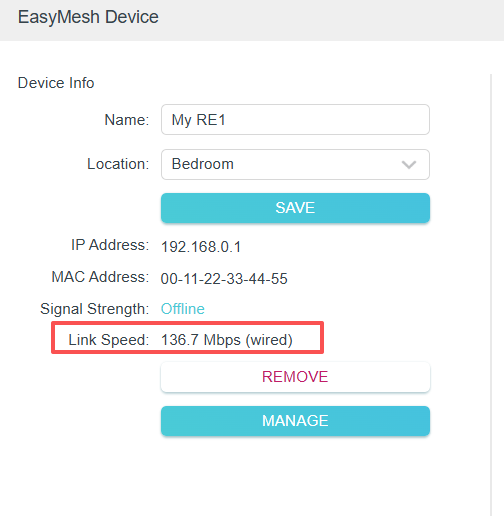
Please take screenshots of the link speed of every satellite unit. Go to Advanced-->EasyMesh-->Modify, and click on the EDIT icon.
- Copy Link
- Report Inappropriate Content
Hello @AndrewLoke ,
Welcome to our community.
What are the hardware and firmware versions of your routers now? Please refer to How to find the hardware and firmware version of my TP-Link device.
Please try changing the channel to 69 (PSC) on the main router. Also, try different channel width options for the 6GHz band.
In addition, could you connect all satellite units to the main router via Ethernet Backhaul and see if they can expand the 6GHz network?
Please take screenshots of the link speed of every satellite unit. Go to Advanced-->EasyMesh-->Modify, and click on the EDIT icon.
- Copy Link
- Report Inappropriate Content
Information
Helpful: 0
Views: 314
Replies: 1
Voters 0
No one has voted for it yet.