C60 V3 not work like wife extender
"I have an Archer C60 V3 and a C6 V4, both updated to the latest firmware versions.
My C6 is the main router from which the Internet is distributed via WAN.
I'm trying to make my C60 work as a Wi-Fi extender for the C6 using WPS, but they don't connect.
How can I make the C60 repeat the C6’s signal wirelessly?"
Firmware C60: Archer C60(BR)_V3_210309
Firmware C6: Archer C6(BR)_V4_1.13.15 Build 240812
- Copy Link
- Subscribe
- Bookmark
- Report Inappropriate Content
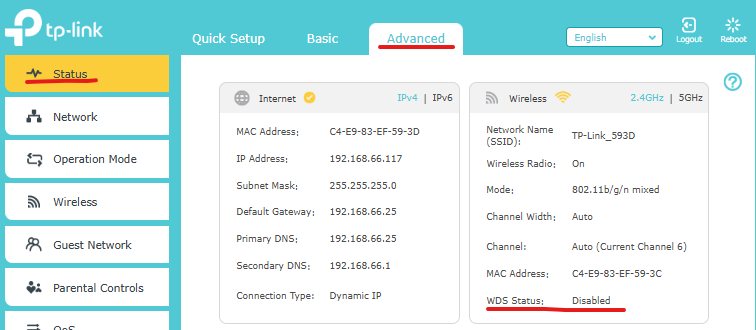
It could be many things. For start here's the Advanced > Status > Wireless (WDS status):

Upon successful configuration your WDS status should be Running.
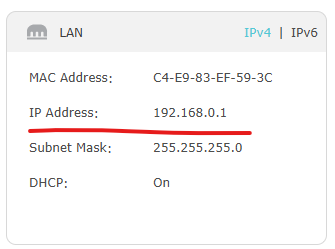
Also, C60 LAN IP address should be in the same network subnet as your C6 LAN IP address and C60 DHCP server disabled:

Put a screenshots of your C60 Wireless and LAN status and also of your C6 LAN status.
- Copy Link
- Report Inappropriate Content
WPS won't work in this case. In order to use C60 as a wireless extender you shoud use this guide refering to the WDS feature
- Copy Link
- Report Inappropriate Content
I tried to set up the C60 and followed all the mentioned steps, but the C60 still shows that it has no internet access. On the C60, there is no such step as Advanced > Status > Wireless.
Any idea what might be happening?
- Copy Link
- Report Inappropriate Content
It could be many things. For start here's the Advanced > Status > Wireless (WDS status):

Upon successful configuration your WDS status should be Running.
Also, C60 LAN IP address should be in the same network subnet as your C6 LAN IP address and C60 DHCP server disabled:

Put a screenshots of your C60 Wireless and LAN status and also of your C6 LAN status.
- Copy Link
- Report Inappropriate Content
Information
Helpful: 0
Views: 309
Replies: 3
Voters 0
No one has voted for it yet.