
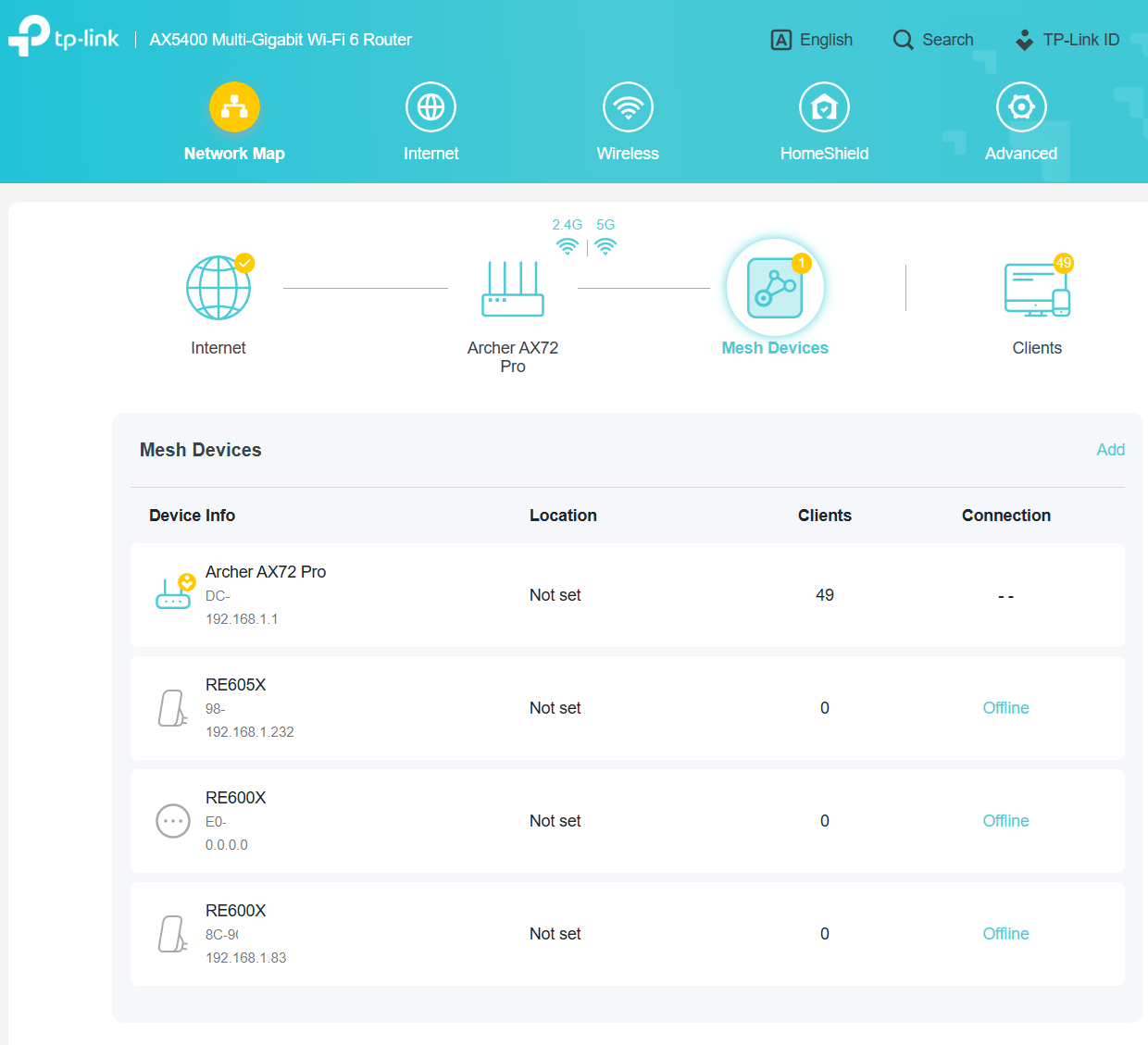
RE600X, RE605X appear offline

My Wifi-extenders RE605X and RE600X appear offline on both the router configuration page and Tether app. That does not change despite reboot of the router.
- Copy Link
- Subscribe
- Bookmark
- Report Inappropriate Content


Hello @wohltemperiert ,
Welcome to our community.
May I know the hardware and firmware versions of your router and extenders? How to find the hardware and firmware version of my TP-Link device
Have you created an EasyMesh Network among the router and extenders? Even the status is offline, the clients still can be connected to the range extenders, right?
I assume you recently updated the firmware for your router or extenders? This anomaly is most likely caused by the EasyMesh component of your router and extenders being out of sync.
If this doesn't affect your network usage, please keep your current settings. Meanwhile, I will report this situation to the relevant departments for further analysis.
Thank you.
- Copy Link
- Report Inappropriate Content
We have released some beta firmware. Please try to install it and test if it can help: RE700X/RE705X/RE715X Shows Offline in the EasyMesh Device List After Updating to New Firmware
- Copy Link
- Report Inappropriate Content
Hello @wohltemperiert ,
Welcome to our community.
May I know the hardware and firmware versions of your router and extenders? How to find the hardware and firmware version of my TP-Link device
Have you created an EasyMesh Network among the router and extenders? Even the status is offline, the clients still can be connected to the range extenders, right?
I assume you recently updated the firmware for your router or extenders? This anomaly is most likely caused by the EasyMesh component of your router and extenders being out of sync.
If this doesn't affect your network usage, please keep your current settings. Meanwhile, I will report this situation to the relevant departments for further analysis.
Thank you.
- Copy Link
- Report Inappropriate Content
@Joseph-TP Yes, I created easy mesh and I updated the firmware to the latest. I had read about similar issue with RE705X and thought it would not affect RE600X and 605X. Apparently it is the case.
- Copy Link
- Report Inappropriate Content
Please tell me the specific hardware and firmware versions of your router and extenders, you can refer to How to find the hardware and firmware version of my TP-Link device
- Copy Link
- Report Inappropriate Content

Hello. I have the same issue. I set up the mesh system but re600x extender appears offline. My ax21 works perfectly with re220 in mesh mode, but now that I have upgraded to re600, it appears offline.
AX21
1.2.1 build 20240809 rel.75559
RE600X
1.2.10 build 20250627 rel. 66328
- Copy Link
- Report Inappropriate Content

- Copy Link
- Report Inappropriate Content

I too have the same issues. using the web browser to access the router/advance/easymesh, I see 4 devices (AX72, RE500x, RE700x and WPA8631, they 3 satellite devices shows offline. It is the same if I use the Tether app.
On those devices there are clients connections, and activity in progress. So the reporting of the offline apparently is not impacting the use of the devices.
Is the issue with the router?
As both the Tether app and the web browsers report the same status.
RE700X Firmware Build 1.3.15 20251124 Rel.43984
Hardware Version RE700X v1.0
RE500X Firmware Build 1.2.0 Build 20250815 Rel. v2.0
Hardware Version RE500X v2.0
- Copy Link
- Report Inappropriate Content
Hello @MachanVenCh ,
Thanks for your feedback.
What are the hardware and firmware versions of your router? How to find the hardware and firmware version of my TP-Link device
May I know if your network topology diagram is as follows:
ISP modem—AX72)))((( client devices
├──RE700X
├──RE500X
└───WPA8631
(Note: — stands for wired connection,)))((( stands for wireless connection )
Before you updated to version 1.3.15, was the RE700X already showing as offline?
- Copy Link
- Report Inappropriate Content
Both the RE700x and RE500X are connected via WIFI.
The WPA8631 is connected via Powerline.
The RE700X was added to my network on the 06-02-26 and update was initiated after setting up. I was unaware if the easymesh was report offline before. The router was updated when the new firmware was made available. That update fixed the display issues we had.
Setup is:
SP modem—AX72 ─- PA8010 ─WPA8631
)))((( RE700X
)))((( RE500X
Router AX72
Firmware 1.4.5 Build 20250928 rel.17568(4555)
Hardware Version Archer AX72 v1.0
- Copy Link
- Report Inappropriate Content
Hi @MachanVenCh ,
Do you mean that after the router's firmware update, the RE700X and RE500X are now showing up as online? Including RE500X?
- Copy Link
- Report Inappropriate Content
We have released some beta firmware. Please try to install it and test if it can help: RE700X/RE705X/RE715X Shows Offline in the EasyMesh Device List After Updating to New Firmware
- Copy Link
- Report Inappropriate Content
Information
Helpful: 0
Views: 950
Replies: 10
Voters 0
No one has voted for it yet.