
External Connected Hard Drive showing as 0GB

External Connected Hard Drive showing as 0GB

External Connected Hard Drive showing as 0GB
2025-11-20 15:41:46 - last edited 2025-12-04 08:26:11
Model: VX231v  
Hardware Version: V1
Firmware Version: 231.0.19

 I have connected a hard drive to my TP Link router to use as a shared data storage, however this doesn't seem to work properly.

In the management interface, it shows it as a connected USB Disk, but with 0GB size.
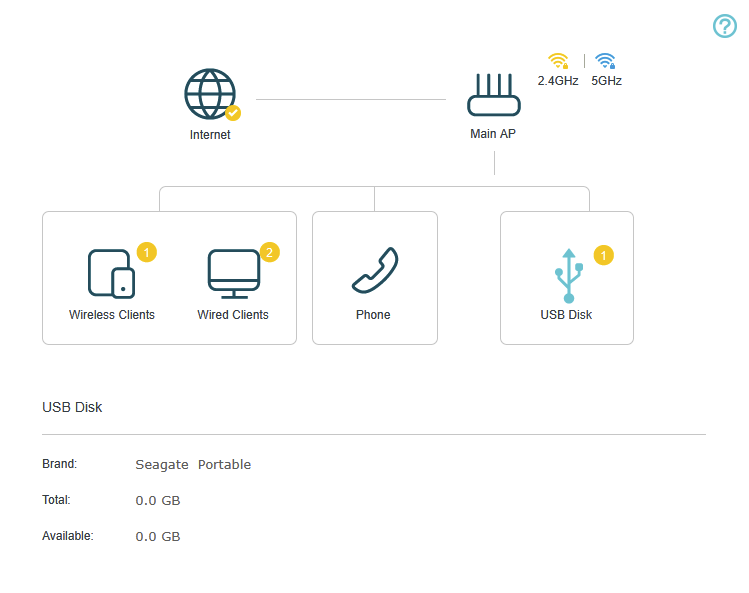


In the USB Storage dialog, it doesn't show at all.
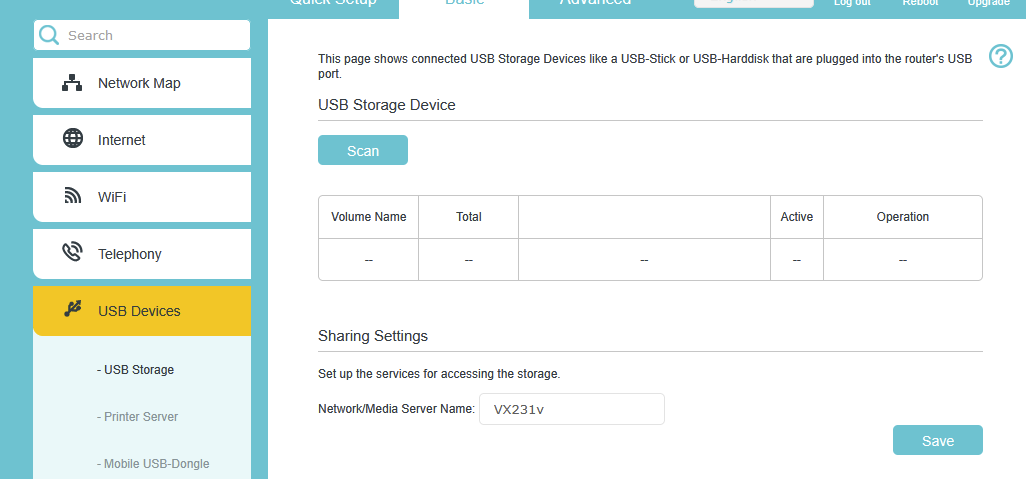
 

The Disk is a total of 4TB, I tried it formatted as NTFS and FAT32, and also split it into smaller volumes in case the router OS couldn't handle drives of this size, but nothing made a difference here.


I found a thread discussing a very similar issue for a different router here: https://community.tp-link.com/en/home/forum/topic/227202

However the solution here seems to have been a firmware update, and I am already on the most current firmware version that is officially available.

https://community.tp-link.com/en/home/forum/topic/227202

  0      
  0      
#1
Options
1 Accepted Solution
Re:External Connected Hard Drive showing as 0GB-Solution
2025-11-25 06:52:53 - last edited 2025-12-04 08:26:11

Hello @Dabrush ,

Welcome to our community.


Just so you know, VX231v is a customized device. If the modem has been provided to you by your ISP, it is recommended to contact your ISP for further help.

If you bought this router from a store, contact your local support with the same request.

Also, you can try the suggestions of Troubleshooting Guide for USB Storage Devices on Wi-Fi Routers.

Recommended Solution
  0  
  0  
#2
Options
1 Reply
Re:External Connected Hard Drive showing as 0GB-Solution
2025-11-25 06:52:53 - last edited 2025-12-04 08:26:11

Hello @Dabrush ,

Welcome to our community.


Just so you know, VX231v is a customized device. If the modem has been provided to you by your ISP, it is recommended to contact your ISP for further help.

If you bought this router from a store, contact your local support with the same request.

Also, you can try the suggestions of Troubleshooting Guide for USB Storage Devices on Wi-Fi Routers.

Recommended Solution
  0  
  0  
#2
Options