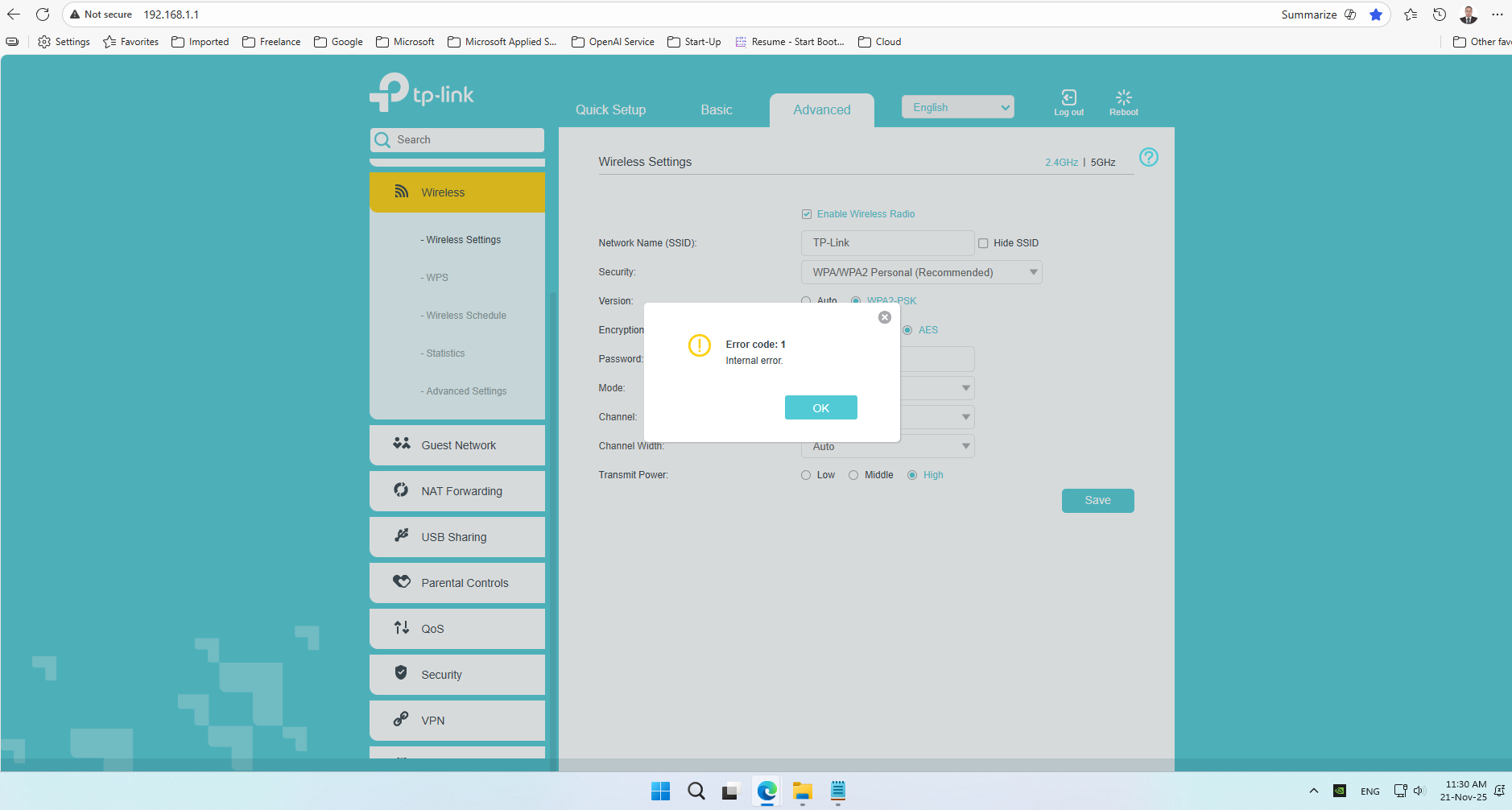
Router Wi-Fi Issue – Archer VR600 v2 Error code: 9805 – Corresponding case not found

Router Wi-Fi Issue – Archer VR600 v2 Error code: 9805 – Corresponding case not found

Router Wi-Fi Issue – Archer VR600 v2 Error code: 9805 – Corresponding case not found
2025-11-21 17:56:37 - last edited a week ago
Tags: #Archer VR600 v2
Model: Archer VR600  
Hardware Version: V2
Firmware Version: Archer VR600(EU)_V2_200226

Subject: Router Wi-Fi Issue – Archer VR600 v2

Hello Support Team,

I am experiencing an issue with my router’s Wi-Fi.

Two days ago, I noticed problems with the wireless connection. Today, I attempted to reconfigure the router, but encountered the following difficulties:

  1. I performed a factory reset from the router UI.

    • When trying to re configure the Wi-Fi settings,

    • use 192.168.1.1 to enter to router
      The setup process complete and after router page reload with router UI i enter pasword and go with steps untill to choose betwen wired connection and wirless i choose wired and next didnot take me to next page did not complete appeared to hang
      so i restart page and enter pasword then login and try difrent things I received the error: Error code: 9805 – Corresponding case not found when try to change wifi sitting.

  2. I attempted a hard reset using the reset button.

    • The setup process complete and .When trying to re configure the Wi-Fi settings,

    • use 192.168.1.1 to enter to router
      after router page reload with router UI i enter pasword and go with steps untill to choose betwen wired connection and wirless i choose wired and next didnot take me to next page did not complete appeared to hang
      I restarted the page and logged in again.

  3. Wi-Fi SSID behavior:

    • 5GHz band: Accepts changes to the network name and password, but does not broadcast any Wi-Fi signal.

    • 2.4GHz band: Does not accept any changes and returns the error above.

    • If I continue the process and keep the 2.4GHz band with its default name and password, I am able to proceed to the next page and complete the Quick Setup wizard. However, the 2.4GHz Wi-Fi still does not broadcast any signal.

  4. Internet connectivity works on my desktop workstation, but speed is significantly reduced.

    • Normally, I achieve over 20 Mbps, but currently only reach about 4 Mbps.

    • Both the router and my network card are Gigabit-capable.

  5. I re-upgraded the firmware with the latest file, which was accepted.

    • After another factory reset, I still cannot change the SSID.

    • Even with the default SSID and password, the 2.4GHz network is not visible to any of my home devices.

Additional notes:

  • Region and Time Zone settings: working.

  • Provider settings: working.

  • Internet connection information: working.

  • Connection type: wired works, Wi-Fi does not.

  • Wireless network name and password: cannot be changed (stuck).

  • Wi-Fi light is on, but the signal is not visible to devices.

  • Wi-Fi button only toggles the light, not the actual wireless function.

Steps already attempted:

  • Factory reset

  • Hard reset

  • Reboot

  • Firmware reload (latest version)

Firmware Version: 0.3.0 0.9.1 v0074.0 Build 200226 RC.65147n Hardware Version: Archer VR600 v2 00000000

Thank you for your assistance.

Best regards,
Abdelrazek rizk

  0      
  0      
#1
Options
1 Accepted Solution
Re:Router Wi-Fi Issue – Archer VR600 v2 Error code: 9805 – Corresponding case not found-Solution
2 weeks ago - last edited a week ago

Hello @Abdelrazek_Rezk ,

Thanks for contacting our community.


It appears there is a problem with the wireless broadcast function.

Please try a hard reset: Press and hold down the reset hole for 10 seconds to reset the modem router to factory default settings.


When did you buy the modem? If the hard reset doesn't help, please try contacting local support for assistance.


Edit: 

You are right, the firmware of your modem should be Archer VR600(EU)_V2_200226.

Please pay close attention to the support team's responses to keep track of your case's progress.


Best Regards.

Nice to Meet You in Our TP-Link Community. Check Out the Latest Posts: △Pre-release Firmware for Archer AX50 Introduces New Parental Control Features and Enhancements △Introducing AI QoS: Elevate Your Gaming Experience on the Archer GE800 Gaming Router △Connect TP-Link Archer BE550 to Germany's DS-Lite (Dual Stack Lite) Internet via WAN △Tether KidShield Test Recruitment - Safeguarding Children's Online Experience If you found the post or response helpful, please click Helpful. If an answer solves your problem, click "Recommended Solution" so that others can benefit from it.
Recommended Solution
  0  
  0  
#2
Options
2 Reply
Re:Router Wi-Fi Issue – Archer VR600 v2 Error code: 9805 – Corresponding case not found-Solution
2 weeks ago - last edited a week ago

Hello @Abdelrazek_Rezk ,

Thanks for contacting our community.


It appears there is a problem with the wireless broadcast function.

Please try a hard reset: Press and hold down the reset hole for 10 seconds to reset the modem router to factory default settings.


When did you buy the modem? If the hard reset doesn't help, please try contacting local support for assistance.


Edit: 

You are right, the firmware of your modem should be Archer VR600(EU)_V2_200226.

Please pay close attention to the support team's responses to keep track of your case's progress.


Best Regards.

Nice to Meet You in Our TP-Link Community. Check Out the Latest Posts: △Pre-release Firmware for Archer AX50 Introduces New Parental Control Features and Enhancements △Introducing AI QoS: Elevate Your Gaming Experience on the Archer GE800 Gaming Router △Connect TP-Link Archer BE550 to Germany's DS-Lite (Dual Stack Lite) Internet via WAN △Tether KidShield Test Recruitment - Safeguarding Children's Online Experience If you found the post or response helpful, please click Helpful. If an answer solves your problem, click "Recommended Solution" so that others can benefit from it.
Recommended Solution
  0  
  0  
#2
Options
Re:Router Wi-Fi Issue – Archer VR600 v2 Error code: 9805 – Corresponding case not found
a week ago

  @Joseph-TP 


Thank you for your response.

I would like to clarify that I purchased the Archer VR600 v2 Archer VR600 | TP-Link Egypt router online through Jumia Egypt in July 2020.
As per TP-Link’s warranty policy, the device carries a 2-year warranty. Since the warranty period has expired,
I am requesting guidance on how to proceed with repair through the maintenance center .
and it not work as 24/7 it is home device it just work couple off hour every day


and the correct version is
Archer VR600(EU)_V2_200226
also i contact support [TP-Link Support]-[TKID251145284] Router Wi-Fi Issue – Archer VR600 v2 – Repair Request
waiting for there guide
 

I appreciate your support and look forward to your guidance.

Best regards,
 

  0  
  0  
#3
Options