
use the same login and password as my box

Hello
I looking for on how to use the same login and password as my box when setup my router be25.
I did not find such possibility within the deco app.
- Copy Link
- Subscribe
- Bookmark
- Report Inappropriate Content


Hi, welcome to the community.
Can you add more details about "using the same login and password as my box"?
Do you refer to the Deco App login password? What do you mean by the "box"?
Wait for your reply.
Best regards.
- Copy Link
- Report Inappropriate Content
@David-TP hello
Thanks to reply to me
I will try to clarify.
I would like to use the same login and password that is on m'y internet box in order to see only one network (the one of m'y internet box) in order to avoid to add the deco network on all m'y phone computer, etc.
When i refer to login and password these are throne of m'y internet box
- Copy Link
- Report Inappropriate Content
Hi, it would be better to disable the WiFi on the ISP router box, then set the same WiFi SSID password on the Deco BE25 so that mobile devices will only see one SSID and automatically connect to Deco:
How to change the Wireless Settings on your Deco app
Best regards.
- Copy Link
- Report Inappropriate Content
@David-TP hello,
You're probably right but I want to avoid to change login and password on all my devices, phone, TV, airconditionner, etc. so how to keep the login, and password of my onternet box with my deco tp link be25
- Copy Link
- Report Inappropriate Content
Hi, thank you very much for your time and patience.
If you haven't configured the Deco BE25 yet, during the first time configuration through the Deco APP, it will ask you to set the WiFi SSID and password for Deco, and you can use the same SSID and password on the ISP internet box.
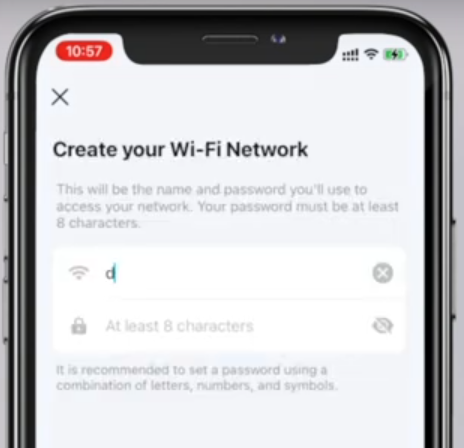
Best regards.
- Copy Link
- Report Inappropriate Content
Information
Helpful: 0
Views: 144
Replies: 5
Voters 0
No one has voted for it yet.