
ACL issues after switch replacement SG3428X 1.30 to SG3428X-M2 1.20
ACL issues after switch replacement SG3428X 1.30 to SG3428X-M2 1.20

Hey guys,
I bought a new switch (SG3428X-M2, firmware 1.20) to take advantage of the 2.5 Gbit ports.
Before that, I was using the SG3428X (non-M2), which already worked pretty well, but it didn’t have any 2.5 Gbit ports.
All ACL rules for VLAN 20 (IoT) and VLAN 50 (Guest) were configured and ran without any issues on the old switch.
After copying the configuration 1:1 to the new switch and setting up the ACL rules again, I suddenly started having problems.
As soon as the rules are active, you can no longer connect to the VLAN.
Neither via Wi-Fi (EAP783) nor via LAN directly on the switch does the connection work anymore.
If I remove the ACL binding, everything immediately works again.
What has been changed on the new Switch?
I'm using a raspberry PI as DHCP/DNS Server and from the Switch the L3 DHCP VLAN Relay.
- Copy Link
- Subscribe
- Bookmark
- Report Inappropriate Content


The two switches differ at the hardware level. For your current configuration you need to add an ACL that explicitly allows DHCP traffic on the new switch: insert a permit rule at the very top that matches UDP src-port 68 → dst-port 67. On the older SG3428X chassis this rule can be omitted because the switch still forwards all DHCP packets by default. We are using IP ACLs, and the DHCP handshake is carried inside IP packets, so under normal circumstances you must create an ACL entry to permit DHCP.
- Copy Link
- Report Inappropriate Content

I don't have an absolute answer to your question as I am not familiar with your switch model. I am assuming that your ACLs are switch ACLs as gateway ACLs do not support IP groups (yet). Switch ACLs are not bi-directional and I don't see any return rules.
- Copy Link
- Report Inappropriate Content
Hi, and yes — these are Switch ACLs. 🙂
So just to confirm: this means that every permit rule also needs a separate rule for the return direction, right?
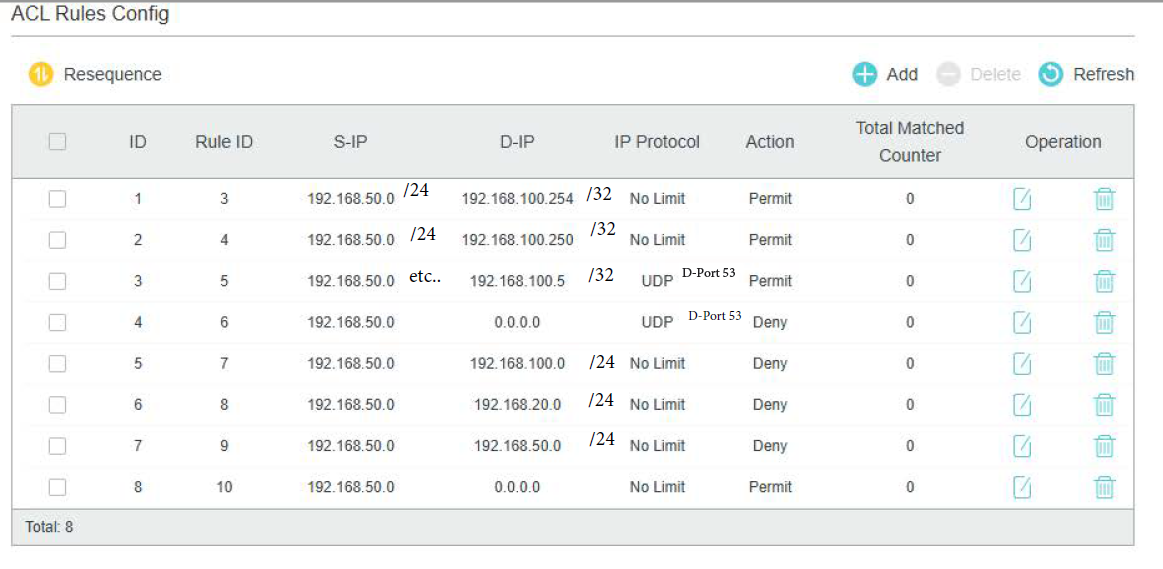
Maybe this makes it easier to understand what my rules are doing:
ID1: Allow access from VLAN50 to the captive portal (AP in VLAN1)
ID2: Allow access to the printer in VLAN1
ID3: Allow access to the DNS server (port 53)
ID4: Block access to all other DNS servers
ID5: Block access to VLAN1
ID6: Block access to VLAN20
ID7: Block access to other devices inside VLAN50
ID8: Allow traffic to the internet
On my old switch, I learned the hard way that if you make a small mistake in the subnet definition (for example, using a single IP target without /32), the entire ruleset stops working.
What still confuses me: the exact same rule set worked on the old switch, but not on the new one.
Is the new model “stricter”, or has the ACL logic changed?
Forgot to tell, I'm using the Switch in standalone mode without controller.
- Copy Link
- Report Inappropriate Content
I use a controller and am not familiar with creating switch ACLs in standalone mode. I do know, however, that switch ACLs are stateless and need a "return" rule for inter-VLAN routing. Another thing... Do you have the switch interfaces configured as in the old switch?
As to why your old switch rules were working OK, I don't have an answer. Perhaps another forum member can shed some light on this.
- Copy Link
- Report Inappropriate Content
Yes, for Sure.
The Interfaces are created (Like the old Switch, but to be honest, thats just few clicks to activate 😅) as the VLAN wouldnt Work in General if not.
- Copy Link
- Report Inappropriate Content
Just out of curiosity, I am looking into switch ACL configurations when the switch is in standalone mode. It would appear that your rules should work "as is" as everything I have read says nothing about return rules. I am sorry I could not help you, especially on a weekend when the moderators and working experts are off.
- Copy Link
- Report Inappropriate Content

@St3ini, does everything work if you disable just the deny DNS ACL? If so, is DNS configured the same way on the new switch?
- Copy Link
- Report Inappropriate Content
I've removed the rule and tested it with the same behavior... Not connecting anymore to the Network.
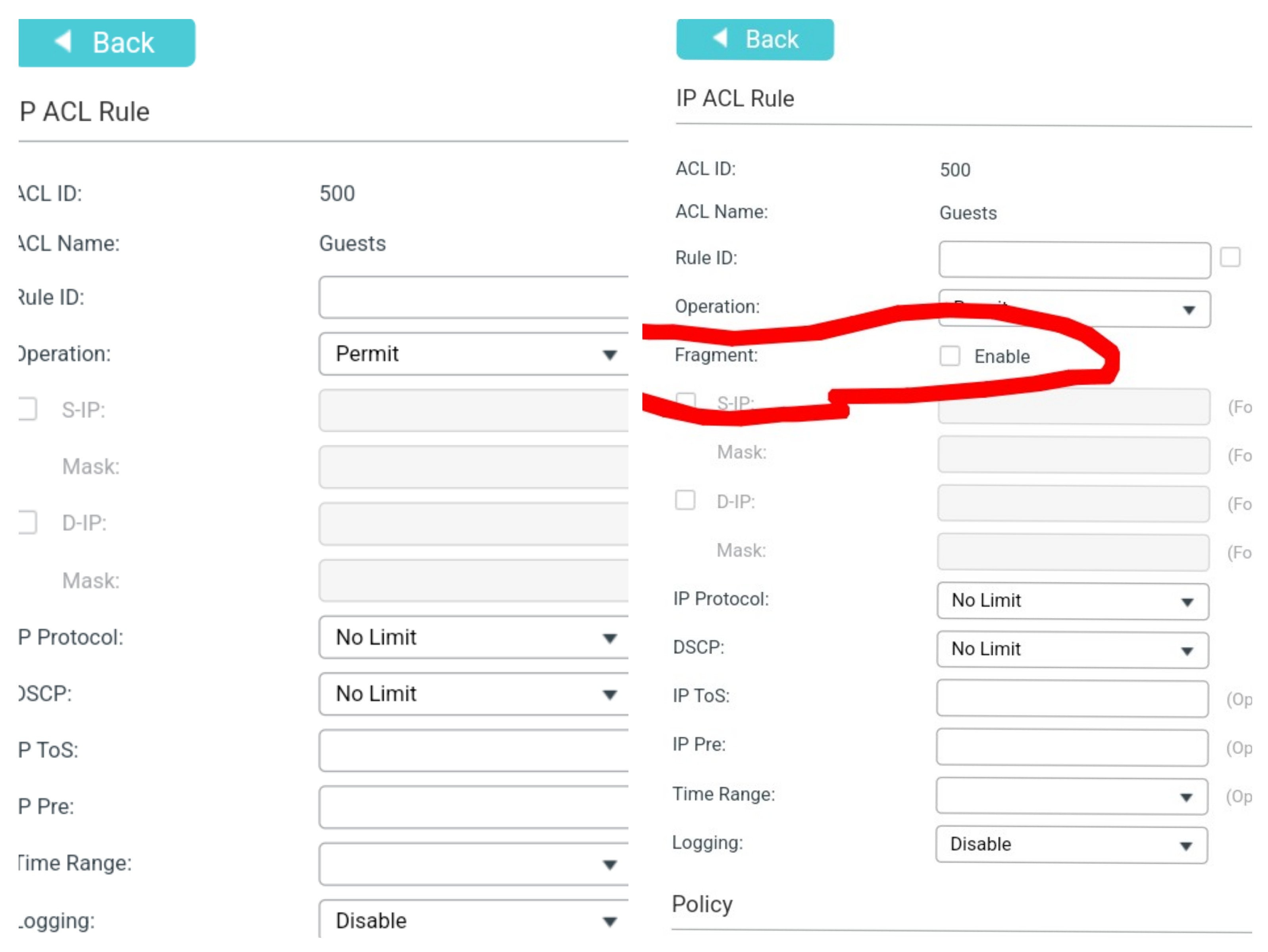
I noticed something different in the UI:
The Fragment element ist missing. (Left is the new one)
Looks Like there is a different engine for ACL in this device?!
- Copy Link
- Report Inappropriate Content
@St3ini, remove deny rules one by one or use logging to find the rule that's causing the issue. Maybe some other setting did get copied from the old switch and this will help you know what to check.
- Copy Link
- Report Inappropriate Content

- Copy Link
- Report Inappropriate Content
@D-C
I'm using the logging-function, nothing hits the rules, if I try to connect to the VLAN. (via WiFi and LAN)
If I disable the ACL, connect to the VLAN and enable the ACL again, the counter starts on rule 3 and 7.
Testings for the other rules are not successful, but it looks like rule 1 and rule 4 hits by testing also.
WAN traffic is open.
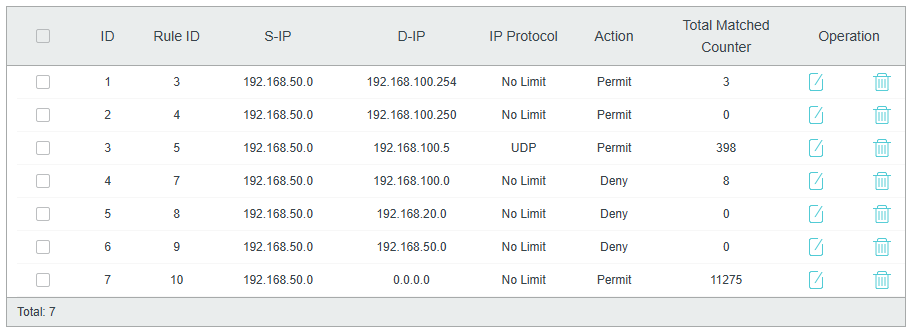
But no new connections can be established. Its just keeping the already connected ones.
I will test to remove all deny rules one by one and see if a connection can be made.
@GRL
The ACL is bind to VLAN (the same on the old Switch).
Very frustrating ...
- Copy Link
- Report Inappropriate Content
Information
Helpful: 0
Views: 1888
Replies: 18
Voters 0
No one has voted for it yet.