
Archer TX20U Plus does not see one wireless network

Let me start by saying I spent about 6 hours straight on this issue and have not found a solution.
I bought a 3D scanner that can be connected over wifi. To use the scanner, computer must connect to a hotspot created by the scanner. I can see and connect to the hotspot (wireless network) of the scanner on:
- Samsung S24 phone
- Samsung S9 phone
- My work laptop, Dell Latitude 7440
- Lenovo Tab Plus
However I cannot even see the network on my desktop PC with Archer TX20U Plus running Windows 11. I have tried:
- Changing every setting of the driver in device manager
- Tried 4 different drivers (latest 113.4 from the forum link, latest official driver, one before that, and original driver)
- Connected the adapter to every available USB port
- Changed all kinds of firewall and security settings in WIndows 11
Adapter sees all other networks and connects to them, including for example my main network running on Deco XE75 Pro mesh system.
Can someone help me before I return the adapter? I bought the adapter specifically to connect to this scanner since I do not have built in wifi on my Gigabyte B650M motherboard with AMD Ryzen 5 processor.
- Copy Link
- Subscribe
- Bookmark
- Report Inappropriate Content

Then the Archer TX20U Plus you've got must be the "EU" version. (sold in countries of the European Union and many other countries that follow the EU's wireless regulations)
Many USB Wi-Fi adapters that TP-Link makes for the EU regulations do not support the channels 149 and higher.
If you indeed have the "EU" version (check on the serial number label), then I see two potential solutions.
1) find out if the 3D scanner allows the channel number of its hotspot to be changed to something between 36 and 140
2) if 1) is not possible, then replace the TX20U Plus with a Wi-Fi adapter that supports channel 149
- Copy Link
- Report Inappropriate Content
Hi,
Can you please connect the Dell Latitude to the 3D scanner again and then look up the channel number within the "Properties" of the connection in Windows?
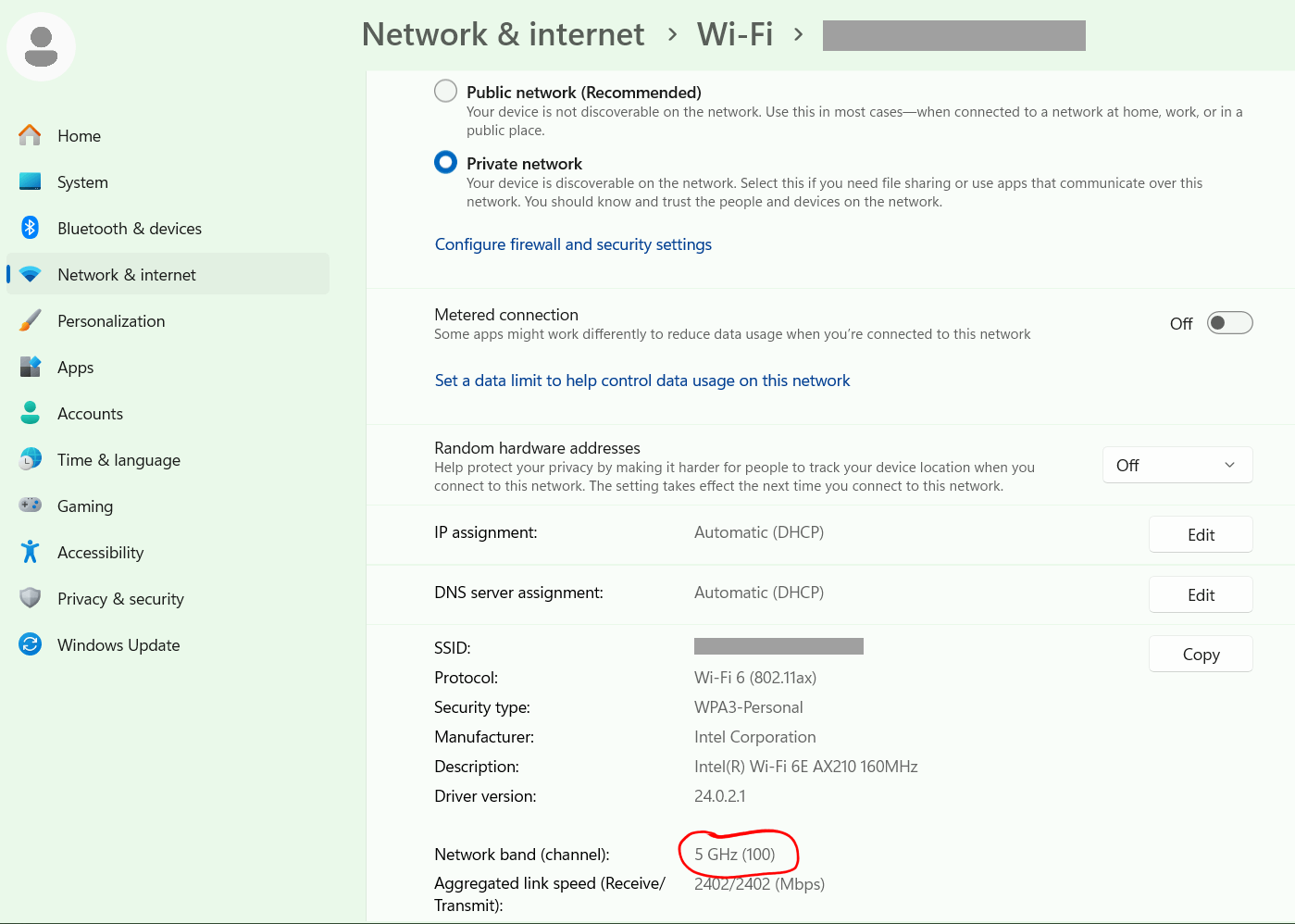
- Copy Link
- Report Inappropriate Content
- Copy Link
- Report Inappropriate Content
Then the Archer TX20U Plus you've got must be the "EU" version. (sold in countries of the European Union and many other countries that follow the EU's wireless regulations)
Many USB Wi-Fi adapters that TP-Link makes for the EU regulations do not support the channels 149 and higher.
If you indeed have the "EU" version (check on the serial number label), then I see two potential solutions.
1) find out if the 3D scanner allows the channel number of its hotspot to be changed to something between 36 and 140
2) if 1) is not possible, then replace the TX20U Plus with a Wi-Fi adapter that supports channel 149
- Copy Link
- Report Inappropriate Content
@woozle thanks for helping.
I am in EU, the adapter is EU. Now I understand why it can't see the scanner hotspot.
I am not sure if scanner hotspot channel can be changed by me. I have already created a support ticket with manufacturer.
Just wondering, how can old Samsung S9 see and connect to the scanner? It is also an EU device.
- Copy Link
- Report Inappropriate Content
There are already many posts about the issue in this forum. But I have not seen a detailed explanation from TP-Link as to what exactly prevents them from allowing channels 149 to 165 while still complying with the EU regulations.
I am not aware of such channel limitations on TP-Link's PCIe Wi-Fi cards.
- Copy Link
- Report Inappropriate Content
@woozle What about TXE70UH? Specs say it works in 160 MHz.
Actually, it is not clear to me at all what is the regulation. Can ANY wifi adapters in EU use channels above 140 MHz? It is not clear from documentation of adapters on the datasheets or websites. Basically what I am asking, can I buy ANY adapter in EU that will actually see anything above 140 MHz?
Does anyone know? This should be an easy statement to make but I cannot find a single web page to explain the regulation.
- Copy Link
- Report Inappropriate Content
The channel numbers do not represent frequencies. Channel 149 corresponds to a frequency of 5745 MHz.
I don't have any USB Wi-Fi adapters from other major brands that officially sell in Europe. So I have no idea whether they support those channels in the European versions of their products.
If you need to solve this urgently, then you may have to settle for a "no-name" brand USB Wi-Fi adapter.
- Copy Link
- Report Inappropriate Content

@pajtaz Google just brougt me here... i have just bought this WLAN adapter today for the exact same purpose... to connect to my Revopoint Inspire 2, 3D scanner...
every other network shows up... but not the 3D scanner (i can see it on laptops, phones etc.) but not with this adapter!
this is ridiculous, there is no limitation on those channels in EU / DK
the Inspire 2 is running on channel 149
- Copy Link
- Report Inappropriate Content
@diondp Any wifi adapter purchased in Europe will not see channel 149. Using that channel or any channel above 140 (channels 144 to 165) by the scanner hardware will not allow you to "see" the scanner wifi hotspot with wifi adapter purchased in Europe.
There is a limtiation and it is by law.
There is only one fix - scanner must use a channel 140 or lower. That is the way it was fixed on Einstar 2, by changing firmware to use the lower channels. It is a stupid thing by the manufacturers outside of Europe to set the default channel on the scanners to be a channel that cannot be seen/used in Europe. Seems Revopoint did the same stupid thing. I cannot believe that both companies did something so ridiculous, they did not even research their markets for issues like this.
What you can do is keep the TX20U (I did) and raise support ticket with Revopoint so they change the firmware. That is what Shining did with Einstar 2, they actually uploaded updated firmware (but not released) to Einstar 2 using TeamViewer on my computer. Once that was done, channel was changed to something lower than 144 and then I could finally see the hotspot and connect to the scanner. I am actually using it now like that.
- Copy Link
- Report Inappropriate Content
@pajtaz i actually just found a "Tool Package" from Revopoint to change the channels on the Inspire2...
strange that it isnt present on the regular "settings" menu in the revopoint software.. anyways i changed it to channel 36 and it works now for me...
- Copy Link
- Report Inappropriate Content
Information
Helpful: 0
Views: 1039
Replies: 10
Voters 0
No one has voted for it yet.