
Weather/Temperature not showing on app, or router screen

I have seen previous threads closed, but I'm not able to solve this issue on my end. Updated the firmware, can verify I can access accuweather's website, all the typical things. Any other things I'm missing?
I have contacted support (I am located in Japan btw), and they have said "Yeah, nothing we can do, we suggest returning it". Basically saying, "if you aren't satisfied with it not doing what it's supposed to, you don't have to keep it", which is fair enough, but what kind of reply is that really?
- Copy Link
- Subscribe
- Bookmark
- Report Inappropriate Content


Thank you very much for the additional information and the previous US community topic. I believe the mentioned 'Weather and Temperature Slides not working, showing X outs' issue had already been addressed and fixed in an earlier firmware. The abnormal or unexpected behavior you encounter now might be different.
Have you tried changing the DNS servers on BE900 to Google's (8.8.8.8) or Cloudflare's (1.1.1.1)? If not yet, please give it a go.
Also, are you able to access https://www.accuweather.com/ (the source used by the BE900 to update its weather info)?
If, unfortunately, nothing can make it work as expected, please export the configuration file on your BE900 (Advanced > System > Backup & Restore > Back Up) and email it to us for further investigation.
Regarding the local support agent's email response, we apologize that he cannot fix the reported issue on the phone or via email troubleshooting. Please don't worry. We will do our best to figure it out.
- Copy Link
- Report Inappropriate Content
Hello @XT14
Thank you for posting on the TP-Link Community.
Do you mean the Weather/Temperature settings are not available on the Tether app? How about on the router's web admin page? Are you able to modify and save the settings?
How about the Date & Time setting? Does it display correctly on the screen?
BTW, which old thread/topic are you referring to that is closed? Could you please provide a link to it? Thanks.
Regarding the local technical support responses, I hope they don't mean what they're saying.
- Copy Link
- Report Inappropriate Content
Kevin,
Thank you for the reply. Within the Tether app, I can modify and save the settings. Within the web interface, it acts a bit weird where when I type my city name into the search box, it doesn't offer me an option to click anything, or I can click a blank square and then press save. So, that has not worked properly. In the Tether app, it shows the correct city but just has a dash " - " as no weather temperature will populate. The time/date work perfectly.
The previous thread is here that is locked, otherwise I would have replied there instead of starting this new one BE24000 Weather and Temperature Slides not working, showing X outs. - Home Network Community
If you would like to see the email I received, it is below. You could use a translation feature to see that basically they chalk it up to a compatibility issue (whatever that is meant to mean) and suggest just returning it. They don't offer much in the way of email support either and only by paying ~10 cents a minute will they walk through anything here in Japan.
お客様
ご連絡いただきありがとうございます。
TP-Linkメールサポートでございます。
情報提供頂きありがとうございます。対応履歴を確認させて頂きました。
電話サポートでもお伝えをさせて頂いた通りファームウェア更新や初期化再設定を行っても改善されない場合は相性問題である可能性が高いため
弊社でもこれ以上のサポートは提供出来かねます。
誠に恐れ入りますが、購入から30日以内の場合は購入店様に返品の相談を頂きますようお願いいたします。
その際に担当者名を確認される場合がございますので
ティーピーリンクジャパンカスタマーサポートの「カセ」より初期不良認定を頂いたとご申告をお願いいたします。
ご希望に添えず申し訳ございませんが、宜しくお願い致します。
- Copy Link
- Report Inappropriate Content
Thank you very much for the additional information and the previous US community topic. I believe the mentioned 'Weather and Temperature Slides not working, showing X outs' issue had already been addressed and fixed in an earlier firmware. The abnormal or unexpected behavior you encounter now might be different.
Have you tried changing the DNS servers on BE900 to Google's (8.8.8.8) or Cloudflare's (1.1.1.1)? If not yet, please give it a go.
Also, are you able to access https://www.accuweather.com/ (the source used by the BE900 to update its weather info)?
If, unfortunately, nothing can make it work as expected, please export the configuration file on your BE900 (Advanced > System > Backup & Restore > Back Up) and email it to us for further investigation.
Regarding the local support agent's email response, we apologize that he cannot fix the reported issue on the phone or via email troubleshooting. Please don't worry. We will do our best to figure it out.
- Copy Link
- Report Inappropriate Content
Thank you for the reply. I have no problem connecting to accuweather from my browser/phone/etc
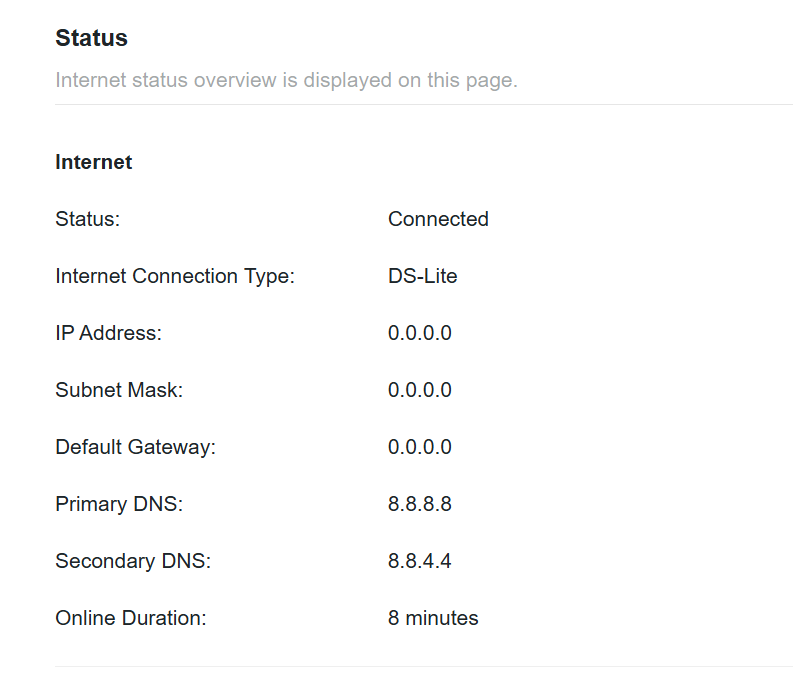
I cannot change the DNS settings as I am using DS-Lite (IPv6). I can change my IPv6 DNS settings, but I believe since my IP Address is dynamic and not static, that it isn't a good idea for me to do that (I tried inputting Google's 2001:4860:4860::8888, but seemed to not run well and break most websites). That being said, it seems the primary/secondary are already set up for Google's.
I have sent an email through to the link you provided that may help you see things faster than I can.
- Copy Link
- Report Inappropriate Content
The email has been received and escalated to our support engineers for further investigation.
Please check your inbox for more troubleshooting suggestions, and feel free to let me know if you need any help.
Thank you very much.
- Copy Link
- Report Inappropriate Content
Information
Helpful: 0
Views: 623
Replies: 5
Voters 0
No one has voted for it yet.