
Connecting Deco X50 to existing Deco X50DSL network

Connecting Deco X50 to existing Deco X50DSL network

Connecting Deco X50 to existing Deco X50DSL network
2025-12-09 21:57:18 - last edited 2026-01-14 07:10:39
Model: Deco X50  
Hardware Version:
Firmware Version:

Hi.  I have a Deco X50-DSL working in modem router mode providing pretty good wifi in the house, but there are some areas where signal strength is less good due to walls etc, so I've bought the Deco X50 AX3000 3 pack thinking this would be able to extend strengthen the signal.  I perhaps naively assumed this would be a fairly straighforward plug and play job and that the existing X50-DSL would recognise that new devices were trying to set up & connect and would appear on the app to be linked up.  Not so it seems.


I've just spent a very (un)pleasant hour trying to do this, since the set-up guide appears to think I'm starting completely from scratch and creating a new system, totally disabled the existing network for about half an hour (not great with 2 teenage daughters) but have restored the status quo and am hoping that someone here can explain how to do it before I try again.  All advice much appreciated, and please bear in mind that although I knew enough to set up the old one, I won't necessarily understand jargon etc.  Many thanks.

  1      
  1      
#1
Options
1 Accepted Solution
Re:Connecting Deco X50 to existing Deco X50DSL network-Solution
2025-12-10 09:39:04 - last edited 2026-01-14 07:10:39

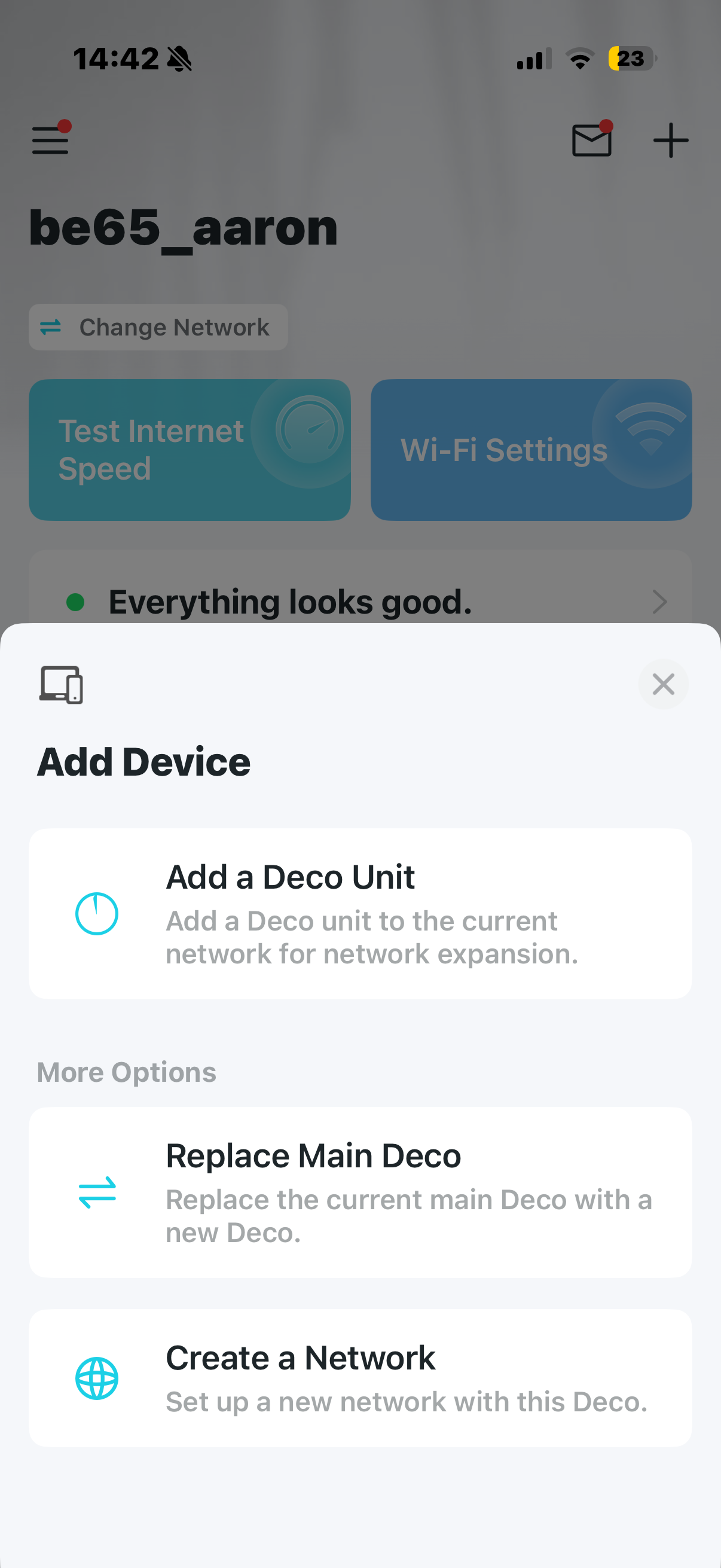
  @David-TP Thanks David, that was what I'd been expecting, very easy indeed, I now have 2 bars wifi in the shed at the bottom of the garden 30 yards away and daugter #2 has 3 bars in her bedroom. smiley  I guess the + sign should obviously be where to look, but for some reason I didn't.  Suggestions for Deco: as & when you update the app, make it more obvious what this does, and maybe make it accessible from elsewhere in the menu with a really obvious prompt, e.g. "Add Deco to existing network", and also make reference to this in the start-up guide, which as it stands is no help at all in this situation.  A one liner would be all it needs.


Thanks for the prompt reply though; all I have to do now is work out how & why I can print to my Brother printer over wifi, the printer says it's connected to the mesh network, but the Deco app says it's not even an offline client, and I can't scan from the printer to my laptop (this problem predates the mesh router, I just had a faint hope that it might solve it). 

Recommended Solution
  0  
  0  
#3
Options
2 Reply
Re:Connecting Deco X50 to existing Deco X50DSL network
2025-12-10 06:45:06

  @RichardMR 

Hi, have you tried to add the extra Deco X50s via Deco App>"+" on the top right>"add a Deco unit":

Wait for your reply.

Best regards.

  0  
  0  
#2
Options
Re:Connecting Deco X50 to existing Deco X50DSL network-Solution
2025-12-10 09:39:04 - last edited 2026-01-14 07:10:39

  @David-TP Thanks David, that was what I'd been expecting, very easy indeed, I now have 2 bars wifi in the shed at the bottom of the garden 30 yards away and daugter #2 has 3 bars in her bedroom. smiley  I guess the + sign should obviously be where to look, but for some reason I didn't.  Suggestions for Deco: as & when you update the app, make it more obvious what this does, and maybe make it accessible from elsewhere in the menu with a really obvious prompt, e.g. "Add Deco to existing network", and also make reference to this in the start-up guide, which as it stands is no help at all in this situation.  A one liner would be all it needs.
 

Thanks for the prompt reply though; all I have to do now is work out how & why I can print to my Brother printer over wifi, the printer says it's connected to the mesh network, but the Deco app says it's not even an offline client, and I can't scan from the printer to my laptop (this problem predates the mesh router, I just had a faint hope that it might solve it). 

Recommended Solution
  0  
  0  
#3
Options