Request for Help – TP - Link AV2000 Powerline Setup (Deco XE75 Pro not working wired)

Hi everyone,
I’m looking for some help with a more complex Powerline Adapter setup using TP - Link AV2000 and Deco XE75 Pro units.
Setup Overview :
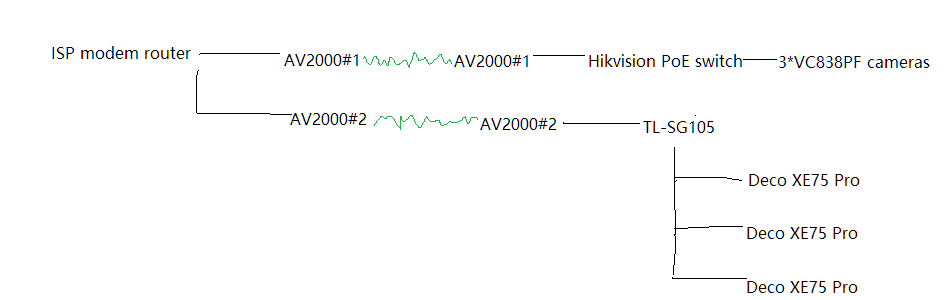
I have two separate pairs of TP-Link AV2000 adapters, for two isolated network segments:
AV2000 Pair 1 : Connected to a Hikvision PoE switch, which powers and connects three Alarm . com VC838PF PoE security cameras . This was done on advice from the alarm company, to ensure camera stability by keeping them on a dedicated, isolated path.
AV2000 Pair 2 : Connected to a TP-Link TL-SG108 switch, and from there Ethernet cables run through the walls to data points (RJ45 sockets) in different rooms .
Both pairs of TP-Link AV2000 are plugged into one double wall socket, one for each .
What I’m trying to do :
I’m trying to use the data points (wired Ethernet) to connect several TP - Link Deco XE75 Pro units — in Access Point mode — via Ethernet, to improve Wi-Fi signal throughout the house.
Problem : The Deco units only connect wirelessly, not via Ethernet, even if I plug them directly into the TP-Link TL-SG108 switch — they do not recognize the wired backhaul.
I’ve tested all cables using a proper tester — they are wired correctly (1 : 1, all pins OK), and LEDs on the switch do turn on when the Deco is plugged in .
I’m also experiencing intermittent smart home issues — apps like IKEA Home Smart, Livolo, Alarm . com become unresponsive when the Deco is plugged into the data points (via Powerline), and go back to normal if I unplug the Ethernet connection.
What could be the issue?
Is the Powerline connection unstable or too noisy for the Deco units to detect as wired?
Is there a conflict introduced by having two Powerline circuits on separate ports of the same double socket?
Any help or insights would be hugely appreciated!
Thanks in advance!
Bogdan