
Archer BE800 router randomly reboots when MLO network is running

Archer BE800 router randomly reboots when MLO network is running. When I disable the MLO network, the router runs stably. The new BE800 router is set as the primary router, along with three additional mesh routers (a BE230 and two BE3600 routers).
- Copy Link
- Subscribe
- Bookmark
- Report Inappropriate Content


Hello @raq50 ,
Welcome to our community.
May I know the EasyMesh Backhaul between the main router and satellite routers? Is it wireless backhaul or Ethernet backhaul?
What happens if EasyMesh is disabled? Does this anomaly occur after the firmware update?
To help you efficiently, I've forwarded your case to the TP-Link support engineers, who will reach out to you using your registered email address later. Please keep an eye on your email inbox for follow-up.
- Copy Link
- Report Inappropriate Content
Hello @raq50 ,
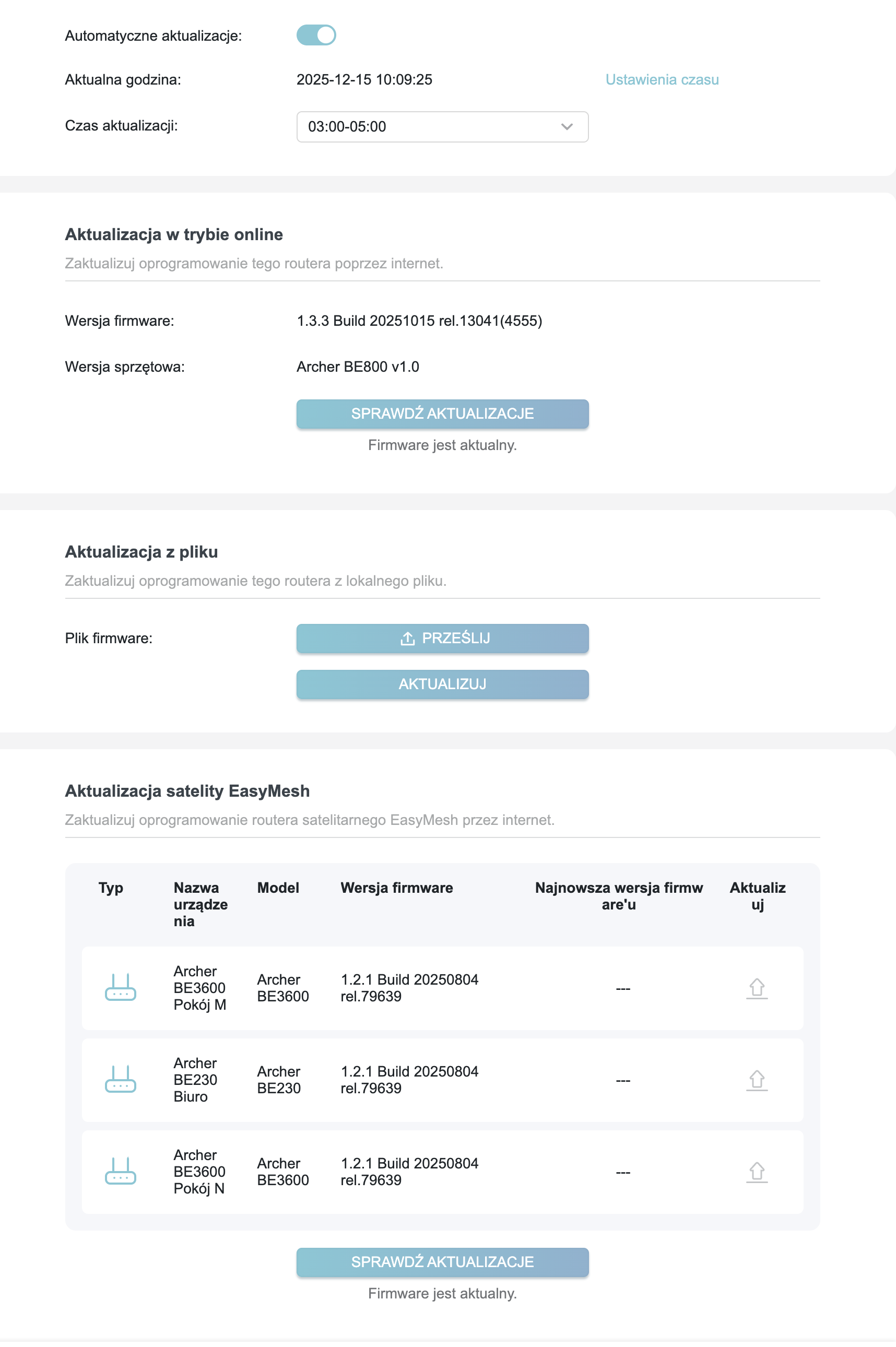
We are delighted to announce the pre-release firmware for the Archer BE800 V1! This update has new advanced features.
It is recommended that you try this firmware and take advantage of the new features.
New Firmware for Archer BE800 V1 to Support VPN Merge,Guest/IoT Network Extend in EasyMesh, and More
Any feedback and suggestions are welcome~
- Copy Link
- Report Inappropriate Content
@raq50 Thanks for the info. Looks like i have the same issue with sudden reboots. I will try disable MLO, as I currently not really use it
- Copy Link
- Report Inappropriate Content
Hello @raq50 ,
Welcome to our community.
May I know the EasyMesh Backhaul between the main router and satellite routers? Is it wireless backhaul or Ethernet backhaul?
What happens if EasyMesh is disabled? Does this anomaly occur after the firmware update?
To help you efficiently, I've forwarded your case to the TP-Link support engineers, who will reach out to you using your registered email address later. Please keep an eye on your email inbox for follow-up.
- Copy Link
- Report Inappropriate Content
Hi @Joseph-TP
In my previous configuration, I was using a BE230 router with two BE3600 satellites in a wireless mesh setup without any issues. Since upgrading my fiber connection to 8Gbps, I decided to purchase a BE800 to serve as the main router.
My network handles over a dozen devices at peak times, including 6 PCs/Macs, 5 smartphones (Android/iOS), 3 tablets (Android/iOS), 3 watchOS, smart home devices (camera/aquarium) on an isolated network, Apple TV, Google TV, and a NAS.
All devices are running the latest firmware. The main unit is connected via wireless mesh to the other routers. I have performed tests by disabling various features, including the mesh itself. The problem clearly relates to the MLO (Multi-Link Operation) network. The router restarts approximately every 4 hours, suggesting a potential memory leak or buffer overflow issue.
Current Configuration:
-
WAN: Currently connected via RJ45 (I have ordered a TP-LINK TL-SM5110-LR SFP+ module).
-
WiFi Settings:
-
TWT: Enabled
-
OFDMA + MU-MIMO: Enabled
-
Smart Connect: Enabled
-
2.4 GHz / 5 GHz / 6 GHz: All enabled, including a Guest Network with a Portal (I run a service center and have been in IT for 30 years).
-
IoT Network: 2.4 GHz / 5 GHz enabled.
-
-
Networking & Security:
-
NAT: Enabled
-
DNS Privacy: DoH (Cloudflare)
-
Negotiation: Auto
-
RX/TX: Enabled for LAN/WAN
-
VLAN ID 35 + 802.1Q Tag for Internet
-
Dynamic DNS (no-IP) and VPN Client (NordVPN) enabled.
-
WMM and AirTime Fairness: Enabled
-
AP Isolation: Disabled
-
Port Forwarding: Active for NAS
-
Firewall: SPI enabled; Ping response disabled.
-
ALG: All options enabled.
-
Device Isolation: Active for 2 devices (IP Camera and Smart Aquarium).
-
IPv6: Disabled.
-
I believe I have listed the most critical parameters of my setup.
- Copy Link
- Report Inappropriate Content
Hi @raq50 ,
Thank you for getting back to me.
I will sync your info to the engineer. Please wait patiently for the engineer's reply.
Best Regards.
- Copy Link
- Report Inappropriate Content

I experience this on my GE800 router. But I'm no enable the MLO network.
- Copy Link
- Report Inappropriate Content
Hello @raq50 ,
We are delighted to announce the pre-release firmware for the Archer BE800 V1! This update has new advanced features.
It is recommended that you try this firmware and take advantage of the new features.
New Firmware for Archer BE800 V1 to Support VPN Merge,Guest/IoT Network Extend in EasyMesh, and More
Any feedback and suggestions are welcome~
- Copy Link
- Report Inappropriate Content
Hi, @Joseph-TP
Thank you. Even with the previous versions provided by the engineer, we managed to stabilize the situation relatively well. I have now installed the new firmware and will continue to monitor the performance.
- Copy Link
- Report Inappropriate Content
Hi @raq50 ,
Thanks for your update. Feel free to contact us if you have any feedback~
- Copy Link
- Report Inappropriate Content
Have you checked your MLO band settings? I recently discovered the root cause of this issue, though I’m not sure whether it applies to your setup as well.
If MLO bands that are not supported by the router are enabled, the main router may enter a continuous reboot loop due to protocol incompatibility. For example, the BE3600 and BE230 only support 2.4 GHz and 5 GHz bands under the Wi-Fi 7 protocol. If the 6 GHz MLO band is enabled on the main router, the devices are unable to establish a proper MLO network, which can cause crashes when clients connect via MLO.[Making the Most of the MLO Network Feature on a Wi-Fi 7 Router - Home Network Community]
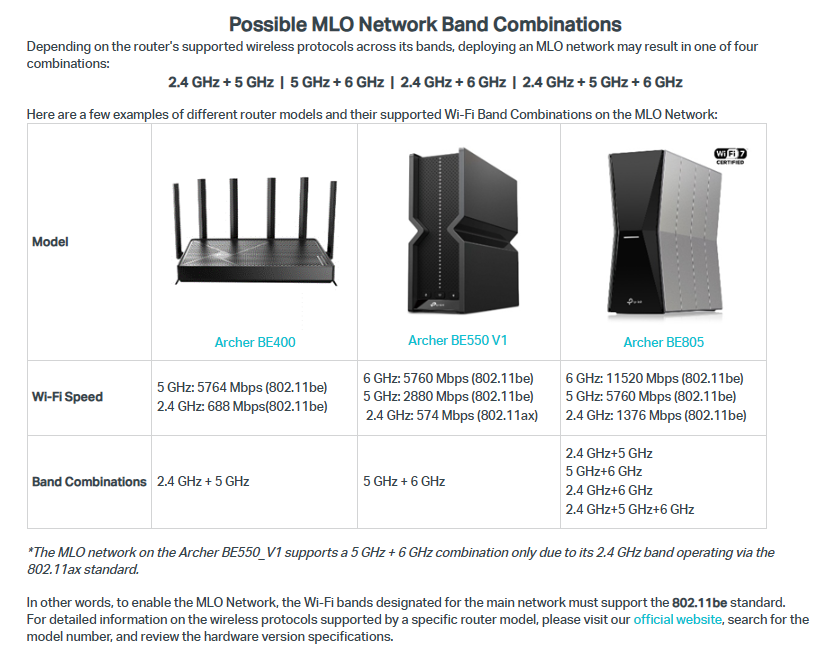
I personally encountered this issue with the GE550. Its 2.4 GHz band only supports Wi-Fi 6. When I enabled 2.4 GHz, 5 GHz, and 6 GHz together for MLO, the main router repeatedly crashed. However, once I disabled the 2.4 GHz band, everything worked normally.
On a separate note, I’m honestly quite disappointed with how TP-Link has positioned their product lineup. The GE550 and BE550 V1 were marketed as Wi-Fi 7 routers, but a closer look at the specifications shows they are not fully compliant with the Wi-Fi 7 standard, as the 2.4 GHz band bandwidth was only support until WiFi 6. Recently, TP-Link released the BE550 V2, which upgrades the 2.4 GHz band to full Wi-Fi 7 support at the same price point. Unfortunately, the retail market is still flooded with V1 units, and even many retailers are unaware of this distinction. This feels unfair to early adopters who supported the product from the beginning. The GE550 is also positioned as a high-priced router, yet TP-Link still chose to limit the 2.4 GHz band standard. I’m not sure whether they plan to release a V2 version for this model, which 2.4GHz is operate in WiFi 7 standard. Personally, I feel this is something that should be addressed through an RMA or exchange program.



- Copy Link
- Report Inappropriate Content
Hi, @Jasson_Hong
I thought about that as well, but it doesn't seem to be the issue in my case. I tested it with the mesh routers turned off, and the problem persisted. In the meantime, I have updated my setup: I am currently using the BE800 as the main router with two BE550 units as mesh satellites. While the issue was still present initially, it has become quite stable after several updates and the current beta firmware.
As you noted, the BE800 does not yet support extending the MLO network to the BE550 satellites—that feature is expected in a future firmware release. I am also running a beta version on my BE550 units, which I am currently testing. This version already supports features like Guest network and MLO propagation.


- Copy Link
- Report Inappropriate Content
Information
Helpful: 1
Views: 730
Replies: 10
Voters 1