
Unable to turn on Network Security

How do you fixed this error?
Unable to turn on Network Security.

- Copy Link
- Subscribe
- Bookmark
- Report Inappropriate Content
- Copy Link
- Report Inappropriate Content


Hi, can you help me submit the Deco App log here:
By the way, from the attached picture, I see all three features have been enabled already. If you get back to the last page and click"network security', would they remain "disabled"?
Have you also tried enabling these features via mobile 4G/5G data?
Wait for your reply.
Best regards.
- Copy Link
- Report Inappropriate Content
- Copy Link
- Report Inappropriate Content
- Copy Link
- Report Inappropriate Content
Hi, thank you very much for the logs and pictures.
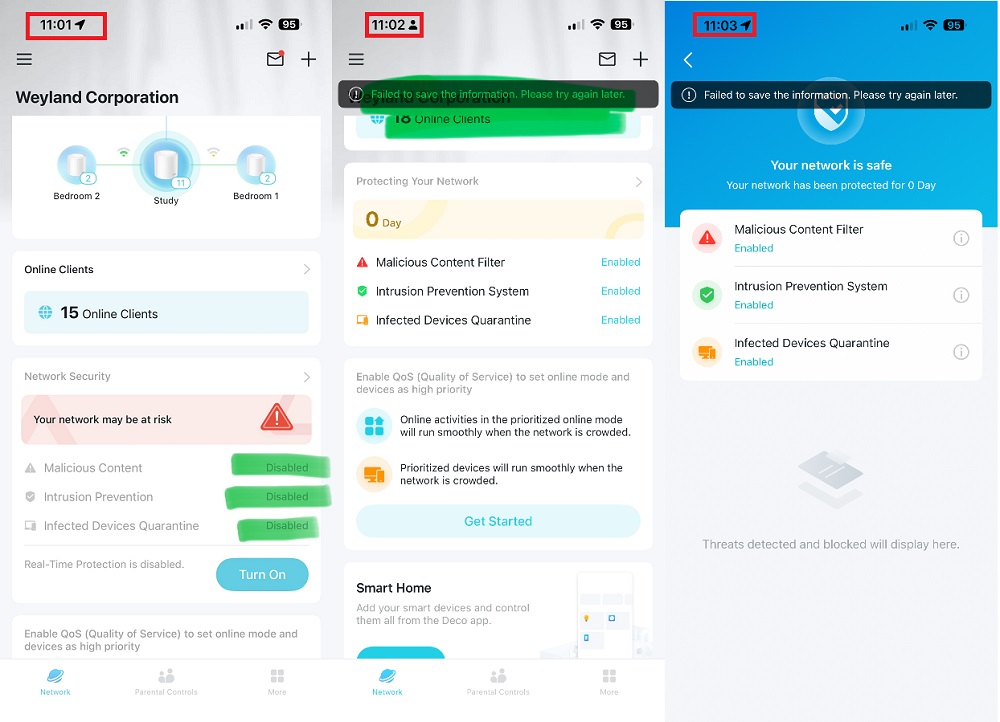
From the time stamp on the attached pictures, it seems like the Network security features are enabled even with an error.
I wonder whether it turned back to "disabled" again.
By the way, did the reported issue start recently, such as after a firmware upgrade?
Wait for your reply.
Best regards.
- Copy Link
- Report Inappropriate Content
- Copy Link
- Report Inappropriate Content
Information
Helpful: 0
Views: 324
Replies: 5
Voters 0
No one has voted for it yet.