
Bufferbloat issues on GE550
Bufferbloat issues on GE550

Hello everyone,
I recently replaced my old ASUS RT-AC86U with a TP-Link Archer GE550, expecting a noticeable improvement in performance and stability under heavy traffic. My main reason for upgrading was recurring bufferbloat issues on the ASUS, especially when running Stremio on a TV while gaming, which caused latency spikes during gameplay.
After installing the GE550 and placing my ISP modem in bridge mode (no double NAT), I started testing the connection using the Waveform bufferbloat test. To my surprise, with QoS enabled, the GE550 consistently scores a bufferbloat grade F, caused almost entirely by extreme latency increases during upload (hundreds of milliseconds).
I have already tried the following troubleshooting steps:
-
Enabling bandwidth-based QoS
-
Manually limiting upload and download bandwidth well below my actual line speed
-
Prioritizing my gaming PC using Game Accelerator
-
Disabling traffic analysis and monitoring features
Despite these adjustments, the issue persists whenever QoS is enabled. Upload saturation causes massive latency spikes, making gaming and other real-time applications unusable under load.
However, when I disable QoS completely, the behavior changes drastically:
the bufferbloat disappears, latency remains stable, and I consistently achieve an A+ rating on the Waveform test.
This suggests that the problem is not related to my ISP, modem, or double NAT, but rather to how QoS / queue management is implemented in the GE550 firmware. This is disappointing, as the GE550 is expected to be significantly more powerful and modern than the RT-AC86U, yet in my environment it only performs well with QoS turned off.
At this point, if this behavior cannot be improved via configuration or firmware updates, I am seriously considering returning the GE550 and reverting to my ASUS, or moving to a different solution altogether.
My questions are:
-
Have other users experienced similar upload bufferbloat issues with QoS enabled on the GE550?
-
Is there any plan to improve queue management or implement proper SQM (fq_codel, CAKE, or similar) in future firmware updates?
Any feedback from TP-Link staff or other users would be greatly appreciated.
- Copy Link
- Subscribe
- Bookmark
- Report Inappropriate Content

Hello @NandoAoT ,
Welcome to our community.
I understand your frustration and I will try my best to help you. If possible, please temporarily disable QoS.
We will provide a solution as soon as possible; please give us a little more time. We will also prioritize your case and follow up on it via ticket.
For Homeshield, which specific features are you using? Which features are required? Here are some free features that you can try. Please navigate to HomeShield Overview Chart.
May I know the settings of your Game Center? If you don't mind, please provide screenshots and send them here.
Also, you can refer to Archer GE550_V1_User Guide (from page 135) to learn more about Game Center, which may help you improve your settings.
For a better gaming experience, please refer to the following suggestions: How can I get the best online game connection with TP-Link Gaming Router and WTFast
- Copy Link
- Report Inappropriate Content
I will wait for future firmware updates, but I sincerely hope the software can be improved. At the moment, it feels like the firmware does not fully extract the potential of the hardware, and unfortunately there is no custom firmware ecosystem available for TP-Link routers, which limits advanced optimization.
To be clear, my intention here is not to compare brands. However, I inevitably reference my previous router because it was my first real “high-performance gaming router” experience. My old ASUS router provided a complete security solution out of the box: threat blocking, infected device protection, and exploit prevention — all without requiring any additional paid subscription.
This is exactly what I expect when purchasing a router that claims to offer “security.” Features such as parental control and time scheduling are basic functionalities and should not be advertised as differentiators. From my perspective, a security solution that requires both a premium router purchase and an additional recurring subscription is disappointing, especially when it fails to protect IoT devices unless the user pays extra. This approach is, in my view, a negative point for TP-Link.
Currently, I am only using the QoS feature from the HomeShield suite. I do not intend to pay for additional features, as I believe that users who have already invested in a high-end router should have access to core security and performance features without further cost.
Game Center feedback
At the moment, I am also only using QoS within Game Center. The remaining features are either not useful in my scenario or do not work as expected:
-
Game Detector: There are no servers listed for Brazil or Latin America, which makes this feature useless for my region.
-
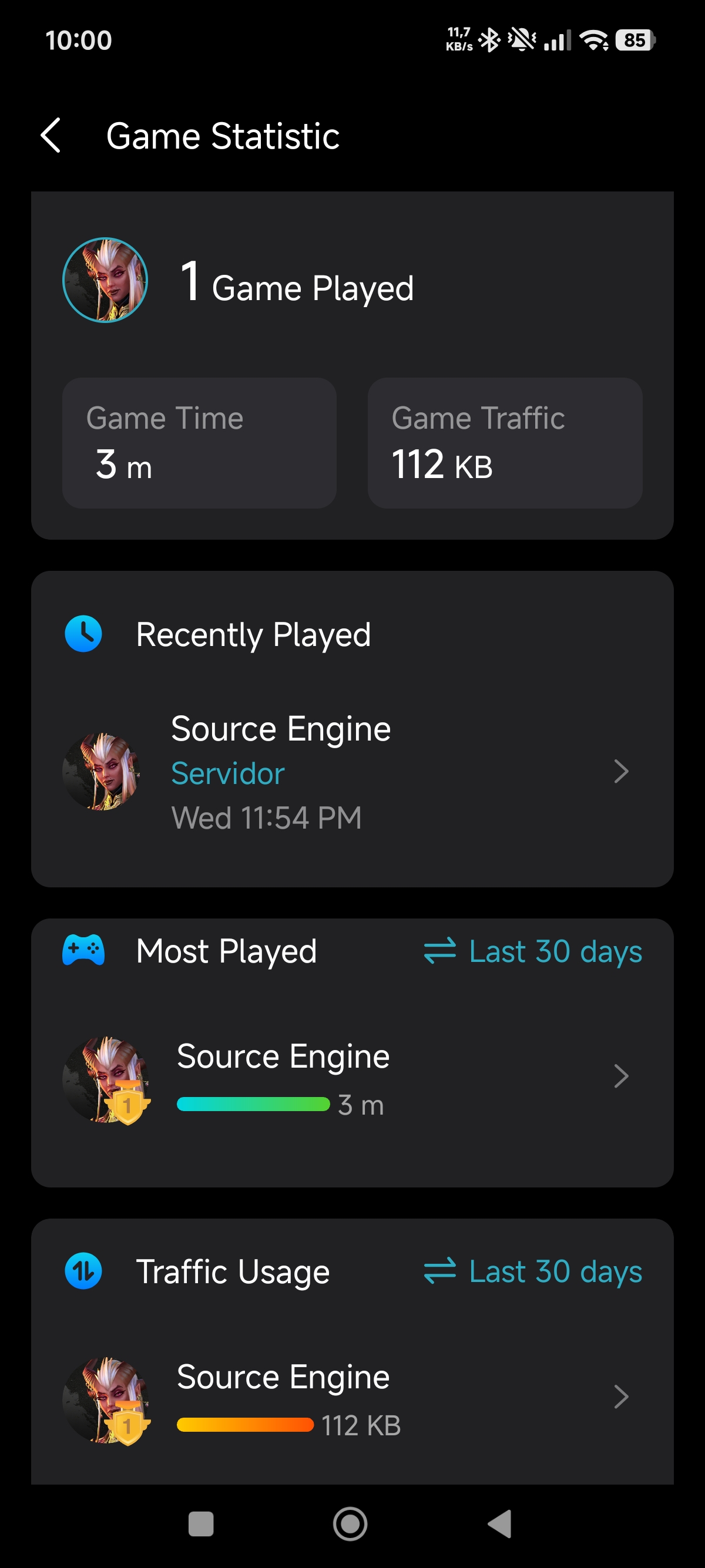
Game Statistics: Game detection is inaccurate. For example, when playing Battlefield 6 and Ready or Not, the system only identified “Source Engine” due to Steam activity. While this is an interesting idea, achieving accurate detection is extremely difficult. Development effort would be better spent on more impactful features.
-
Game Port Forwarding: Useful feature overall, but it would benefit greatly from more frequent updates to the game database.
-
Game Diagnostics: This is essentially a standard ping and traceroute tool. While functional, it does not belong under the Game Center section, as it is not a gaming-specific feature.
Additional feedback
I also miss:
- having a built-in network-level ad blocker similar to projects like Diversion. At the moment, I am using AdGuard DNS as a workaround.
- A page where I can see all connections by device, this is usefull to know where my games are connecting to, i had this on Asus and I cant find this on GE550
Final customer feedback
-
Improve QoS implementation to effectively prevent bufferbloat
-
Consider offering a truly complete security solution without mandatory subscriptions
Game statistic screen:
- Copy Link
- Report Inappropriate Content

Hi @NandoAoT ,
I have shared your feedback, including suggestions, with the relevant departments.
If there is any progress, the tech team will likely contact you via email to continue troubleshooting. Please check your email inbox and confirm.
- Copy Link
- Report Inappropriate Content
Hi, @Joseph-TP
The only thing that they answered was:
- Copy Link
- Report Inappropriate Content
Hello @NandoAoT ,
Thanks for getting back to me.
Regarding your requests, here are some updates:
1. We have submitted an application to address the bufferbloat issue caused by enabling QoS, and a beta firmware should be released soon.
2. I have forwarded your suggestions to the relevant departments regarding Game Center feature optimizations. They will seriously consider them and may implement these optimizations in the future.
3. We have also actively forwarded your feedback to the relevant departments regarding the limitations of the HomeShield feature. We hope to receive a response that we both look forward to.
Thanks again for your kind understanding and support. Hope you have a great day~
- Copy Link
- Report Inappropriate Content
Thanks, I will be waiting, hope we can see some improvements, otherwise it will be my first and last tp link router..
- Copy Link
- Report Inappropriate Content
Another issue:
Wi-Fi clients are intermittently disconnected and are unable to reconnect, receiving an “Incorrect Wi-Fi password” error, even though the password is correct.
The issue only occurs under high P2P traffic, specifically when Stremio is running with BitTorrent-based streaming enabled. Once the application is stopped, Wi-Fi connections immediately recover.
Wired connections remain stable at all times.
---
Steps to Reproduce
1. Connect a device to the router via Wi-Fi.
2. Start Stremio with torrent-based streaming enabled.
3. Generate sustained P2P traffic.
4. After some time, Wi-Fi clients are disconnected.
5. Reconnection attempts fail with “Incorrect password”.
---
Expected Result
Wi-Fi authentication and connectivity should remain stable under high traffic load, or the router should gracefully handle internal resource limits without impacting Wi-Fi authentication.
---
Actual Result
Wi-Fi authentication fails and clients are rejected with a false “Incorrect password” error. Also the internet does not work properly on the other devices.
---
Log Evidence
Router system log shows conntrack/NAT table flush events occurring at the same time as the Wi-Fi failures:
Flush conntrack
Flush conntrack table succeeded
---
Additional Notes
During the issue, CPU and memory usage do NOT show abnormal or sustained high utilization according to the router’s system status page.
This suggests the problem is not caused by general CPU or memory exhaustion, but more likely related to:
Internal connection tracking (conntrack/NAT) limits
Firmware-level handling of high concurrent sessions
Wi-Fi authentication state handling under connection table pressure
The misleading “Incorrect password” message appears to be a side effect of failed authentication handshakes, not a real credential issue
Log attached

- Copy Link
- Report Inappropriate Content
Hello @NandoAoT ,
Thanks for contacting our community again.
We would like to escalate your case to the support engineers, and they will follow up on it. If you are willing to conduct further analysis, please check your inbox and respond.
- Copy Link
- Report Inappropriate Content
Additionally, system logs from a separate incident (under weak Wi-Fi signal conditions and without high traffic) show the same behavior, including forced conntrack table flush events:
Flush conntrack Flush conntrack table succeeded
This indicates the issue is not traffic-specific, but related to Wi-Fi authentication state handling under stress conditions (weak signal or high retries).
- Copy Link
- Report Inappropriate Content
Hi @NandoAoT ,
Thank you for your feedback. I have shared your information with the engineer. I will also request that your case be prioritized.
Best Regards~
- Copy Link
- Report Inappropriate Content
Information
Helpful: 1
Views: 3631
Replies: 20
Voters 0
No one has voted for it yet.