Router Remotely Manageable Even With Remote Management Disabled

This thread has been locked for further replies. You can start a new thread to share your ideas or ask questions.

Router Remotely Manageable Even With Remote Management Disabled

This thread has been locked for further replies. You can start a new thread to share your ideas or ask questions.

Router Remotely Manageable Even With Remote Management Disabled
Yesterday - last edited 7 hours ago
Tags: #Web GUI Management #Remote Management
Model: XX230v  
Hardware Version: V1
Firmware Version: 0.16.0 3.0.0 v6066.0 Build 250423 Rel.43799n

Hello,


I want to report a security/management issue regarding my TP-Link router, model XX230V (BR).


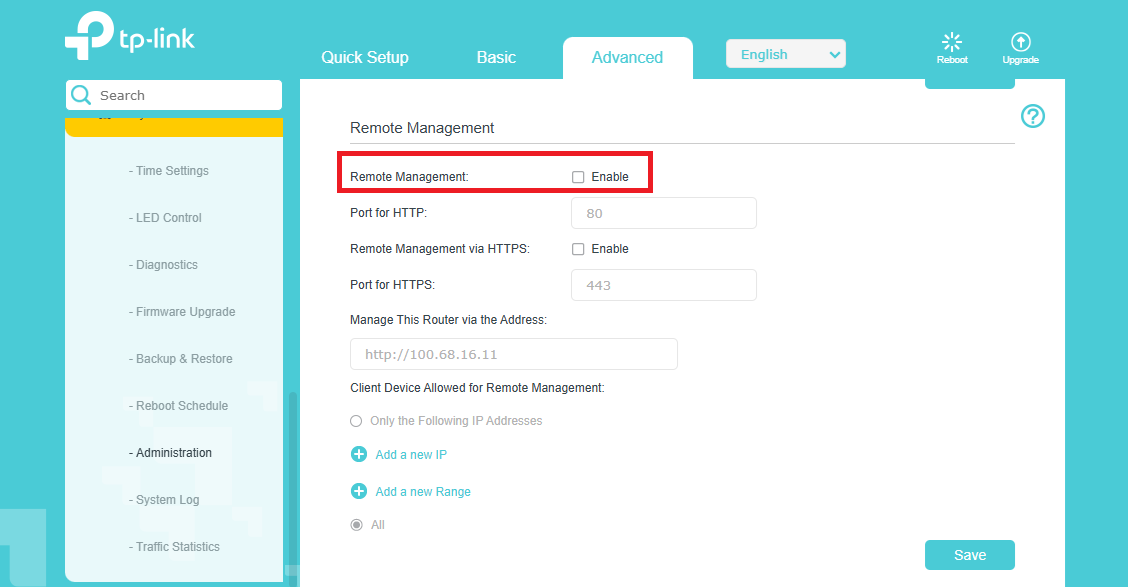
Even with Remote Management disabled in the Administration settings, the router still appears to be remotely manageable.

My ISP operates under CGNAT, so I cannot access the router using my public IP address. However, I performed a test and confirmed that I can access the router’s management interface using the IP address assigned by my ISP.

This behavior suggests that the router is still listening for management connections on the WAN side despite remote management being explicitly disabled in the configuration.


Key points:

  • Remote Management is disabled in the router settings

  • ISP uses CGNAT (no direct public IP access)

  • Router management interface is accessible via the PPPoE-assigned IP


I would like to understand:

  • Whether this behavior is expected by design

  • How to fully disable any form of WAN-side management access


Please advise on how to properly secure the router and prevent any external management access.

Thank you.


Pictures of my config below:


  0      
  0      
#1
Options
1 Accepted Solution
Re:Router Remotely Manageable Even With Remote Management Disabled-Solution
16 hours ago - last edited 14 hours ago

Hello @isouza 


Thank you for posting on the TP-Link Community.


Could you please show me how you accessed the web management page of the XX230v remotely? If the Remote Management is disabled, it's not possible to access the web management page from an outside network.


I'm wondering whether you're accessing the web management page of the XX230v from a 'visual' LAN network, meaning you're accessing it from a device on the same network, not from outside.

Nice to Meet You in Our TP-Link Community. Check Out the Latest Posts: Introducing AI QoS: Elevate Your Gaming Experience on the Archer GE800 Gaming Router! Connect TP-Link Archer BE550 to Germany's DS-Lite (Dual Stack Lite) Internet via WAN Archer GE550 - BE9300 Tri-Band Wi-Fi 7 Gaming Router Archer AX90 New Firmware Added Support for EasyMesh and Ethernet Backhaul If you found a post or response helpful, please click Helpful (arrow pointing upward icon). If you are the author of a topic, remember to mark a helpful reply as the "Recommended Solution" (star icon) so that others can benefit from it.
Recommended Solution
  2  
  2  
#2
Options
3 Reply
Re:Router Remotely Manageable Even With Remote Management Disabled-Solution
16 hours ago - last edited 14 hours ago

Hello @isouza 


Thank you for posting on the TP-Link Community.


Could you please show me how you accessed the web management page of the XX230v remotely? If the Remote Management is disabled, it's not possible to access the web management page from an outside network.


I'm wondering whether you're accessing the web management page of the XX230v from a 'visual' LAN network, meaning you're accessing it from a device on the same network, not from outside.

Nice to Meet You in Our TP-Link Community. Check Out the Latest Posts: Introducing AI QoS: Elevate Your Gaming Experience on the Archer GE800 Gaming Router! Connect TP-Link Archer BE550 to Germany's DS-Lite (Dual Stack Lite) Internet via WAN Archer GE550 - BE9300 Tri-Band Wi-Fi 7 Gaming Router Archer AX90 New Firmware Added Support for EasyMesh and Ethernet Backhaul If you found a post or response helpful, please click Helpful (arrow pointing upward icon). If you are the author of a topic, remember to mark a helpful reply as the "Recommended Solution" (star icon) so that others can benefit from it.
Recommended Solution
  2  
  2  
#2
Options
Re:Router Remotely Manageable Even With Remote Management Disabled
13 hours ago

  @Kevin_Z My bad. You are right. Even though I was accessing the web management page from the PPPoE IP assigned by my ISP, I was actually still on the same network.


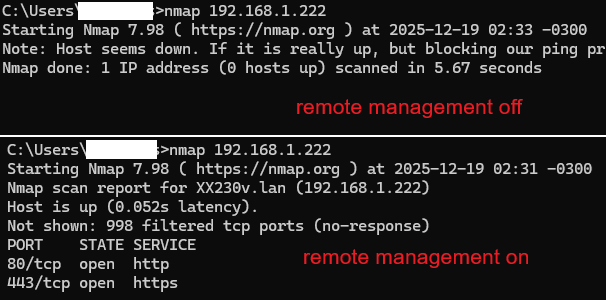
To get to the bottom of this, I set up an additional router to simulate an ISP and connected both my XX230V and a third router to this “fake ISP” via their WAN ports. Once everything was in place, I tried accessing the XX230V from the other router and got nothing, exactly as it should be.


I was only able to access my primary router after enabling remote management.

At least I learned something new today 😄


Thanks for the help! Have a great day.


  1  
  1  
#3
Options
Re:Router Remotely Manageable Even With Remote Management Disabled
13 hours ago

@isouza 


Good job.yes


I appreciate your efforts to figure this out and update me with the details.


Thank you very much.

Nice to Meet You in Our TP-Link Community. Check Out the Latest Posts: Introducing AI QoS: Elevate Your Gaming Experience on the Archer GE800 Gaming Router! Connect TP-Link Archer BE550 to Germany's DS-Lite (Dual Stack Lite) Internet via WAN Archer GE550 - BE9300 Tri-Band Wi-Fi 7 Gaming Router Archer AX90 New Firmware Added Support for EasyMesh and Ethernet Backhaul If you found a post or response helpful, please click Helpful (arrow pointing upward icon). If you are the author of a topic, remember to mark a helpful reply as the "Recommended Solution" (star icon) so that others can benefit from it.
  1  
  1  
#4
Options