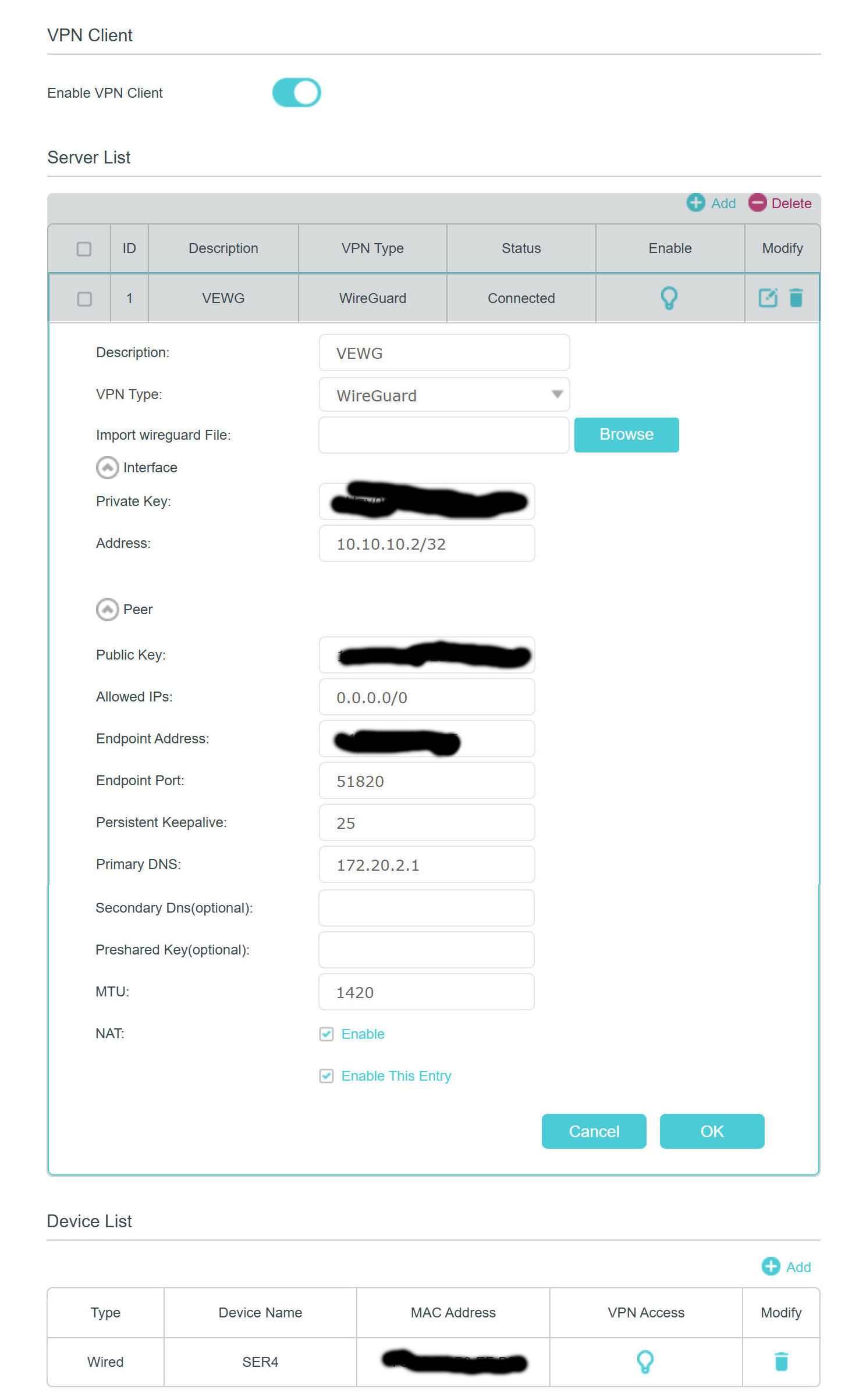
Wireguard Client fails while Win11 Wireguard Client (with same config) works fine...
 This thread has been locked for further replies. You can start a new thread to share your ideas or ask questions.
I've been looking for a decent 5G hotspot with a built in VPN client and I had high hopes for the M8550. I've been fighting with this for a couple of days now...
Basic Problem: Can not get the Wireguard client to pass traffic properly to/from my router (OPNsense 25.7.10-amd64 = latest)
- The M8550 seems to work fine as a hotspot for my test PC to/from the Internet. So that is good. To simplify things, my Test PC is connected directly to the ethernet port on my M8550.
- I have tested my configuration using the generic Wireguard client on my Test PC. It works just fine. This confirms that my router and my test configuration is appropriate and functional. I am even using the M8550 in this configuration as my hotspot (obviously with the M8550's Wireguard client disabled).
- Trying to import the simple Wireguard Configuration file is all but impossible on the M8550. I don't think I have ever seen it succeed so I always have to enter the corresponding client configuration data by hand (copy/pasting the all-important public/private keys to be sure they are correct).
- Even when entering the data by hand, the M8550 always seems to want more data then is available in the config file (like MTU and PersistentKeepalive). The M8550 never reports a meaningful error (just "9007 invalid data" - even when a field is left blank). Anyway, I finally know which fields arte required and I can get a proper config entered by hand.
- In comparing the manually entered configuration data with the data in the client configuration file everything seems consistent and accurate.
- The M8550 shows that the connection is established once the client is activated but this is pretty useless data. I have seen the "connected" message on the M8550 when even a knowingly incorrect config parameter was provided. The client "connected" indication is essentially useless for troubleshooting.
- The M8550 also provides no useful VPN data in the system log files even at "debug" level.
- However, I can see on my router when a Wireguard Client (any client) successfully negotiates a tunnel. The router will indicate when a tunnel has been established and also when it collapses. I can see from my router that it looks like the M8550 is successfully opening a Wireguard tunnel.
- After the M8550 appears to successfully open the wireguard tunnel, it looks like something is broken with respect to the routing tables on the device. If I try to ping an internal IP address in my network (from my test PC), I will get a "192.168.1.1: Destination host unrerachable". To me, this looks like the M8550 (192.168.1.1) does not understand what it needs to do to reach the internal network on the other side of the Wireguard tunnel. "AllowedIPs = 0.0.0.0/0" is set in my cleint config so all traffic should be passed via the tunnel. Again, this exact same configuration works just fine when imported into the generic Wireguard client on my Test PC.
- I have also tried "AllowedIPs = 0.0.0.0/1" as I have seen that used as an example in various TP-Link documentation - but it also does not work.
- I have tried "AllowedIPs = 172.20.0.0/16" in the M8550 (and reconfiguring the OpnSense router accordingly) as that is the RFC1918 Class B address of my internal/private network - but it also does not work.
I don't think there is anything else I can do here. I've been at this literally for days. The fact that the generic Wireguard client on my Test PC works just fine and the M8550 client does not is a pretty good indication where the problem is. It would be helpful if the Client Config import actually worked properly (not hanging) and also if it would give meaningful information if it thought it had a configurastion issue. This is pretty lazy programming I think...
Anyone have any ideas?