
[Deco XE75 V1.0] Constant "pppd: len < 0" errors every 10s - PPPoE Parser Bug
[Deco XE75 V1.0] Constant "pppd: len < 0" errors every 10s - PPPoE Parser Bug

Hi everyone,
I am experiencing a persistent issue with my Deco XE75 V1.0 (EU) running the latest official firmware 1.4.3 Build 20240926 Rel. 38336.
My ISP is Dimensione (Italy), providing a 2.5Gbps fiber connection via ONT and PPPoE. In the system logs, I see the following error recurring precisely every 10 seconds:
daemon.notice pppd[XXXXX]: len < 0 daemon.notice netifd: internet (XXXXX): len < 0
Impact: While the connection doesn't drop for standard browsing or streaming, these errors cause micro-lags and "packet buffering" on time-sensitive applications, specifically ADS-B receivers and GNSS miners connected via wifi.
Technical Analysis: My ISP’s technical support analyzed the logs and confirmed that this is a known bug in the PPPoE/netifd parser (likely related to LCP Echo Request handling) within the Deco firmware's OpenWrt-based backend. They mentioned that this has been addressed in newer firmware versions for other regions/models.
Troubleshooting already performed:
-
Tested MTU at 1492, 1480, and 1472 (no change).
-
Disabled IPv6 (no change).
-
Replaced the WAN cable with a certified Cat6 (no change).
-
The issue persists even with minimal network load.
Since 1.4.3 is currently the latest available version for V1.0 EU, is there a Beta firmware (e.g., 1.4.4 or 1.4.5) or a specific "Lab" release that includes the fix for this PPPoE parser bug?
.
Thank you in advance for your help!
- Copy Link
- Subscribe
- Bookmark
- Report Inappropriate Content


Hi, welcome to the community.
I'm afraid I didn't find such a beta firmware.
If you can consistently reproduce this issue, it is recommended to contact the local technical support team with a copy of the web UI system log for further assistance.
https://www.tp-link.com/it/support/contact-technical-support/#Hotline-Support
Thank you very much.
Best regards.
- Copy Link
- Report Inappropriate Content
Thank you for your reply. I have already contacted local support as suggested, but received no feedback so far.
However, I have an urgent update regarding this issue. My Deco XE75 V1.0 is now experiencing total system crashes (tilts) that require a hard power cycle.
Upon inspecting the latest logs right before the crash, I found hundreds of critical errors related to the imsnoop process: daemon.err imsnoop: mcManagerMCProcess: vlan node X, add it to encap table
It appears that the IGMP Snooping table is overflowing or failing to handle multicast traffic from devices like Sonos and Android TV boxes , even when they are idle.
Crucially: Disabling the 'IPTV/VLAN' toggle in the Deco App does NOT stop these imsnoop errors from flooding the system log and eventually crashing the router.
Since this seems to be a separate but related stability issue with firmware 1.4.3:
-
Is there a way to completely disable the imsnoop/IGMP process via a hidden setting or the Web UI?
-
Is this a known memory leak or table overflow issue in the V1.0 hardware?
This is severely impacting my network, as the system crashes under normal domestic multicast load. Any specific workaround for the imsnoop flood would be greatly appreciated.
- Copy Link
- Report Inappropriate Content

Hi!
Same issue on my side. Also tried the things you did, but nothing yet. Have you maybe found something in the meantime?
Thanks
- Copy Link
- Report Inappropriate Content
Hi,
Also tagging you, just in case. I'm having a lot of problems lately, because of this issue, so I'm pretty desperate to find a solution. It is the exact same case as Pengo's.
Thanks
- Copy Link
- Report Inappropriate Content
I sent an email to local tech support, they kept me waiting for a month and then forwarded my ticket to a higher level, but I have not yet receive any real assistance. I will let you know in case I have any update from them.
- Copy Link
- Report Inappropriate Content
Hi, can I have the firmware version of your Deco XE75?
How long have you had the Deco? Did the issue start recently?
May I know your internet service provider?
When you commented "Same issue on my side", are you specifically trying to say the following error log:
daemon.notice pppd[XXXXX]: len < 0 daemon.notice netifd: internet (XXXXX): len < 0
Have you also observed any actual performance impact?
By the way, have you seen any Deco turn red/flashing red?
Please also add some screenshots of the network map as well as Mesh Backhaul types on the Deco, such as:
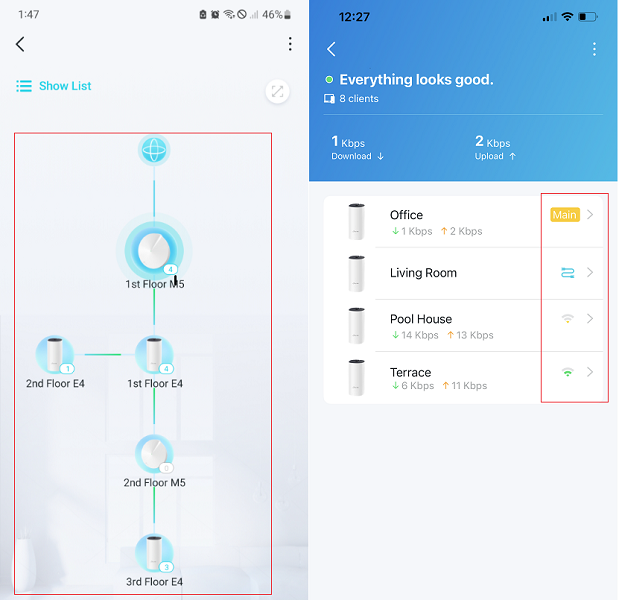
Best regards.
- Copy Link
- Report Inappropriate Content
Hi,
Yes, same reports
I have the same type of devices, so Apple TVs, Sonos system, home assistant on a pi4 etc. I changed nothing in my network in the last 6 months at least.
The issues started on Monday or around Monday, 9th March.
The system worked perfectly up to that point as follows. 1 deco was the main connected as a router to the ISP modem (my ISP is DIGI Romania) . And the other 2 decos were connected to the main, 1 wired and the other one wireless to the wired second one. This was the setup that worked for at least 1 year, no problem.
Now I even got an Omada ER707-M2 (latest firmware too) to work as the router and switched the decos to AP. One main wired directly to the Omada, and the other 2 wireless chain, as in the images.
Even in this scenario, the decos keep disconnecting for a few seconds then coming back on. So a lot of disconnects while the directly wired devices tot the omada work without interruption. Performance is good when it works (over 500mb on the main, around 300 on the wireless decos on speedtest and with around 20 latency), but the disconnects are so frequent that it doesn't matter.
And yes. devices all go red. blinking for about a minute or 2 then reconnect.
Reset them about 7 times now and recreated everything from 0 in different combinations, trying a different main and not having all 3, etc. Same thing.
firmware 1.4.3 build 20240926 Rel. 38336
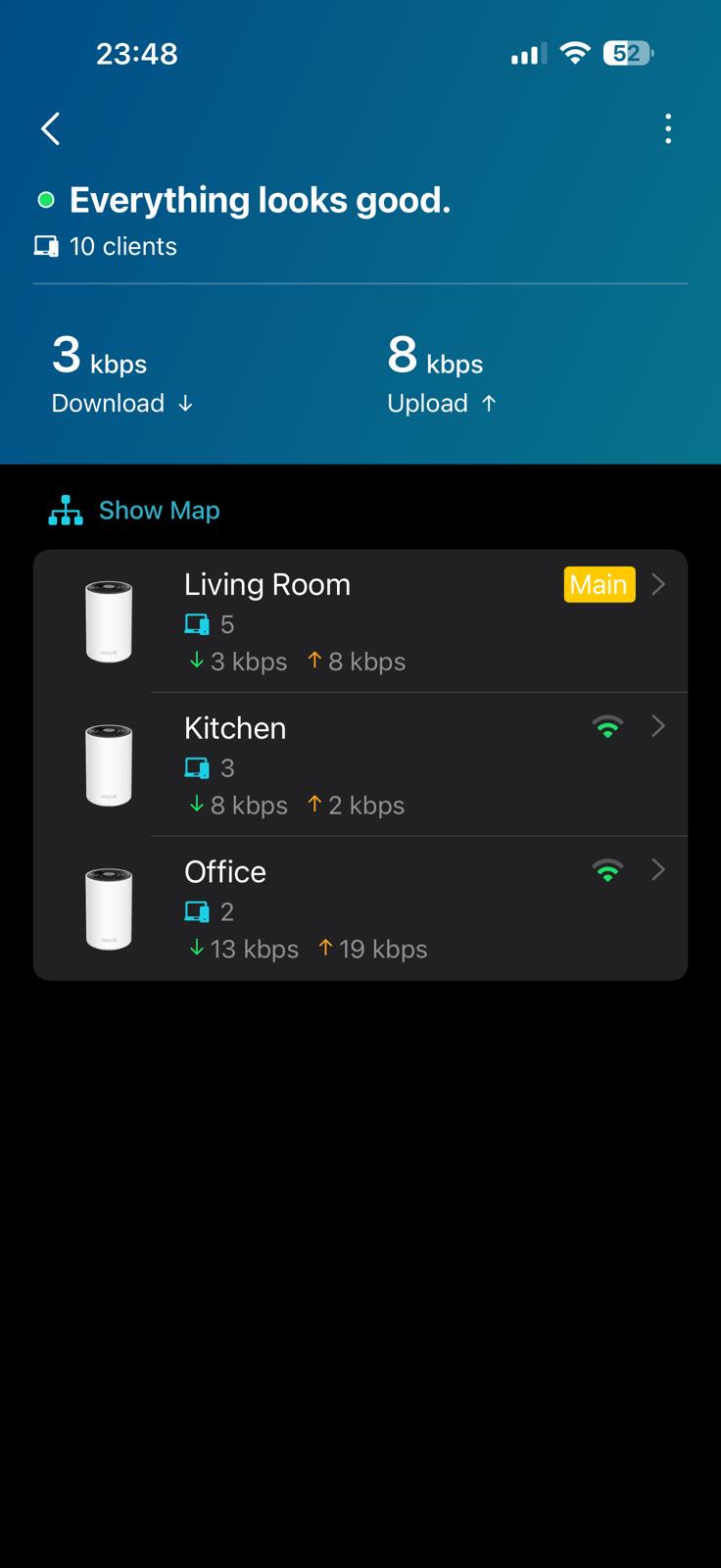
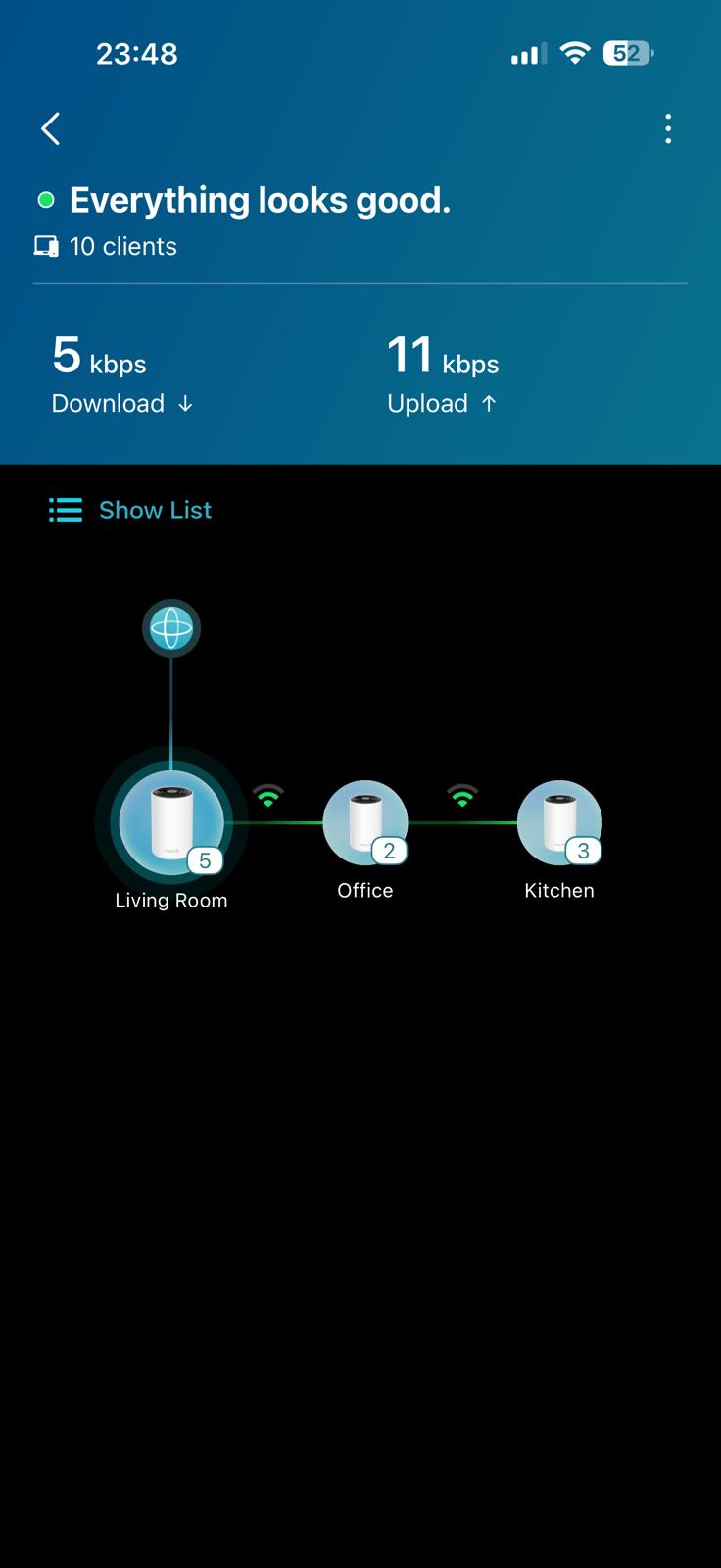
- Copy Link
- Report Inappropriate Content
Hi, thanks for the update.
If Deco XE75 can't hold a stable connection even in Access Point mode, the "PPPoE Parser Bug" might not be related to the current issue.
I remember there was some feedback about the sudden hardware failure of the top/bottom Ethernet ports on the Deco XE75_V1.
So if possible, it is suggested to connect the Omada ER707-M2 to the middle Ethernet port on the Deco XE75_v1 to see whether it could reduce the disconnection frequency.
Wait for your reply.
Best regards.
- Copy Link
- Report Inappropriate Content
Hi, and thanks for the reply.
I did what you recommended, and it seems to be stable. This may be the issue. I let it ping for about 4 hours continuously, both the Omada and Google, and there were no drops and good stable pinging. I'll keep it up like this and get back to you with updates tomorrow.
Does this mean I shouldn't use the other 2 ports for anything? Fortunately, I don't need them now, but it's still not a good scenario.
Thank you and have a nice one.
- Copy Link
- Report Inappropriate Content
Hi, thank you very much for the feedback.
The previous feedback has all been directed to connect the local office to check about the warranty service.
It is also suggested to have a check with the local technical support if the device is still under warranty.
Best regards.
- Copy Link
- Report Inappropriate Content
Information
Helpful: 0
Views: 525
Replies: 11
Voters 0
No one has voted for it yet.