
TP link archer AX55 update (newest one)

I have updated my router from the previous version to this new version as it says alot of things have been fixed, then realised this new version for the Archer AX55 resets the router back to factory settings and you have to setup the router as if it came out of the box, not a great start, but also with the new firmware version I am getting 150mbps, but the package I pay for is 1000mbps, my speed test isnt reaching this atall.
The version my router was on was build:
1.4.1 Build 20250821 rel.70686
And this worked a treat with the speed and was getting 800+ on speed.
Can anyone from tp link reach out to me with the old version of firmware for this router as it worked fine before or a new update that allows my speed how it was back to normal, now the new update has decreased my network speed entirely, I cant even play a game of warzone without it lagging 😅 getting each game od 550ms of ping 🤮
Or is there a setting I'm missing and thats why its not back to its original speed.
- Copy Link
- Subscribe
- Bookmark
- Report Inappropriate Content

In my case the cable was faulty. I was not knowing about it until I rechecked today. With a correct cable between AX55 and desktop, the network speeds got restored. I am not facing internet speed limitation. Apologies for unknown cable defect.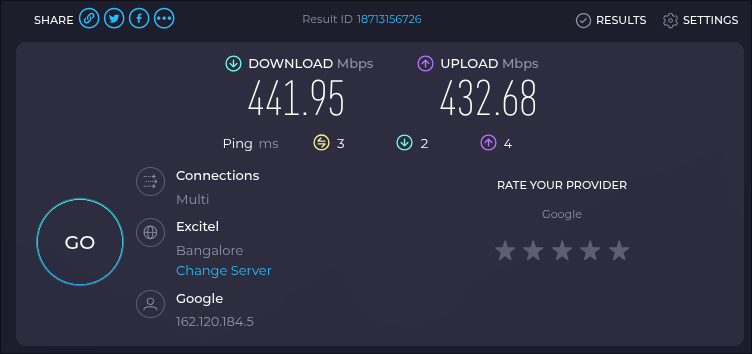
- Copy Link
- Report Inappropriate Content


Hello @DanishSweets90 ,
Welcome to our community.
May I know if your network topology diagram is as follows:
ISP modem—AX55)))((( client devices
(Note: — stands for wired connection,)))((( stands for wireless connection )
Could you let me know if you enabled the Auto Update Button and update the firmware immediately? Were there any prompts during the update process? Or did you accidentally trigger the reset button?
Here are some suggestions for slow speed:
1) If Ethernet speed is slower than expected, please try different Ethernet cables (CAT5E or above) on the Router.
2) Disable QoS, please access http://tplinkwifi.net and go to Advanced >> QoS to disable it.
3) Disable Parental Control, please go to Advanced >> Parental Control to disable it.
4) If wireless speed is slower than expected, please go to Advanced >> Wireless Settings to change the 5GHz Wi-Fi channel, you may try different channels to find the best one for your environment.
5) Disable SIP ALG and UPNP: go to Advanced >> NAT Forwarding >> UPNP to disable UPNP; go to Advanced>> Security to disable SIP ALG.
- Copy Link
- Report Inappropriate Content
Hello,
I'm also having issues with the latest update 1.5.10 Build 20251119 rel.50509(4555).
VPN connection keeps droppings since then (router has VPN Server - openVPN enabled) and keeps rebooting for some reason.
Frustrating update, regrets! Hop they bring out a proper fix soon!
- Copy Link
- Report Inappropriate Content
Hi joseph,
Tried all of these settings and options, the speed remains 330mbps and the bandwidth before the update was above 800mbps plus, and call of duty and other devices never had latency as it was such a consistent speed.
I need UPNP enabled as I have wall adapters running wired connection to the router, otherwise id have to assign static ip to the wall sockets.
Other settings are all disabled, its maybe down to the dev team to release another version to fix the problem with the issues ive addressed?
The build before this ran absolutely fine with everything, just this update has crippled the speed download and upload.
- Copy Link
- Report Inappropriate Content
Hi,
Yeah its causing a few problems with more stuff then as youve said about VPN settings, they clearly dont test software before they send, otherwise this wouldn't happen, Microsoft do the same thing,m!
- Copy Link
- Report Inappropriate Content
Hi @DanishSweets90 ,
We would like to escalate your case to the support engineers, and they will follow up on it. If you are willing to conduct further analysis, please check your inbox and respond.
- Copy Link
- Report Inappropriate Content
Hello @YPR-IT ,
Welcome to our community.
Besides updating the firmware, have you changed any settings recently?
The abnormal behavior you're currently experiencing is that the router keeps restarting and the VPN server connection is unstable, right?
How is the network speed and stability?
Because your situation is slightly different from DanishSweets90's, more details will help us pinpoint the cause.
- Copy Link
- Report Inappropriate Content
Nope, didn't change a thing.
The behavior i'm experiencing is when connecting to the OpenVPN servering thats running on it, works for 30seconds-1min and then the router reboots for some reason.
Connecting to VPN = reboot
I have been monitoring the router with a docker Machine to see if it keeps rebooting. Only when a VPN connets is the conclusion, no errors for 3 dags, tried to connecting and reboots. Weird issue and didn't change a thing apart from the reboot itself.
- Copy Link
- Report Inappropriate Content
Hello@YPR-IT ,
We would like to escalate your case to the support engineers, and they will follow up on it. If you are willing to conduct further analysis, please check your inbox and respond.
- Copy Link
- Report Inappropriate Content
Any improvements yet? I had to disconnect the router for now since it only lets 60 mbits pass through even though i should get 500+ mbits download. (upload is fine) tried all settings recommended.
- Copy Link
- Report Inappropriate Content
Im the same, download has been crippled, im on 1gbps and getting 250mbps download only or it pushes at 400mbps only, bit shocking. Im awaiting for a debut firmware update, but have had nothing yet as for a new update to allow speeds to be back to normal.
- Copy Link
- Report Inappropriate Content
Information
Helpful: 1
Views: 12103
Replies: 48
Voters 0
No one has voted for it yet.