

convert to AP

convert to AP

convert to AP
convert to AP
Saturday
Model: RE505X  
Hardware Version:
Firmware Version:

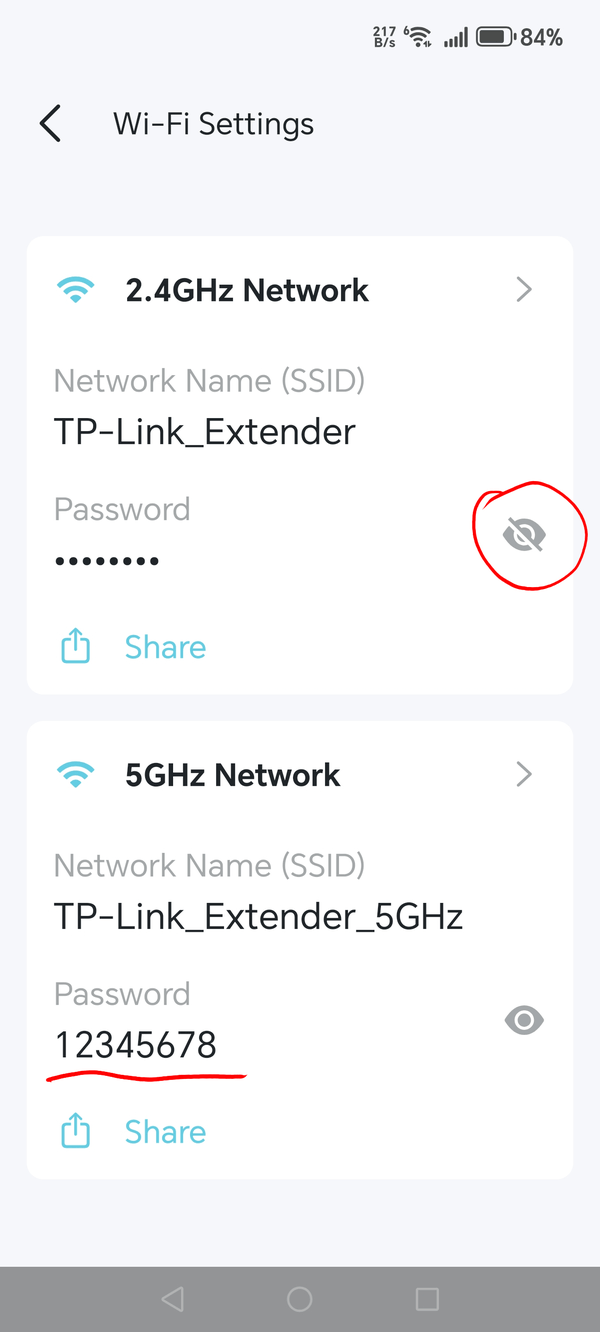
I have converted the extender to AP using the TP Link App and connected to my router via a CAT cable to LAN point on my router. The RE505X shows 3 lights (Solid) Power, 2.4g and 5g. When i go to available networks it is visible and requires a password. I have tried using the router password, but it does not accept. Any idea which password it requires , the unit only has a MAC address and S/N on the rear of the device.

  0      
  0      
#1
Options
1 Reply
Re:convert to AP
Saturday

  @TP-ext1_ 


Hi,


Connect your phone to the Wi-Fi of the router to which your RE505X AP is connected to via cable. Then open the Tether app again, select the RE505X, tap on "More" -> "Wi-Fi Settings" and reveal the passwords by tapping on the crossed-out eyes.

If you don't like the currently set passwords, then you can also change them.


  0  
  0  
#2
Options