
HELP-All WiFi devices showing no internet

HELP-All WiFi devices showing no internet

HELP-All WiFi devices showing no internet
2026-01-11 18:48:45 - last edited 2026-01-22 11:13:30
Model: Archer VR2100  
Hardware Version: V1
Firmware Version: 1.8.0 0.9.1 v009e.0 Build 230705 Rel.12787n
Hi all,


Really hoping you can help me.


This afternoon all my devices connected via WiFi went "no internet"

All lights are on and router tests come back healthy.

Everything wired is fine and connected.

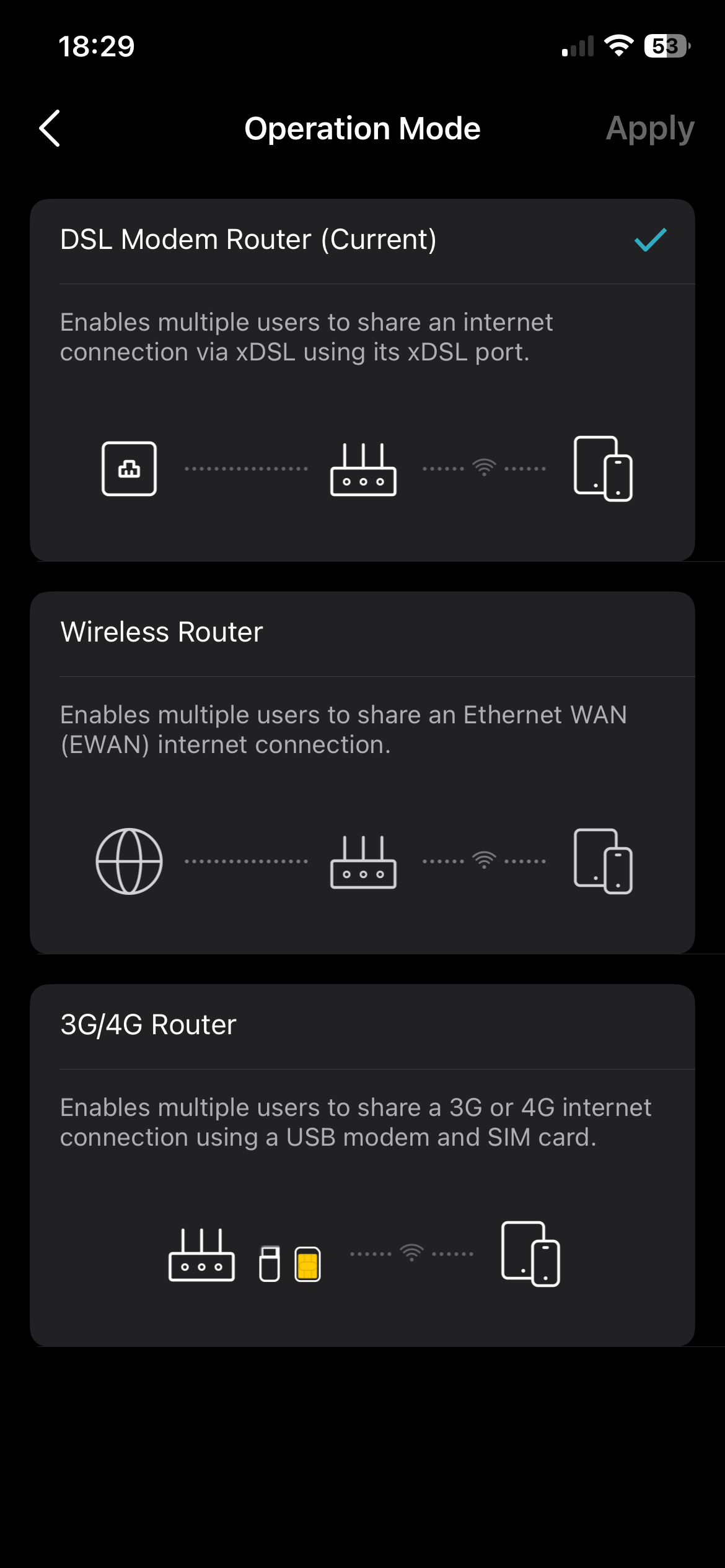
I did have an issue with WiFi and clicked on one of the settings shown above  (can't remember which one) and I lost everything.

out of desperation I factory reset the router and started again and as I wasn't sure how to reverse my selection (which made me lose internet via WiFi)


I am not even vaguely competent with home networking but at least I had it working before I went and meddled.


any help would be so gratefully received 


  0      
  0      
#1
Options
1 Accepted Solution
Re:HELP-All WiFi devices showing no internet -Solution
2026-01-15 09:18:00 - last edited 2026-01-22 11:13:30

Hello @MissNobody ,

Welcome to our community.


If you reset the modem, you will need to reconfigure it. 


1. If you are connecting your DSL modem router directly to a phone line (without an NBN box),you can refer to these resources:
Web UI Setup FAQ;
Tether App Setup FAQ;
Video Guide.


2. If you already have an NBN box and want to use your modem router as a wireless router.
Web UI or Tether App Setup FAQ;
Tether App FAQ;
Video Guide.


For a faster reply, you can also contact TP-Link Technical Support for further assistance.


Welcome to Community! Get the latest posts: △New Firmware for Archer GE550/GE650 V1 Introduces AI-QoS, EasyMesh IoT Expansion, and More! △New Firmware Releases for Archer BE805 V1/BE450 V1 to Support VPN Merge, New ECO Mode, and More! More posts, please see: △ Get the Ongoing Pre-release Firmware for Wi-Fi Routers Here— Subscribe for Updates! Urgent problems with your Wi-Fi Router, Range Extender, or DSL Modem? Please reach out via private Messages or @Joesph-TP in your new thread directly. Click Or ☆Recommended Solution if the post/answer helps.
Recommended Solution
  0  
  0  
#2
Options
1 Reply
Re:HELP-All WiFi devices showing no internet -Solution
2026-01-15 09:18:00 - last edited 2026-01-22 11:13:30

Hello @MissNobody ,

Welcome to our community.


If you reset the modem, you will need to reconfigure it. 


1. If you are connecting your DSL modem router directly to a phone line (without an NBN box),you can refer to these resources:
Web UI Setup FAQ;
Tether App Setup FAQ;
Video Guide.


2. If you already have an NBN box and want to use your modem router as a wireless router.
Web UI or Tether App Setup FAQ;
Tether App FAQ;
Video Guide.


For a faster reply, you can also contact TP-Link Technical Support for further assistance.


Welcome to Community! Get the latest posts: △New Firmware for Archer GE550/GE650 V1 Introduces AI-QoS, EasyMesh IoT Expansion, and More! △New Firmware Releases for Archer BE805 V1/BE450 V1 to Support VPN Merge, New ECO Mode, and More! More posts, please see: △ Get the Ongoing Pre-release Firmware for Wi-Fi Routers Here— Subscribe for Updates! Urgent problems with your Wi-Fi Router, Range Extender, or DSL Modem? Please reach out via private Messages or @Joesph-TP in your new thread directly. Click Or ☆Recommended Solution if the post/answer helps.
Recommended Solution
  0  
  0  
#2
Options
