
VX800v new Firmware V1_0.16.0 Build 251212: What IPv6 changes have been made?

Hello,
I have seen there is new firmware update of VX800v (V1_0.16.0), now officially released,
while already available within the router itself as firmware update
According changelog there are some IPv6 optimizations made, but not described exactly what.
I've made the firmware update in the router, but went back to V1_0.12.0.
It was because I've seen that with DHCP IPv6 the option of disabling RDNSS when using RADVD was removed.
Since custom DNS of IPv6 cannot be configured, I have disabled that.
So my question is about the IPv6 changes, what are they in detail?
Why that option was removed and whether custom DNS for IPv6 can be configured now?
- Copy Link
- Subscribe
- Bookmark
- Report Inappropriate Content


Hello @Martin-B ,
Welcome to our community.
After confirmation, that the firmware version makes the following changes to IPv6:
1. The function to disable RADVD has been removed in the new version because disabling RADVD would prevent users from accessing the internet.
2. The new firmware also adds the function to set the IPv6 ULA prefix.
3. Customizing IPv6 DNS is still possible:
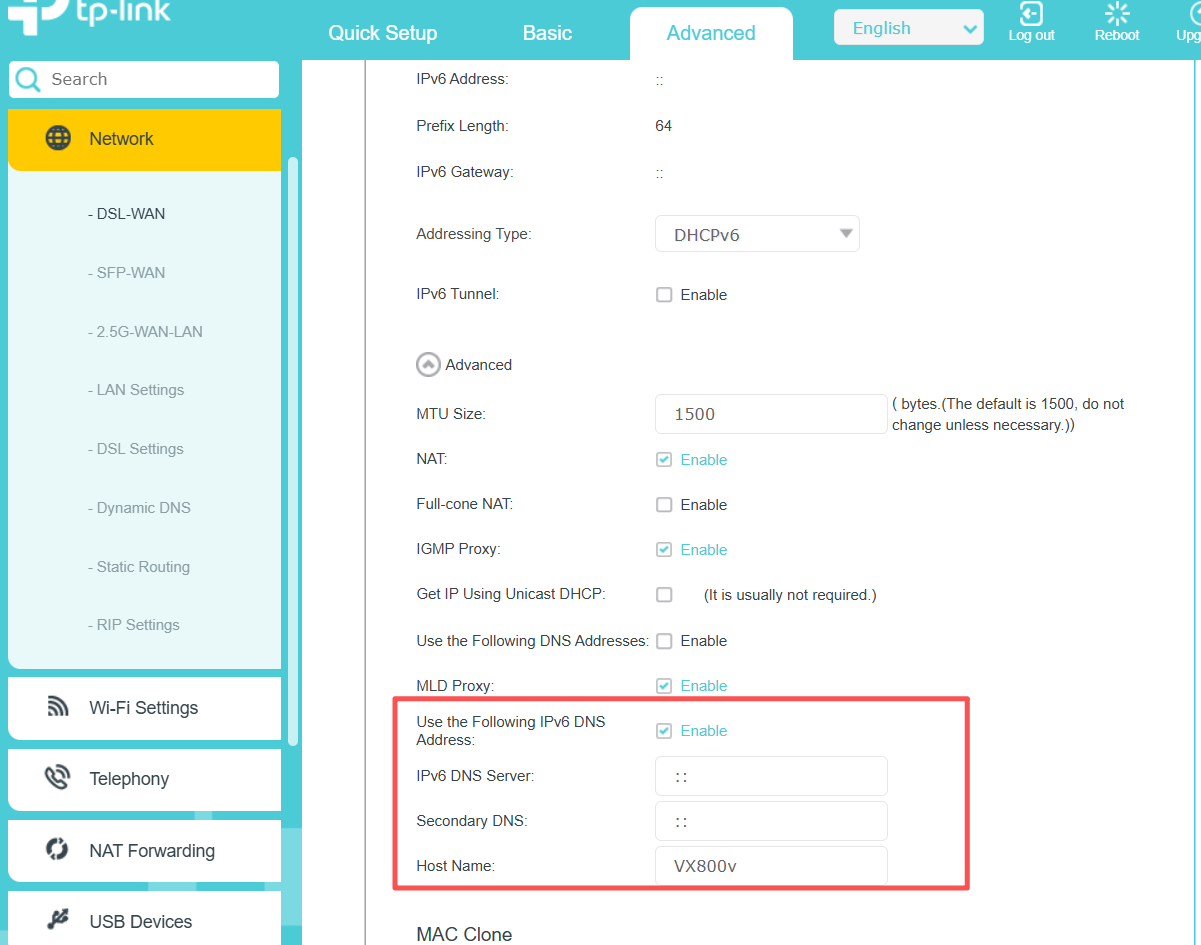
If you need more details, you can also contact Local Technical Support for assistance.
- Copy Link
- Report Inappropriate Content
Hello @Martin-B ,
Welcome to our community.
After confirmation, that the firmware version makes the following changes to IPv6:
1. The function to disable RADVD has been removed in the new version because disabling RADVD would prevent users from accessing the internet.
2. The new firmware also adds the function to set the IPv6 ULA prefix.
3. Customizing IPv6 DNS is still possible:
If you need more details, you can also contact Local Technical Support for assistance.
- Copy Link
- Report Inappropriate Content
Joseph-TP wrote
Hello @Martin-B ,
Welcome to our community.
After confirmation, that the firmware version makes the following changes to IPv6:
1. The function to disable RADVD has been removed in the new version because disabling RADVD would prevent users from accessing the internet.
2. The new firmware also adds the function to set the IPv6 ULA prefix.
3. Customizing IPv6 DNS is still possible:
If you need more details, you can also contact Local Technical Support for assistance.
Setting this IPv6 DNS to my custom (home network) DNS Server, e.g. fd00:: or fe80:: address does not be advertised to home net devices, even when RDNSS enabled.
What's advertised is some other IPv6 DNS, maybe one of the router itself. But this gives me DNS leaks.
Setting custom (and only that) DNS of local network device doesn't work. Prove me wrong.
There are only two options left. First deactivate IPv6 LAN completely or setup own radvd service for a local IPv6 adress range and modify DNS v6 server on each device in home network. Hence, if you say, internet (IPv6) would not work without RDNSS is not true.
- Copy Link
- Report Inappropriate Content
Hi @Martin-B ,
Did you get the modem from your ISP? The VX800v is a customized modem, and we haven't received any further updates regarding it.
Have you contacted Local Technical Support? Perhaps they could provide more information.
- Copy Link
- Report Inappropriate Content
Joseph-TP wrote
Hi @Martin-B ,
Did you get the modem from your ISP? The VX800v is a customized modem, and we haven't received any further updates regarding it.
Have you contacted Local Technical Support? Perhaps they could provide more information.
No, I have bought the modem in a local electronic devices store and use the public available firmware distributions (or auto updated within the router).
I already had contacted Technical Support of TP-Link, but got the same answer that you gave in your first reply.
Just to note: My ISP is M-Net and also know, that their own distributed modem devices are modified or at least contain older firmware versions.
Nevertheless, the initial configuration and regular usage does not show any problems with the bought router.
- Copy Link
- Report Inappropriate Content
I have updated again to new firmware and the DNS IPv6 Servers configured are not used all, i.e. are not advertized to clients in the home network.
And it doesn't matter if I configure a home network DNS server or some internet DNS server (e.g. Google's DNS).
It is always advertised some unknown DNS IPv6 server adresses (either 2001:: or f3da.. or fe80::) that must belong to the router or ISP.
That is not what I want, i.e. only the DNS servers configured in the router GUI should be used for home network clients.
Hence I will submit another support ticket with that investigation.
- Copy Link
- Report Inappropriate Content
Hello @Martin-B ,
Thank you for your understanding, and you are welcome to update us on your case progress here at any time.
- Copy Link
- Report Inappropriate Content

@Joseph-TP did this new firmware update fix the bufferbloat issue ?
- Copy Link
- Report Inappropriate Content
Hi @XTCy ,
Thanks for contacting our community.
It has been confirmed that the new firmware has fixed Bufferbloat.
You can also refer to the FAQ to reduce latency if needed:Wie kann man Spiel- oder Videoverzögerungen auf dem VX800v(DE) reduzieren?
- Copy Link
- Report Inappropriate Content
Information
Helpful: 0
Views: 869
Replies: 8
Voters 0
No one has voted for it yet.