
Very slow smb file transfer when using 6ghz band

Hi
My AXE75 is configured as an Access point, connected to the ISP box. One computer is connected in wifi6 (using realtek 8922ae), the other is on the 6ghz band (using intel ax210). Both has a fast access to the internet (speedtest = 800mbps). But when trying to copy files through local network between the two computer I'm having 1.5 to 3MB/s only ...
When both computer are connected in wifi6, file copy is about 60MB/s. So, it seems there is something wrong with SMB on the 6ghz band. Any clue ?
Copying a file from a Galaxy S25 to the computer connected on 6ghz is very slow (300KB/s !!). Copying to the computer connected on wifi6 is better but slower than the ISP wifi6 box... It's seems like SMB is not well implemented on this routeur.
Thanks in advance
- Copy Link
- Subscribe
- Bookmark
- Report Inappropriate Content

Astrakan7 wrote
I'm now running your beta fw.
I was able to set channel 112 for 5ghz, but it was in 80mhz width. Then I set it to 160mhz (like I can do on my ISP router) :
- I lost 5ghz band
- reboot
- I saw the 5ghz in 160Mhz band on Wifi Scanner app (from Lizards system brand) on PC. But I was unable to connect to it
- Then 5ghz vanished. Not visible in wifi scanner nor by windows nor by Android.
- After about 15mn it reappeared (with 160mhz width !!) and I was able to connect to it.
Modifying wifi settings makes 5ghz very very slow to estabilize...
As you probably know, the actual channels that are in use depend on the configured "channel width" and the number of the selected channel.
To achieve a channel width of 80 MHz four 5 GHz channels are grouped together and for 160 MHz eight channels are grouped together. Which channels are grouped together has been predefined in the Wi-Fi standards.
In your example, selecting channel 112 and 80 MHz channel width results in channels 100, 104, 108 and 112 being used. For these channels the EU regulator has mandated a 1 minute waiting time before they can be used by a Wi-Fi router (i.e. Wi-Fi AP). Most users apparently don't even really notice this.
Switching from 80 MHz channel width to 160 MHz channel width results in all channels from 100 to 128 being utilized.
However, for channels 120, 124 and 128 the EU regulator has mandated a 10 minutes waiting time before they can be used. This has lead many users to think there is something wrong with their equipment, because the 5 GHz Wi-Fi has disappeared and doesn't seem to reappear (within a reasonable time).
Also, changing settings related to the 5 GHz Wi-Fi or rebooting the router normally resets that 10 minute timer and then another full 10 minutes have to be waited.
Unlike TP-Link who just show a message about "some waiting time" some other brands do specifically warn the user that the waiting time is a full 10 minutes when using those particular channels.
In America the waiting time for the 5 GHz DFS channels is 1 minute for all channels, which apparently is short enough to not cause confusion among the users.
The waiting times defined by the regulators are the minimums. So that time could be longer if the router maker decided to make them longer in order to be on the safe side.
- Copy Link
- Report Inappropriate Content
- Copy Link
- Report Inappropriate Content
Hi
As I use the router in Brazil and bought it in France, is it possible to use an "America" firmware ? I could then escape the 10 minutes pause when changing 5ghz band (mentioned by @woozle )
- Copy Link
- Report Inappropriate Content
For me the 6 GHz band doesn't seem to work any better with the 1.5.1 Build 20260109 rel.68679 beta firmware.
If I have time I might try to downgrade to an old firmware via the Recovery mode, to see if the 6 GHz performance goes back to what it used to be.
@Astrakan7 The regional information that was programmed into the router at the factory can't be changed by the end user.
- Copy Link
- Report Inappropriate Content


Hello @Astrakan7 & @woozle
The new firmware 1.5.2 has been released. Please update it promptly and verify if the new firmware can fix it.
- Copy Link
- Report Inappropriate Content
Where can we download it ? It's not here : https://www.tp-link.com/fr/support/download/archer-axe75/v1/#Firmware
- Copy Link
- Report Inappropriate Content
Hi @Astrakan7 ,
Firmware release times may vary by region. You can continue using the beta firmware and wait for subsequent automatic update notifications.
- Copy Link
- Report Inappropriate Content
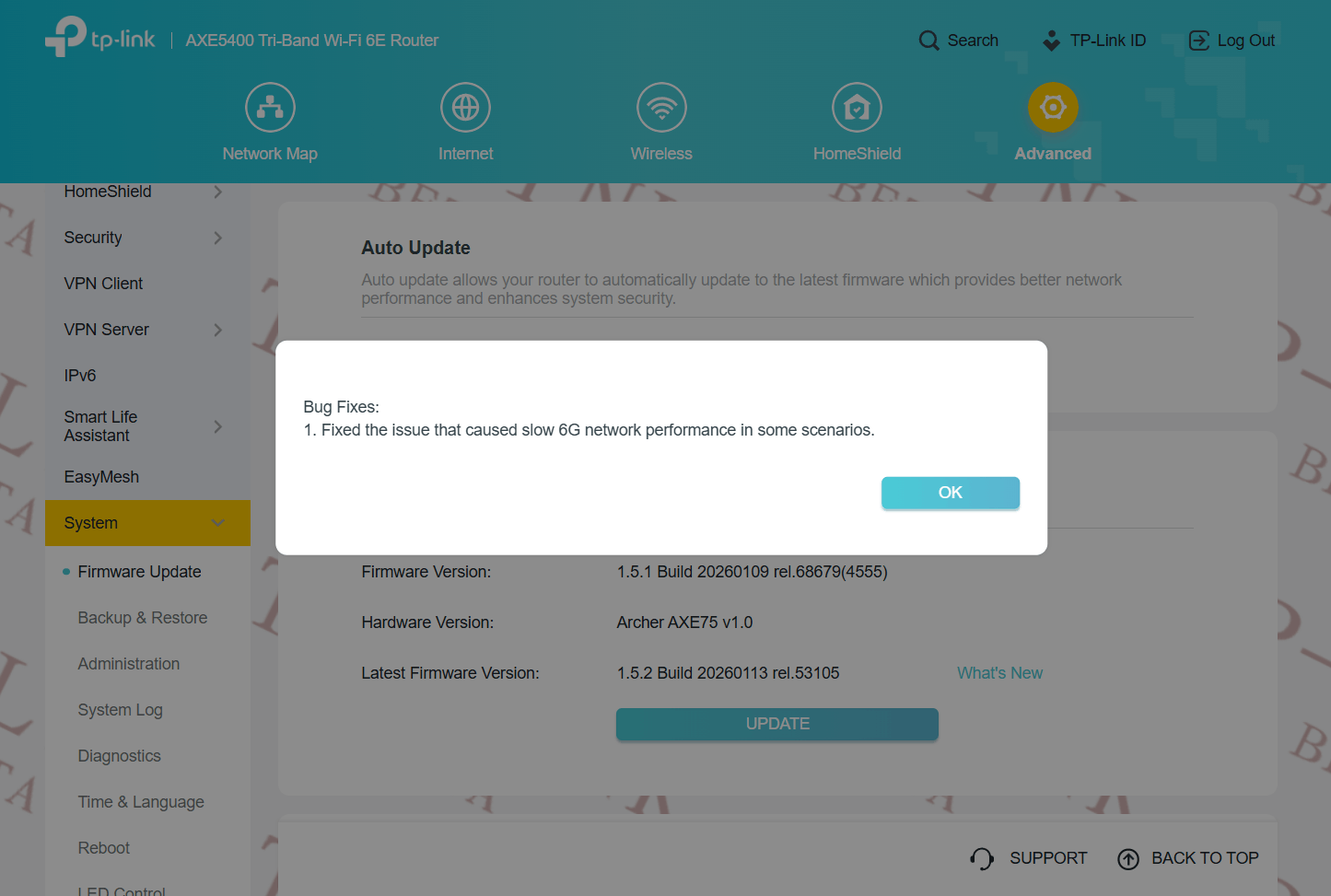
- Copy Link
- Report Inappropriate Content
Hi @woozle
Thanks for your advice! I will update soon and give feedback.
Everything ok on your side for 6ghz ? Do you have a 5ghz network on 100+ channel with 160mhz bandwidth ?
- Copy Link
- Report Inappropriate Content
I haven't extensively tested the new firmware 1.5.2 yet, but at first glance the 6 GHz issue appears to be resolved.
- Copy Link
- Report Inappropriate Content
Information
Helpful: 0
Views: 2862
Replies: 31
Voters 0
No one has voted for it yet.