
Impossible to enter a password on Deco app

I have been struggling to enter the details of a 2.4 GHz Network on the Deco app. Though it is indicated that "Password must be at least 8 characters", no conceivable combination or number of numbers, letters or characters is allowed.
Considering that without the (extremely barebones and unhelpful app) the device cannot be activated and used, I am wondering why I shouldn't return it as useless. Any possible solution before I do so?
The device was purchased in Greece.
- Copy Link
- Subscribe
- Bookmark
- Report Inappropriate Content


Hi, the default SSID Deco_FD54 is only used for setup. This SSID is open and has no internet.
During the setup, even though the mobile phone reported "no internet", the mobile phone still needs to keep this SSID connected in order to detect this device on the Deco App.
(Please also try to turn off mobile data/VPN connection service.)
It is also recommended to contact the local technical support, and they could provide live step-by-step suggestions during the setup:
https://www.tp-link.com/nl/support/contact-technical-support/#Hotline-Support
If the same issue continued, they might also help to check whether this device needs to be replaced.
Thank you very much.
Best regards.
- Copy Link
- Report Inappropriate Content
Hi, welcome to the community.
Can I have the model number and firmware version of your Deco?
Would there be any error message, or can I have a screenshot of the wireless configuration page?
By the way, can you enable the Guest Network on the Deco App, and will it accept a standard wireless password?
It is also recommended to delete the Deco App and install it again from the App store.
Wait for your reply.
Best regards.
- Copy Link
- Report Inappropriate Content
Hello, and very many thanks for your kind response. I have been struggling with this device over several hours, and though I am reasonably familiar with computers on the home level, I feel as though the device, its minimalist instructions and associated software have come from another planet. I will gratefully try to answer your questions below.
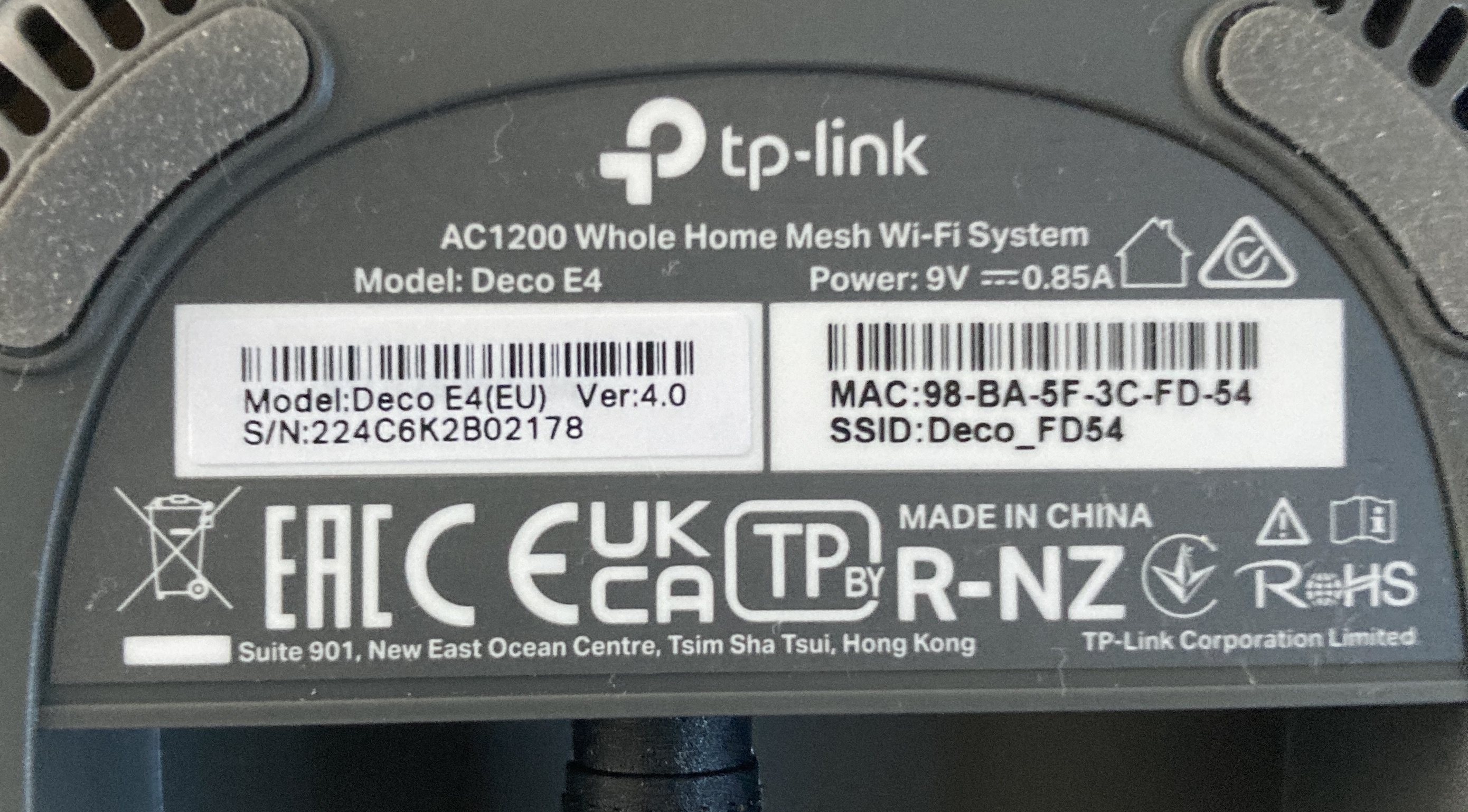
1. I have no idea where to find out what firmware version my device has; but I attach Image 01, which shows the only technical information provided by the manufacturer anywhere that I could find!
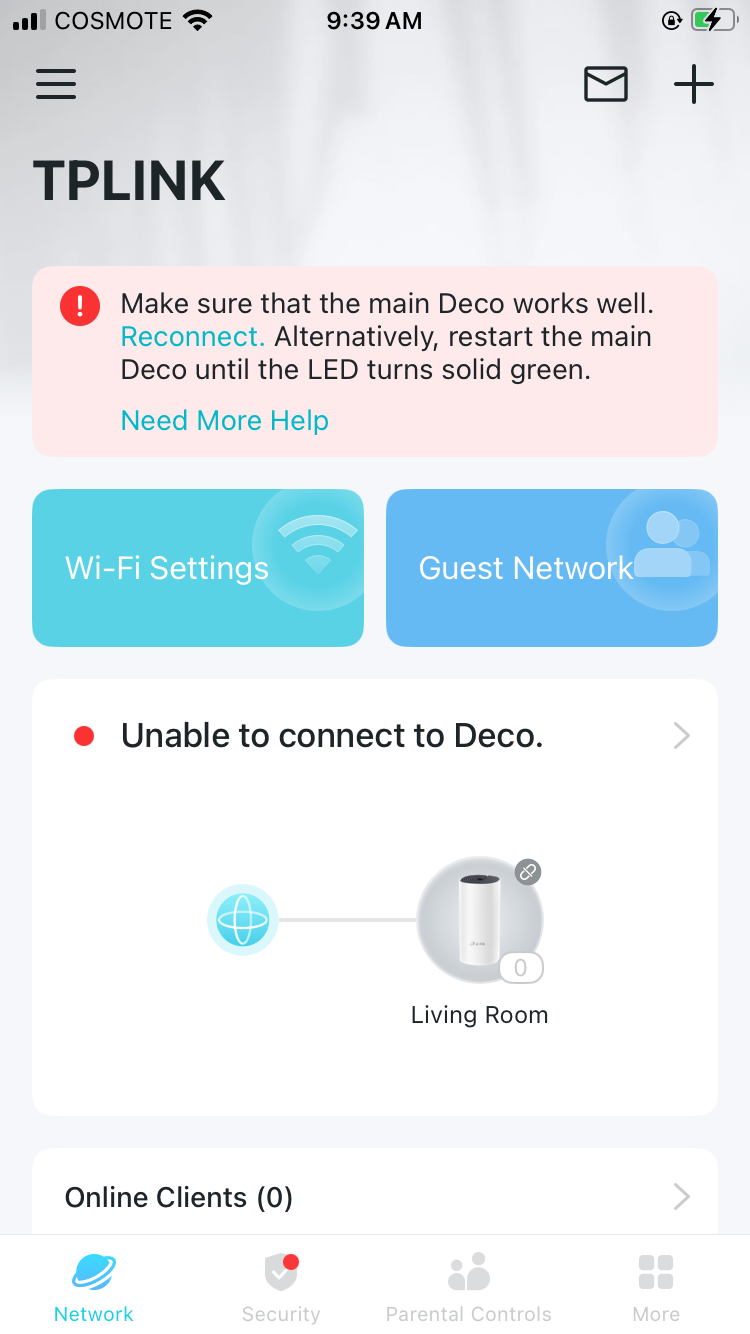
2. Image 02 shows the very first screen encountered when I open the app; this was downloaded from the Apple Shop.
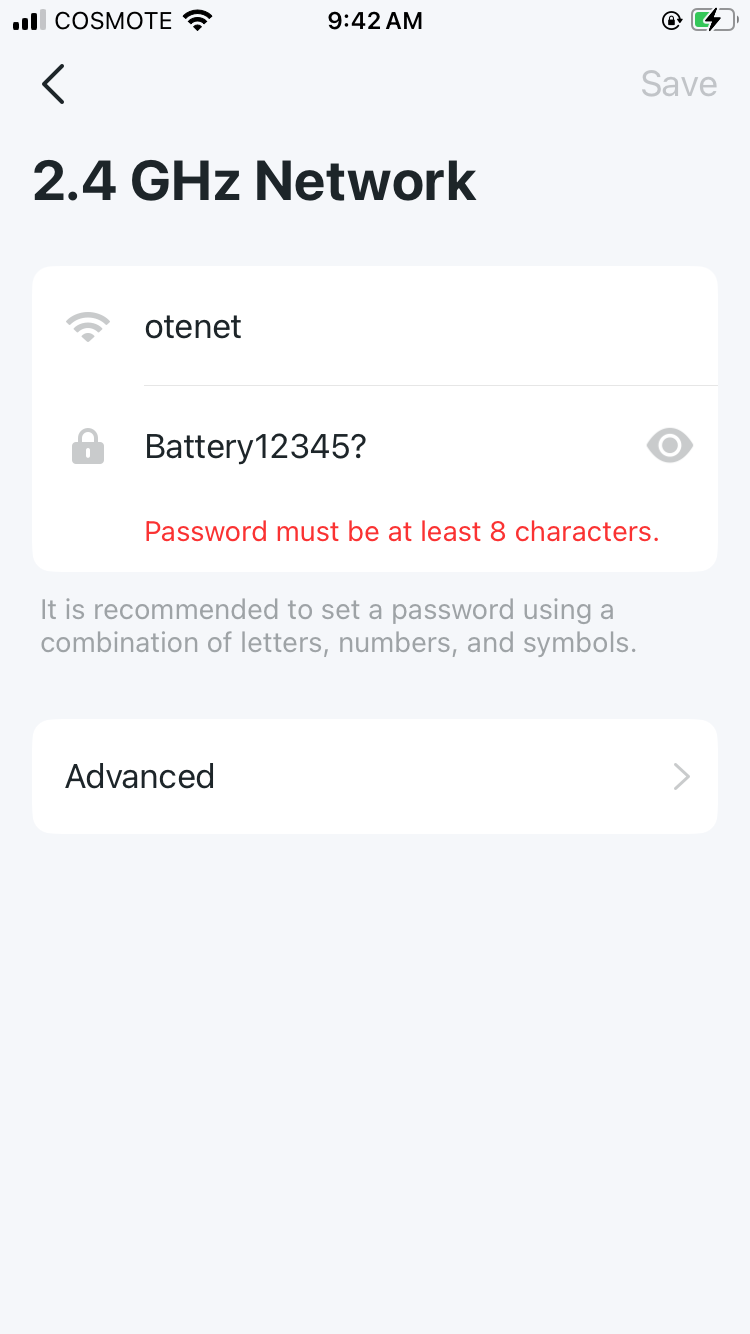
3. Image 03 shows one of my many failed efforts to set up what I believe to be the wireless configuration page.
4. I had to create a new PW to access the TP community pages on the internet; but this PW is not accepted by the app, provoking the usual "PW must be at least 8 characters" error message.
5. Image 4 is a screen shot from a YouTube video entitled "How to set up the TP-Link Deco M4" (https://www.youtube.com/watch?v=7X7Q2mMGiS0). This video very helpfully shows screenshots of the app - but it seems to be a very different app from the bare-bones app I downloaded. For instance, it includes a useful page asking the user to select the model, something my app never asked for (in all honesty, my app appears wholly unhelpful and even hostile...).
I am sending this information now, and will respond regarding my effort to activate Guest Network next!
(By the way, my crazy user name ( @quq77ujw8jj2quy ) is due to the fact that the registration page of the TP community page resisted all my efforts to create a user name for almost five minutes. The TP system appears to have a particular problem with internet ID and PWs).
- Copy Link
- Report Inappropriate Content
- Copy Link
- Report Inappropriate Content
- Copy Link
- Report Inappropriate Content
Hi, thank you very much for the update.
It is suggested to hold the reset pinhole (it is at the bottom of the Deco E4) for 1 second only to run a factory reset first.
When the LED starts blinking blue, you can go back to the Deco App to set up the Deco E4 per the YouTube video again from scratch.
Wait for your reply.
Best regards.
- Copy Link
- Report Inappropriate Content
Thank you for your response.
I followed your instruction and reset the device. Unfortunately, the first thing the app says is "Unable to connect to Deco".
Deco can be joined on other devices as "Deco_FD54", but indicates "No Internet Connection" (see attached screen grab).
To explain my attempt to set up:
My internet connection is via a combine modem/router with a G4 chip; this connects to my desk computer via its own network, and works perfectly. I have connected the Deco unit to the router via the Ethernet cable provided, but even after the factory reset recommended, all it does is pulse green. As mentioned above, the app confirms "no internet connection".
So no further progress to report!
- Copy Link
- Report Inappropriate Content

- Copy Link
- Report Inappropriate Content
Could I please have a response from some responsible person at TP-link?
My issues are, quite simply:
1. The recommended app is from the first moment, unable to recognise the Deco.
2. The app continues to refuse all combinations of pw.
Full details above.
These two issues alone make the Deco unusable. I assume there are solutions - otherwise why is the device still being marketed?
- Copy Link
- Report Inappropriate Content
Hi, the default SSID Deco_FD54 is only used for setup. This SSID is open and has no internet.
During the setup, even though the mobile phone reported "no internet", the mobile phone still needs to keep this SSID connected in order to detect this device on the Deco App.
(Please also try to turn off mobile data/VPN connection service.)
It is also recommended to contact the local technical support, and they could provide live step-by-step suggestions during the setup:
https://www.tp-link.com/nl/support/contact-technical-support/#Hotline-Support
If the same issue continued, they might also help to check whether this device needs to be replaced.
Thank you very much.
Best regards.
- Copy Link
- Report Inappropriate Content
Hi, welcome to the community.
Can I have the model number and firmware version of your Deco?
It would be better to start a new thread here with more details/screenshots about your current issue:
https://community.tp-link.com/en/home/forum/edit/topic?moduleId=39
Best regards.
- Copy Link
- Report Inappropriate Content
Information
Helpful: 0
Views: 614
Replies: 10
Voters 0
No one has voted for it yet.