
Archer AC1200 C50 - Firmware update

Hi, I have an Archer C50 AC1200 router. I decided to update it, but I don't have many options according to what I see on the TP-link website and in videos and guides on the internet. How can I deal with this and update the firmware?
- Copy Link
- Subscribe
- Bookmark
- Report Inappropriate Content

Then normally you should see all the options.
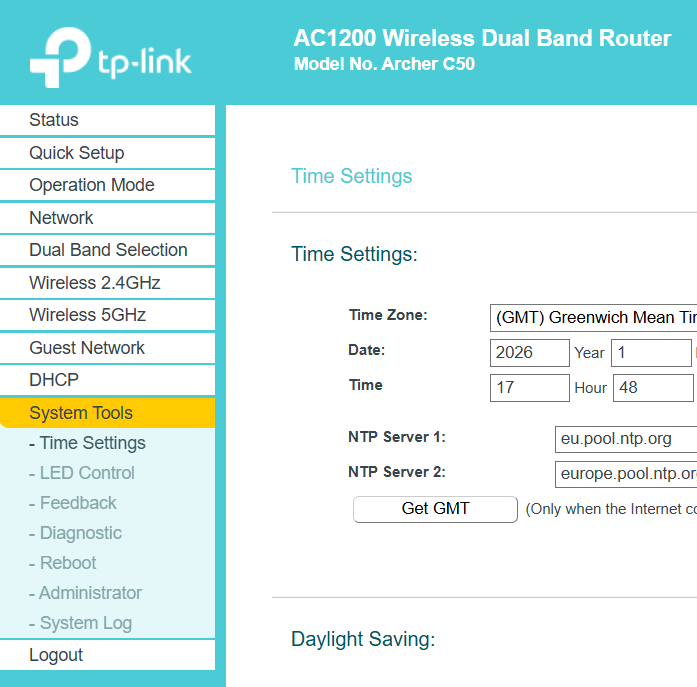
Based on the menu's structure in your picture it appears your C50 is currently in "Access Point" mode. You could test if the Firmware Upgrade menu might show up after you switch the C50 to "Wireless Router" mode.
- Copy Link
- Report Inappropriate Content
Hi,
How are you logging into the Archer C50?
When logging into TP-Link routers via remote login (i.e. via WAN), then some options are not available. Therefore, make sure you are logging in from the router's local network.
- Copy Link
- Report Inappropriate Content
- Copy Link
- Report Inappropriate Content
Then normally you should see all the options.
Based on the menu's structure in your picture it appears your C50 is currently in "Access Point" mode. You could test if the Firmware Upgrade menu might show up after you switch the C50 to "Wireless Router" mode.
- Copy Link
- Report Inappropriate Content
- Copy Link
- Report Inappropriate Content
Information
Helpful: 0
Views: 638
Replies: 4
Voters 0
No one has voted for it yet.