
RE655BE problem after 1.1.3 update
RE655BE problem after 1.1.3 update

Hello,
I use RE655BE as an easymesh repeter, controled by a BE800 router.
After updating to 1.1.3, I encounter big problem with my network if the RE655BE is on.
The network become as unstable as I can't access BE800 or RE655BE. Accessing my nas, VM.. is really difficult too. Mainly not possible.
I try using a wired or wifi connection between them, but nothing changed.
I reset le RE655BE and the problem is still here.
What can I do ?
Regards,
- Copy Link
- Subscribe
- Bookmark
- Report Inappropriate Content


Hello @Fredx_xda ,
You mentioned 'The repeater is not providing any SSID to connect directly and configure it.'
This is likely because the RE655BE was automatically added as a Satellite unit for the BE800, and it has successfully formed an EasyMesh network with the BE800, sharing the same SSID. You can check the operating status of the RE655BE by observing its LED lights.
The inability to access the RE655BE's admin console is also because, in an EasyMesh network, when some models operate as Satellite units, we cannot directly access their admin console. You need to temporarily remove the RE655BE and then try accessing its admin console again.
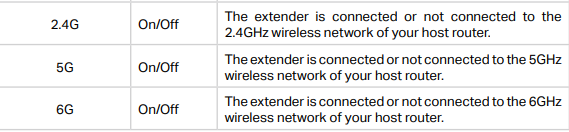
Regarding the 2.4G light being off after configuring the RE655BE in AP mode, have you checked the RE655BE's 5G and 6G lights? If they are both off, this is actually normal, because the RE655BE is currently obtaining network access from the router via Ethernet, not Wireless Backhaul.
Refer to the LED explanation:
- Copy Link
- Report Inappropriate Content

If you suspect the culprit is the new FW release then you can downgrade the FW to the previous release from here and then test the stability of your local network.
The downgrade procedure is the same us upgrade procedure, just using an older FW release.
- Copy Link
- Report Inappropriate Content
Hello @Fredx_xda ,
Welcome to our community.
May I know if your network topology diagram is as follows:
ISP modem—BE800 —RE655BE in AP mode )))((( client devices
(Note: — stands for wired connection,)))((( stands for wireless connection )
Is there a switch between the BE800 and RE655BE? If yes, please remove the switch for a try.
Or, remove the RE655BE to see if the network can run on the BE800 again.
Recently, have you changed any settings on the BE800? Like a firmware update. And what are the firmware and hardware versions of BE800?
- Copy Link
- Report Inappropriate Content
Hello @Joseph-TP.
The ISP modem is configured as bridge. The BE800 acts as DHCP server, ...
When removing the RE655BE the network run again.
I am not able to reach the admin console of both BE800 and RE655BE when the last one is in the network. I'll try to reset it a second time and downgrade the firmware.
Joseph-TP wrote
Hello @Fredx_xda ,
Welcome to our community.
May I know if your network topology diagram is as follows:
ISP modem—BE800 —RE655BE in AP mode )))((( client devices
(Note: — stands for wired connection,)))((( stands for wireless connection )
Is there a switch between the BE800 and RE655BE? If yes, please remove the switch for a try.
Or, remove the RE655BE to see if the network can run on the BE800 again.
Recently, have you changed any settings on the BE800? Like a firmware update. And what are the firmware and hardware versions of BE800?
- Copy Link
- Report Inappropriate Content
Hello @Fredx_xda ,
You mentioned that you have created an EasyMesh network between the BE800 and RE655BE, right?
What if you disable EasyMesh?
Please set different SSIDs for BE800 and RE655BE to determine whether the disconnected clients were connected to the BE800 or RE655BE
In addition, what is the firmware version of your router now? Is it the pre-release firmware 1.4.1?
- Copy Link
- Report Inappropriate Content
Hello @Joseph-TP
My BE800 firmware is 1.2.4. Several months ago when moving to 1.3.1 I had too many problems with my large network and the only way to recover network was moving back to 1.2.4.
Today I made some tests with the RE655BE.
After resting the device, I was not able to reach the admin console using a wired connection (Direct connection between repeater and router). The repeater is not visible in BE800 admin console. Device is shown offline.
The repeater is not providing any SSID to connect directly and configure it.
I try to connect the repeater directly to my laptop and reach the admin console through tplinkrepeater.net or 192.168.0.254 or 192.168.1.254 but it doesn't work. The only way to get it back was to disable easy mesh in BE800 admin console, and reactivate him.
I was able to reach RE655BE admin console but I am not allowed to downgrade RE655BE firmware to previous one.
After some minutes, the network become unstable. I was able to change the mode to access point. After that, the repeater was not show anymore in the BE800 admin console and the 2G led is not activated anymore. Restarting the device do not solve the problem.
PS : when booting the device, the led become all green for 1 second except for the 2g that become red. After the boot is finish and when in AP mode, the 2g led is off
- Copy Link
- Report Inappropriate Content
Hello @Fredx_xda ,
You mentioned 'The repeater is not providing any SSID to connect directly and configure it.'
This is likely because the RE655BE was automatically added as a Satellite unit for the BE800, and it has successfully formed an EasyMesh network with the BE800, sharing the same SSID. You can check the operating status of the RE655BE by observing its LED lights.
The inability to access the RE655BE's admin console is also because, in an EasyMesh network, when some models operate as Satellite units, we cannot directly access their admin console. You need to temporarily remove the RE655BE and then try accessing its admin console again.
Regarding the 2.4G light being off after configuring the RE655BE in AP mode, have you checked the RE655BE's 5G and 6G lights? If they are both off, this is actually normal, because the RE655BE is currently obtaining network access from the router via Ethernet, not Wireless Backhaul.
Refer to the LED explanation:
- Copy Link
- Report Inappropriate Content
Hello @Joseph-TP
I week without answer. I answer your last message by email. Have you got a look at it ?
Can you give me highlights?
- Copy Link
- Report Inappropriate Content
Do you mean that you have contacted the local support email? May I have your Ticket ID?
- Copy Link
- Report Inappropriate Content
Hello @Joseph-TP
No. I haven't contact the local support yet.
I am still facing the same problem.
After disabling easymesh on BE800 and resetting the RE655BE, the RE655BE is not proving any SSID and is not able to connect to the network using wired connection between him and the BE800 as well as using ad-hoc connection with my laptop.
Do you think it is an hardware failure or due to the firmware ?
- Copy Link
- Report Inappropriate Content
Hello @Fredx_xda ,
If you disable the BE800's EasyMesh button, the RE655BE will lose its Ethernet Backhaul connection.
As you mentioned, you have reset the RE655BE. If so, it is in Range Extender mode by default. You will see the default WiFi name 'TP-Link_Extender'.
Setting the extender to Access Point mode, you can connect it to the router via cable again. How to setup Access Point Mode of Range Extender.
- Copy Link
- Report Inappropriate Content
Information
Helpful: 0
Views: 4905
Replies: 12
Voters 0
No one has voted for it yet.