
Brutal "USB 3" Transfer Speeds on AX3000 (Archer AX55) Router

I'm getting TERRIBLE speeds from a connected USB3 HDD, on the order of 3-4 MB/sec. Not even good enough to stream HD media from, let alone use as a network storage.
This is true whether I'm connected via wifi or (gigabit) ethernet. And I've confirmed the drive is properly quick when connected directly. Is this defective or was this router a rug-pull?
- Copy Link
- Subscribe
- Bookmark
- Report Inappropriate Content
samba write speed
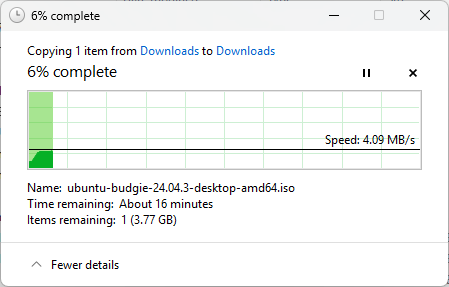
Slightly better over FTP but still only half of USB2.0 speed to a USB3 drive over gigabit ethernet.

- Copy Link
- Report Inappropriate Content

Hello @zacass ,
Welcome to our community.
Please note that TP-Link routers typically do not support advanced USB HDD features such as dedicated sleep mode or HDD spindown. While this does not directly address slow transfer speeds, it's important to know that the USB port on many consumer Wi-Fi Routers is primarily designed for basic file sharing and may not deliver the same performance as connecting the drive directly to a PC. Actual transfer speeds can be limited by the router's hardware, firmware, and network conditions.
If you are seeing much lower speeds than expected, this is not necessarily a defect, but rather a limitation of the router's USB file sharing capability. For high-speed file transfers or HD media streaming, we recommend using a dedicated NAS (Network Attached Storage) device or connecting the HDD directly to your computer for best performance.
Best Regards.
- Copy Link
- Report Inappropriate Content
@Joseph-TP This is a bad-faith response. The device is advertised for its network file-sharing functionality. The router advertises USB 3.0 -- you have to know that people are interested in the data transfer rates for the standard, not the increased power output or asynchronous notification. What about the 3.0 USB spec does the device implement?
- Copy Link
- Report Inappropriate Content
@zacass ,
Thanks for getting back to us.
Have you used CrystalDiskMark to Test Your Storage Device? What are the peak read and write speeds respectively? Please send the screenshots with the test results here.
- Copy Link
- Report Inappropriate Content
@Joseph-TP The drive is fine and fast, as stated at the start. Here's the same drive over the same gigabit ethernet connected to another local machine.

- Copy Link
- Report Inappropriate Content
Hi @zacass ,
What is the partition format and hard drive model of a hard drive?
To help you efficiently, I've forwarded your case to the TP-Link support engineers, who will reach out to you using your registered email address later. Please keep an eye on your email inbox for follow-up.
- Copy Link
- Report Inappropriate Content
@Joseph-TP I'll pull the drive details later but the drive isn't the issue. I've tested two enclosures with HDD, SSD, I've tried flash drives -- none of the matters. The common denominators are those drives work well when connected directly to a machine, they work well when shared by another PC on the local network, and they read and write at 4MB/sec when connected through the AX55's USB port.
- Copy Link
- Report Inappropriate Content

@zacass This is likely due to the AX 55 using a very old samba/SMB implementation (Mine is on 2.0.2). You can improve speeds by disabling SMB signing, but that lowers security. TP-Link should really upgrade to SMB 3.1.1 for a proper fix.
More info here:
- Copy Link
- Report Inappropriate Content
Information
Helpful: 0
Views: 1470
Replies: 8
Voters 0
No one has voted for it yet.