
Baby Giant Frames

hi, I am having problems, my provider KPN supports an MTU of 1500 on their fiber optic network via the RFC 4638 standard, many TP-Link routers (including high-end models such as the GE800) often have a hard software limit of 1492 for PPPoE connections
please update that I can set to 1500 MTU.
- Copy Link
- Subscribe
- Bookmark
- Report Inappropriate Content


Hello @Pro-gamer ,
EDIT:
Yes, The MTU determines the largest packet size that can be sent over your network without fragmentation. By default, it's set to 1500 bytes for Ethernet connections and 1492 bytes for PPPoE. Some internet service providers (ISPs) may require different values.
Important Note: We recommend changing the MTU value only if you are experiencing specific issues such as slow internet speeds, trouble loading websites or apps, or frequent connection drops. Otherwise, it's best to leave the MTU at its default value.
To change the MTU setting on your TP-Link Wi-Fi Router:
1. Connect your computer or phone to the router using Ethernet or Wi-Fi. Open a web browser and go to http://tplinkwifi.net to log in.
2. Navigate to Advanced > Network > Internet > Advanced Settings.
3. Enter a smaller MTU value, such as 1440, 1420, 1400, or as low as 1300 if you use cellular internet. Save your changes.
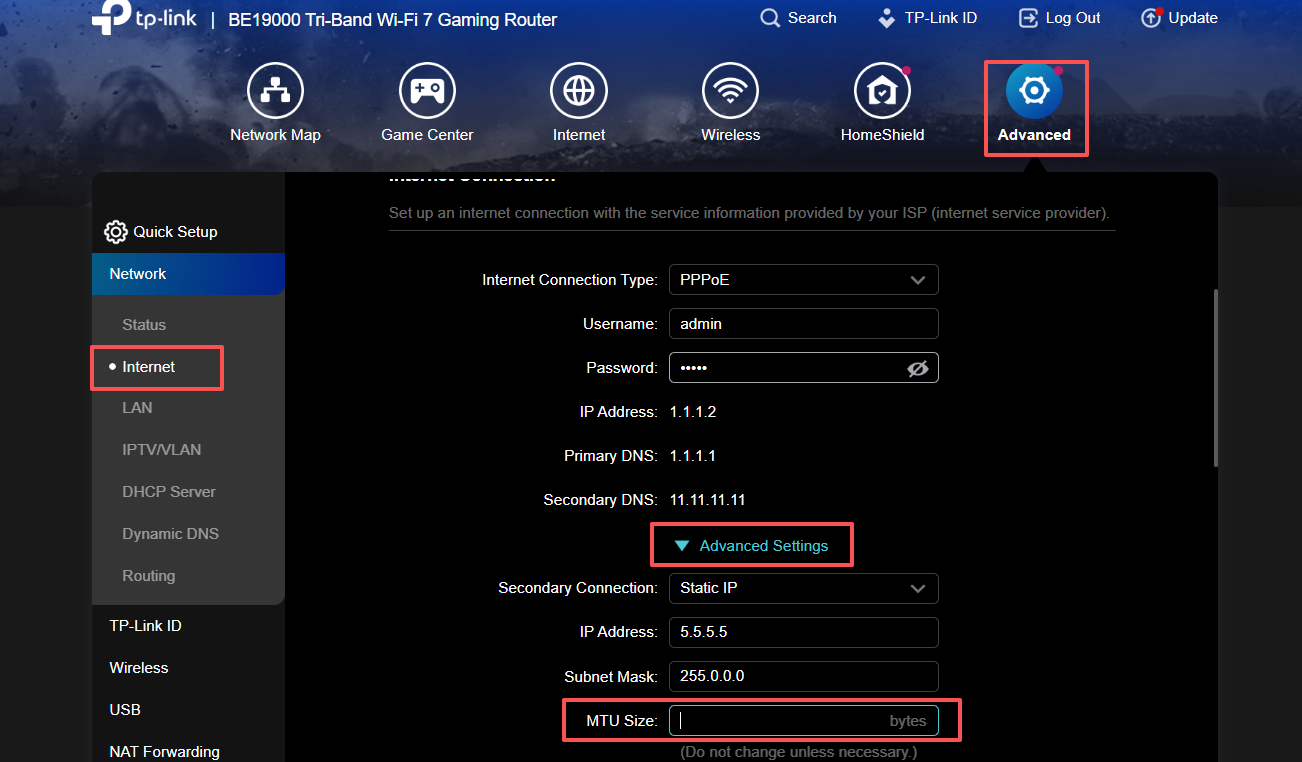
- Copy Link
- Report Inappropriate Content
@Joseph-TP doesn't work, I keep getting this This number should be between 576 and 1492
- Copy Link
- Report Inappropriate Content
@Joseph-TP It's technically impossible to select "Static IP" as the connection method on a TP-Link Archer GE800 and simultaneously achieve an MTU of 1500 over PPPoE on the KPN network.
This is due to two TP-Link hardware limitations:
1. The Static IP vs. PPPoE error
With KPN, a "Fixed IP" isn't a setting you type into the router. KPN assigns your static IP address via the PPPoE session.
If you set the router to Static IP, it won't ask for a username. The connection to KPN simply won't be established.
The only way: You have to set the router to PPPoE. The IP you receive from the KPN server is automatically your static IP.
2. Why 1500 MTU Won't Work
To achieve 1500 MTU over PPPoE, the router must support RFC 4638.
PPPoE requires 8 bytes of additional space (overhead). To send 1500 bytes of data, the router must be able to send a frame of 1508 bytes (Baby Jumbo Frames).
TP-Link Archer routers (including the GE800) currently do not support 1508 bytes on the WAN port. The hardware limit is 1500 bytes.
Consequence: 1500 (limit) - 8 (overhead) = 1492. This is the absolute maximum MTU you can get on a TP-Link router working for KPN.
The only "correct" settings for KPN:
Connection Type: PPPoE
VLAN ID: 6 (under Advanced > Network > IPTV/VLAN)
Username/Password: internet/internet
MTU: 1492 (If you enter 1500, the router will internally ignore it or split packets, which causes slowness).
Conclusion: If you really want an MTU of 1500 over PPPoE (RFC 4638), you should set the Archer GE800 in Access Point mode behind a router that does support it (such as a MikroTik, Ubiquiti UniFi, or your own PFsense box).
Would you like me to help you configure the MTU 1492 as optimally as possible to avoid fragmentation?
- Copy Link
- Report Inappropriate Content

Hi all, my concern is the PS5 MTU. If my connection is 1492 MTU because it's PPPoE, what will the PS5 MTU be ?
- Copy Link
- Report Inappropriate Content
@Sulooo if you have the same connection as me pppoe then it won't work on 1500 MTU because you can't get anything above 1492 and PS5 wants to work on 1500MTU that's why I had connection problems yesterday online gaming only TP-link needs to be fixed so that we can set it to 1500 MTU instead of 1492
- Copy Link
- Report Inappropriate Content
Yes, I noticed that I dropped to 1492 and then to 1472. Someone told me that it's very important for the stability of the connection. Now, for me, I don't know which one is the accurate MTU for PS5 in my situation.
- Copy Link
- Report Inappropriate Content
@Sulooo the correct mtu is for ps5 1470 1450 or 1492. but i have mtu set to automatic then sometimes when connecting test nat type 2 you get that it takes a long time
- Copy Link
- Report Inappropriate Content
I wish pppoe was 1500 mtu, that's why I'm switching to another internet network, as a last resort this is ipoe dhcp ip address, then I'll buy 1500 mtu directly
- Copy Link
- Report Inappropriate Content
From your experience, which MTU is better for us in our situation: PPPoE in PS5?
- Copy Link
- Report Inappropriate Content
@Sulooo Recommended (Standard PPPoE): 1492.
Alternative (In case of lag/interruptions): 1473 or 1472.
- Copy Link
- Report Inappropriate Content
Information
Helpful: 0
Views: 1175
Replies: 10
Voters 0
No one has voted for it yet.