
Issue with stuttering, and, "Band steering" with Starlink.

Recently I just came off Telstra to Starlink due to moving a remote area, I've been using the extender on Telstra and needed to use it on Starlink due to my desktop not having a wireless antenna. I would use the bridging feature on my tp-link to turn wireless into an Ethernet connection.
Unfortunately, I have had some issues with my tp-link which would usually be 10-30 seconds of downtime, and overall lower speed from native 300-400Mbps to 35-100Mbps. I don't have this issue with the native Starlink connection and it is not an issue with any networking drivers (as I've tried on multiple devices - both Windows, Linux and BSD), and still encounter issues with the extended network. Additionally, I never had this issue with Telstra.
I did some tinkering with both my Network Managers and the tp-link settings within browser, but I still cannot find the issue of the extender stuttering like this.
I have a few theories from most likely to least, that being:
- Band Steering: with my Starlink bands being in only 1 SSID, it is most likely stalling when it automatically switches from 2.4GHz to 5.0GHz causing a stutter during handshake and having my packets wait in limbo for a couple seconds while the router and extender sort out their issues. It could also be the problem with my speed seeing as my tp-link sometimes to stay in 2.4GHz causing lower speeds, or 5GHz causing more downtime.
- DHCP Stall/Latency: With both my Network Manager and tp-link logs, it states in both that my DHCP would sometimes cancel, forcing it to change a new lease, this might be an issue with Starlink since it changes ip during the minute and perhaps the extender can not handle that much.
- Co-Channel Interference: Since my 5.0GHz is on channel 152 and other connections use that, it could be another way for stuttering, though I highly doubt it.
- Bufflerbloat: Although unlikely, either my machine, Starlink, or the extender can not handle the data being pumped through it; although, highly doubtful - both my machine, Starlink, and tp-link are rated somewhere above/below 300+Mbps.
These are just a handful of theories though as I'm not very experienced in networking to gauge, diagnose, and fix these issues.
I have tried disabling my DHCP servers, less downtime, but slower speeds; disabling 2.4GHz, more downtime, faster speeds; using a static IP, works, but can break easily with a wrong handshake, and does not achieve speeds of native network; manually setting High Speed to use 5GHz only, extreme downtimes, with close to native network speeds.
I skimmed through all of Starlinks channels to make absolutely sure I am assigning the right MAC Address to the right band. I am not looking for my extender to reach the same speed as native, I just want at least my rated 300MBps and no downtime.
My conclusion is it would be something to do with my DHCP server and Band Steering. It is an issue I'd likely have to solve with both tp-link and Starlink.
Here are logs:
tp-link > System Tools > System Log [31/1/26 5:00PM]
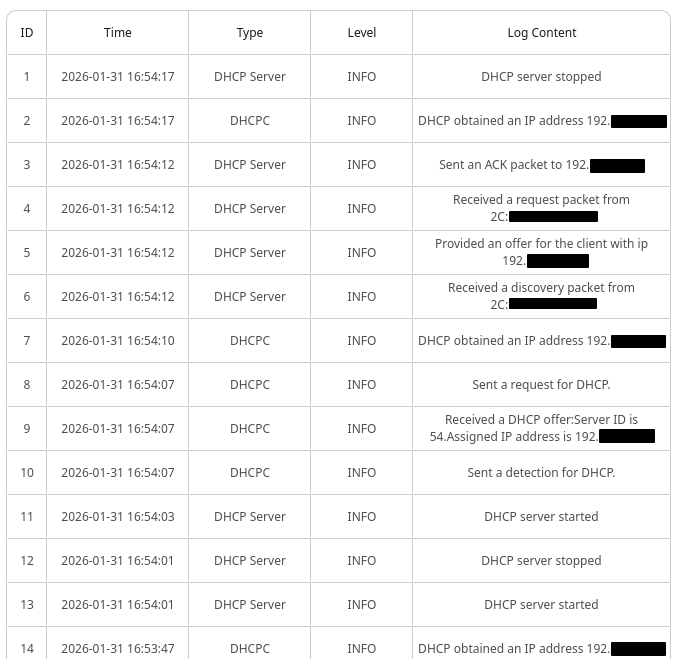
terminal > journalctl -f -u NetworkManager [31/1/26 5:20PM] *anything marked '*address' is my private IP address
Jan 31 16:54:20 c0ffix NetworkManager[46983]: <info> [1769849660.5861] dhcp4 (enp37s0): state changed no lease
Jan 31 16:54:20 c0ffix NetworkManager[46983]: <info> [1769849660.5862] dhcp4 (enp37s0): activation: beginning transaction (timeout in 45 seconds)
Jan 31 16:54:20 c0ffix NetworkManager[46983]: <info> [1769849660.5862] device (enp37s0): ip:dhcp6: restarting
Jan 31 16:54:20 c0ffix NetworkManager[46983]: <info> [1769849660.5862] dhcp6 (enp37s0): canceled DHCP transaction
Jan 31 16:54:20 c0ffix NetworkManager[46983]: <info> [1769849660.5862] dhcp6 (enp37s0): activation: beginning transaction (timeout in 45 seconds)
Jan 31 16:54:20 c0ffix NetworkManager[46983]: <info> [1769849660.5862] dhcp6 (enp37s0): state changed no lease
Jan 31 16:54:20 c0ffix NetworkManager[46983]: <info> [1769849660.5863] dhcp6 (enp37s0): activation: beginning transaction (timeout in 45 seconds)
Jan 31 16:54:21 c0ffix NetworkManager[46983]: <info> [1769849661.5384] dhcp6 (enp37s0): state changed new lease
Jan 31 16:54:22 c0ffix NetworkManager[46983]: <info> [1769849662.8813] dhcp4 (enp37s0): state changed new lease, address=*address, acd pending
Jan 31 16:54:22 c0ffix NetworkManager[46983]: <info> [1769849662.8814] dhcp4 (enp37s0): state changed new lease, address=*address
I would appreciate it if anyone knows how to stop stalling out on Starlink or if any staff know what I should do? Also I have not tried the tether app. Is there any way I can manually assign SSIDs and network configurations on my current firmware and/or model version? Thank you for your time.

