
Ethernet backhaul AXE75 with RE705x problem

Hello, i have extender RE705X v1 EU, with version 1.3.10. Ethernet backhaul work only till something reboot. RE705X or AXE75. I have two extenders one is connected direct to router second one from switch. They act the same.
After reboot router works just fine, but extenders dont have access to internet. Only option to get it back working is unplug ethernet cable extend with wifi. When everything start working normal can plug back ethernet cable and everythinh works again till something reboots
- Copy Link
- Subscribe
- Bookmark
- Report Inappropriate Content


Hello @RobBR ,
Thanks for your detailed reply with test results.
We would like to escalate your case to the support engineers, and they will follow up on it. If you are willing to conduct further analysis, please check your inbox and respond.
- Copy Link
- Report Inappropriate Content
Hello @RobBR ,
Welcome to our community.
After restarting the device, how long did you wait before the severe Ethernet Backhaul failure occurred?
If using one RE705X, can the connection be automatically restored after a restart?
- Copy Link
- Report Inappropriate Content
If i RE705x lose connection with router it doesnt matter after reboot or i unplug eth cable and plug it back it lost connection to Internet, local networks works. When connection to internet is lost after i reboot RE705x if ethernet cable is plugged in it will never get internet connection. Only walkaround i found is that if i reboot RE705x i unplug eth cable, and when all starts up and internet is available, i plug back eth cable and everything work, till next reboot or unplug. If i reboot router it acts the same. When router is started no internet connection from RE705x. I tried to unplug eth cable without reboot and plug it back, on RE705x, it works as wifi repeater but when i plug back eth cable it stops immediately.
- Copy Link
- Report Inappropriate Content
Hello @RobBR ,
Thanks for getting back to us.
It seems that your network topology is as follows:
May I know if your network topology diagram is as follows:
Archer AXE75 — switch — RE705X)))((( client devices
└───RE705X
(Note: — stands for wired connection,)))((( stands for wireless connection )
What model is your switch? Please temporarily remove the switch and test the Ethernet Backhaul again.
- Copy Link
- Report Inappropriate Content
Hello @Joseph-TP
Lower added my topology. It does not matter if there is switch between or not they act the same, i tried.
Basically if ethernet connection is lost for any reason RE705x don't have access to internet after that.
I tried to disconnect RE705x which is behind switch and left only that is connected directly to router result was the same. If it is working in ethernet backhaul mode and it lost connection after reboot it self or router reboot or unplug ethernet cable, it never gets back internet. After reboot without ethernet cable it connects to router mesh and get internet access, after that i plug back ethernet cable and everything works like charm. Till next interruption.
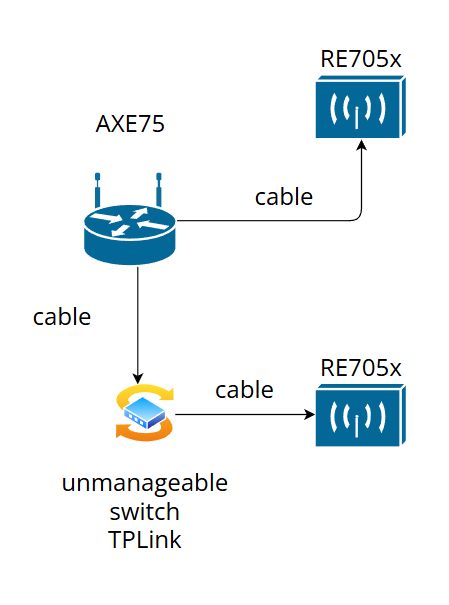
- Copy Link
- Report Inappropriate Content
Hello @RobBR ,
Thanks for your detailed reply with test results.
We would like to escalate your case to the support engineers, and they will follow up on it. If you are willing to conduct further analysis, please check your inbox and respond.
- Copy Link
- Report Inappropriate Content

Hi.
I live in EU and will have similar setup soon.
AXE75 > wired through gigabit switch or wireless connection to RE705X > wireless connection to RE365 in the garage. Everything over Easymesh to have a seamless connection for my lawn mower close to the garage.
The extenders are ordered but still not delivered, so i assume they will be of the later/latest EU-versions.
I've found mixed information if this will work or not, but I would like to know if ethernet backhaul is supported now for later EU-model RE705X or if any new software/firmware supporting this is expected to roll out soon?
Problem is that my AXE75 is not sending a strong enough signal to reach the garage, so I need a link between (RE705X) and still want to benefit from Easymesh seamless switching between signals.
BR.
Stefan
- Copy Link
- Report Inappropriate Content

Hi,
Both existing versions of the RE705X have received firmware updates that add support for EasyMesh Ethernet backhaul.
https://www.tp-link.com/en/support/download/re705x/v1/#Firmware
https://www.tp-link.com/en/support/download/re705x/v2/#Firmware
The user who started this thread was just reporting that the Ethernet backhaul of the RE705X V1 doesn't work properly after rebooting the router or extender.
- Copy Link
- Report Inappropriate Content
Hi.
Thank you for the information. Now I'll sleep better, at least until my hardware arrives. 😀
BR.
Stefan
- Copy Link
- Report Inappropriate Content
Information
Helpful: 0
Views: 1117
Replies: 8
Voters 0
No one has voted for it yet.