
TP-Link BE550 (India) 6 GHz Wi-Fi appears very randomly — channel / firmware issue
TP-Link BE550 (India) 6 GHz Wi-Fi appears very randomly — channel / firmware issue

I’m trying to understand a strange 6 GHz Wi-Fi behavior on the TP-Link BE550 (Indian model) and whether this is a firmware / region issue.
Some important context:
- My Xiaomi Pad 7 fully supports 6 GHz Wi-Fi
- Xiaomi never blocked 6 GHz, even before the Indian government officially de-licensed the band
- On the same router, my Pad 7 sometimes detects the 6 GHz SSID — but very randomly (once in several days or even a week)
- Most of the time, the 6 GHz network doesn’t appear at all
- No changes in router config, firmware, or environment
- I even purchased a USB Wi-Fi adapter that explicitly supports 6 GHz, and it shows the same random behavior (Adapter: https://www.amazon.in/dp/B0F48KJLGH)
This makes it clear that:
- Client hardware support is not the issue
- 6 GHz has been usable on Xiaomi devices even before de-licensing
- The inconsistency likely points to router firmware, channel selection
Questions:
- Is there a specific 6 GHz channel / PSC channel that actually works reliably on TP-Link BE series in India?
- Is this a known firmware issue on BE550 Indian models? But the firmware version is same as in US.
- Has anyone received or heard about a firmware update to properly stabilize 6 GHz now that India has allowed it?
Would really appreciate input from anyone using BE550 / BE series routers in India or who understands how TP-Link is handling 6 GHz region configs.
Note: Please don’t reply saying “6 GHz Wi-Fi was blocked in India”. I’ve already clarified that the TP-Link BE550 has always been broadcasting 6 GHz signals, and Xiaomi never blocked 6 GHz on my Xiaomi Pad 7. I was receiving and connecting to 6 GHz Wi-Fi even before the government officially de-licensed it last week.
The issue here is random / unstable availability, not regulatory blocking.
- Copy Link
- Subscribe
- Bookmark
- Report Inappropriate Content

Hello @mehulparmar31 ,
Welcome to our community.
First of all, ensure that both your router and client device were purchased in regions where 6GHz is permitted. If the router and client device were purchased in different countries, Wi-Fi 6E operation may not be available.
As you mentioned, the 6GHz unlicensed network was released last week, and full coverage may still take some time. Have you used a Wi-Fi analyzer to check whether there is a stable, uncongested 6 GHz channel in your area?
What are your wireless settings on the 6 GHz band? This includes both channel and channel width. Please try a different channel and channel width for the 6 GHz band.
In addition, please enable the 6GHz guest network for comparison. If possible, you can test a different router's 6 GHz band for comparison.
- Copy Link
- Report Inappropriate Content
In India, the government has recently permitted the use of the 6 GHz band. However, my TP-Link BE550 router was already broadcasting a 6 GHz signal earlier as well — the issue is not availability, but stability.
The 6 GHz network appears randomly, stays active for about 5 minutes, and then disappears. Previously, 6 GHz was restricted only on client devices due to regulatory limitations, not on the router itself.
I am using two compatible client devices:
-
Xiaomi Pad 7
-
This 6 GHz Wi-Fi adapter: https://www.amazon.in/dp/B0F48KJLGH
Both devices are capable of connecting to 6 GHz without any issues when the signal is available.
Since 6 GHz is very new in India, there are likely no other 6 GHz routers in my area, so congestion is not a concern. Unfortunately, I cannot purchase another router just for comparison testing.
My main concern is: why is the 6 GHz band not stable like the 5 GHz band? The router is capable of broadcasting it, but the signal is inconsistent.
I have sent multiple emails to the Indian support team but have not received any response so far. At this point, it feels like I spent $200 primarily for 6 GHz capability, which is currently unusable due to instability.
- Copy Link
- Report Inappropriate Content
I got to know that its a famous issue for this router and hardware V1. 2 years and still no solution!!! Horrible TPlink
https://community.tp-link.com/en/home/forum/topic/674854?sortDir=ASC&page=1
- Copy Link
- Report Inappropriate Content

Hello @mehulparmar31 ,
Thanks for getting back to us.
I understand how you feel, especially your desire for a stable 6 GHz network usage.
As mentioned before, your area has just opened up 6 GHz usage without a license. Regarding coverage comprehensiveness, we still need to confirm and verify this further. This is a significant influencing factor, and your experience differs from other users you mentioned. Additionally, a high-quality network environment is crucial for 6 GHz usage.
It is recommended to use relevant software to scan your surrounding Wi-Fi environment, including the best channel and the quality of different Wi-Fi bands.
May I know if your network topology diagram is as follows:
ISP modem—BE550—Satellite router )))((( client devices
(Note: — stands for wired connection,)))((( stands for wireless connection )
What are region versions of your clients? For example, the EU or US versions. The EU and US versions support slightly different channel ranges, which may cause 6 GHz connection instability. Also, are you setting the channel to the default 'Auto'?
We suggest you share your router's 6 GHz wireless settings here, along with the Wi-Fi analyzer test results. This may help us adjust the settings to improve connectivity.
Have you tried calling the local support hotline? Local troubleshooting might be more targeted.
- Copy Link
- Report Inappropriate Content
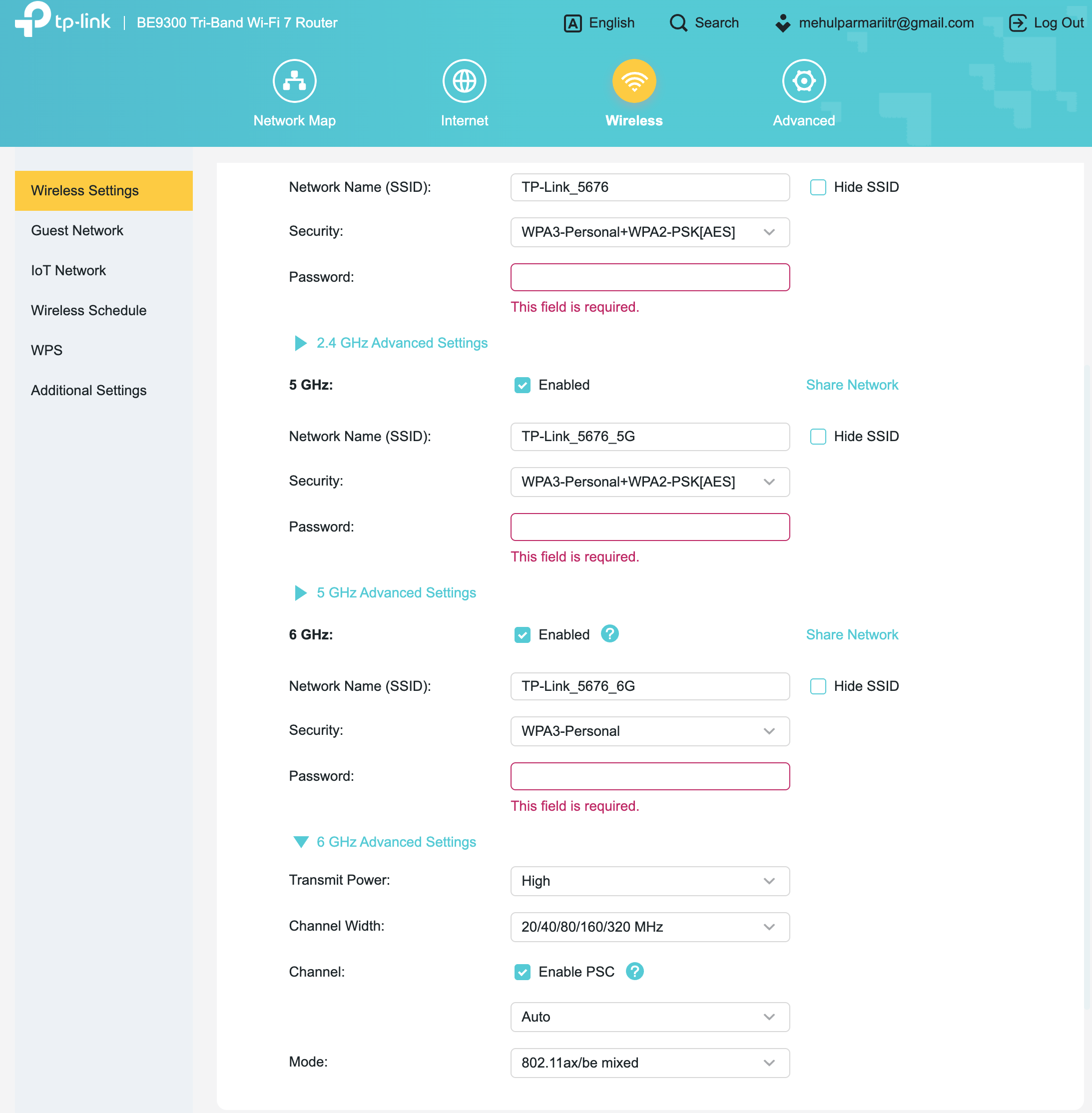
Here are the details of my setup and current 6 GHz settings:
-
Router Model: TP-Link Archer BE550 (Indian version)
-
Hardware Version: Archer BE550 v1.0
-
Firmware Version: 1.2.1 Build 20250813 rel.27119(5553)
-
Client Device: Xiaomi Pad 7 (Indian variant)
Network Topology:
ISP Syrotech ONU — (wired) —D-Link M30 — (wired) — BE550 Router
6 GHz Wireless Settings:
-
6 GHz: Enabled
-
Security: WPA3-Personal
-
Transmit Power: High
-
Channel Width: 20/40/80/160/320 MHz (Auto)
-
Channel: Auto (PSC enabled)
-
Mode: 802.11ax/be mixed
The 6 GHz network is visible like once in a week, and I experience intermittent instability and connectivity issues even when signal strength is good.
It has been around two months since the Indian government allowed 6 GHz usage. However, local Indian support has not been able to help so far, and the issue is still unresolved.
Please let me know if there are any recommended settings specifically for India (such as preferred channels, bandwidth limits, or other configuration changes) that could improve stability.
- Copy Link
- Report Inappropriate Content
Hey @Joseph-TP Any update on this?
- Copy Link
- Report Inappropriate Content

Hi,
Unfortunately, history has shown that manufacturers of Wi-Fi client devices (including Xiaomi) are in no rush to update the region databases in their devices for supporting the 6 GHz band after it has been opened for public use in a particular country. In the past it has usually taken them six months or longer to do so.
A recent example is Vietnam, which officially opened the 6 GHz band on May 15, 2025.
In this thread https://community.tp-link.com/en/home/forum/topic/715808?replyId=1658124 a Vietnamese user mentioned in January this year for example, that his Intel Wi-Fi card finally received a driver update that enabled the 6 GHz band for Vietnam. That's like 8 months delay.
I fear that manufacturers are not going to make an exception for India. It's quite likely that you will need to wait just as long as fellow users from other countries had to wait.
- Copy Link
- Report Inappropriate Content
@woozle Wow, that’s quite bad. But at the very least, the company providing a 6 GHz router and advertising tri-band support should fix the issue ASAP. I suspect it’s a channel-related issue, as the 6 GHz signal appears for about 30 seconds and then disappears.
- Copy Link
- Report Inappropriate Content
If the client device refuses to show the 6 GHz network once it realizes it is currently residing in a country that (according to its outdated internal database) doesn't allow the use of the 6 GHz band, then how would the router company be able to fix that?
- Copy Link
- Report Inappropriate Content
I already clearly mentioned that I have client devices like the Xiaomi Pad 7 and even a Chinese Wi-Fi dongle that detect and connect to the 6 GHz network without any issue. So this is not a country database or client restriction problem.
The 6 GHz SSID appears normally, connects, works fine for about 5–6 minutes, and then the signal randomly drops. That behavior points directly to a router-side issue, not a client device limitation.
Also, there is already a large ongoing thread regarding the Archer BE550 having very low 6 GHz transmit power and unstable 6 GHz performance, so this is clearly not an isolated case.
- Copy Link
- Report Inappropriate Content
Information
Helpful: 2
Views: 504
Replies: 12
Voters 1