
Enabl data roaming abroad on SMARTY SIM in a TP-Link M7200

As per thread title.
I've just bought a SMARTY data only SIM and put it in my TP-Link M7200. In a few weeks I'll be going to Tenerife, and want to use the M7200 out there with a portable music player (the Wi-Fi Hotspot on my iPhone won't work with the music player).
How do I turn Data Roaming on with this SIM?
Thank you.
- Copy Link
- Subscribe
- Bookmark
- Report Inappropriate Content
@David-TP Hardware version 3.0, Firmware version 3.0.9.
On the app I can't see anything like the screenshot you posted.
Under Tools -> Quick Setup (1st option down ), 2nd page (after the Time Zone page) I've switched on 'Data Roaming'. Then under Tools -> Interne Settings (3rd option down) I've turned on Mobile Data and Data Roaming.
Should that do it?
- Copy Link
- Report Inappropriate Content


Hi, can I have the hardware and firmware version of the M7200?
You can take the following screenshot for reference:
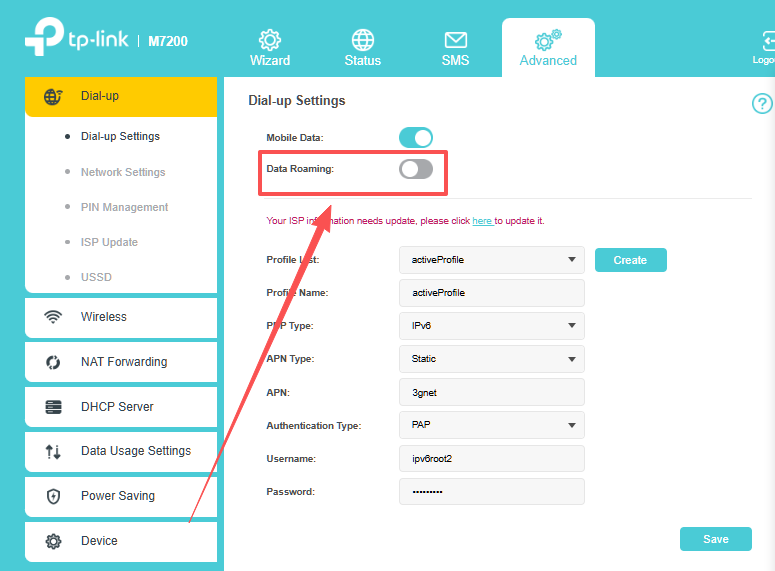
Best regards.
- Copy Link
- Report Inappropriate Content
@David-TP Hardware version 3.0, Firmware version 3.0.9.
On the app I can't see anything like the screenshot you posted.
Under Tools -> Quick Setup (1st option down ), 2nd page (after the Time Zone page) I've switched on 'Data Roaming'. Then under Tools -> Interne Settings (3rd option down) I've turned on Mobile Data and Data Roaming.
Should that do it?
- Copy Link
- Report Inappropriate Content
Hi, sorry for the inconvenience.
SteveWoodhouse wrote
@David-TP Hardware version 3.0, Firmware version 3.0.9.
On the app I can't see anything like the screenshot you posted.
Under Tools -> Quick Setup (1st option down ), 2nd page (after the Time Zone page) I've switched on 'Data Roaming'. Then under Tools -> Interne Settings (3rd option down) I've turned on Mobile Data and Data Roaming.
Should that do it?
Yes, it is the correct path to enable "Data roaming" on the tpMiFi App.
Best regards.
- Copy Link
- Report Inappropriate Content
Information
Helpful: 0
Views: 129
Replies: 3
Voters 0
No one has voted for it yet.