Can't add old deco m5 to new x60 mesh

Can't add old deco m5 to new x60 mesh

Can't add old deco m5 to new x60 mesh
21 hours ago
Model: Deco X60  
Hardware Version:
Firmware Version:

I have replaced my mesh from m5 to x60. Using access point mode and Ethernet backhaul 

Would now like to add one of my old m5 units. I connect it via Ethernet directly to main deco x60. It is blinking blue but cannot be found after reset etc.


Are they supposed to be able to work together? If so, what am I doing wrong?

  0      
  0      
#1
Options
2 Reply
Re:Can't add old deco m5 to new x60 mesh
19 hours ago - last edited 19 hours ago

  @DavidBGoode Pls try reset all the deco > Then power off (3min) the isp router, turn off WLAN if available > Start set up the X60 as router mode > Power on the M5 and set up via wireless first to see it can dectect the X6.

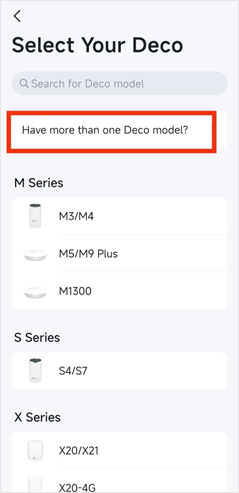
Can you help check if the current Deco app removed the “Have more than one Deco model?” when adding new deco/ new network right? I’m not sure which should be the main one, Deco BE25 or XE75 Pro.  laugh


  0  
  0  
#2
Options
Re:Can't add old deco m5 to new x60 mesh
10 hours ago

  @47Cosmos thanks.

Resetting everything did not work, have tried it multiple times. But shifting the main deco from AP mode to Router mode did the trick. 


This is clearly a bug in the product. A very annoying one. 


  0  
  0  
#3
Options