
TPLink VR2100v EU wont get IP address for VoIP connection

TPLink VR2100v EU wont get IP address for VoIP connection

TPLink VR2100v EU wont get IP address for VoIP connection
2026-02-08 22:52:03 - last edited 2026-02-08 22:54:03
Model: Archer VR2100v  
Hardware Version: V1
Firmware Version: Archer VR2100v(EU)_V1_241012

Hello there

Recently i have issue with my VR2100v EU V1 with VoIP.

Suddenly one day VoIP stopped working.
My VoIP login info and other VoIP stuff is correct as i tryed it on FritzFiber 5530.

However the main problem isnt VoIP settings but VoiP connection itself wich requires to tag VLAN ID 101 with Dynamic IP setting.
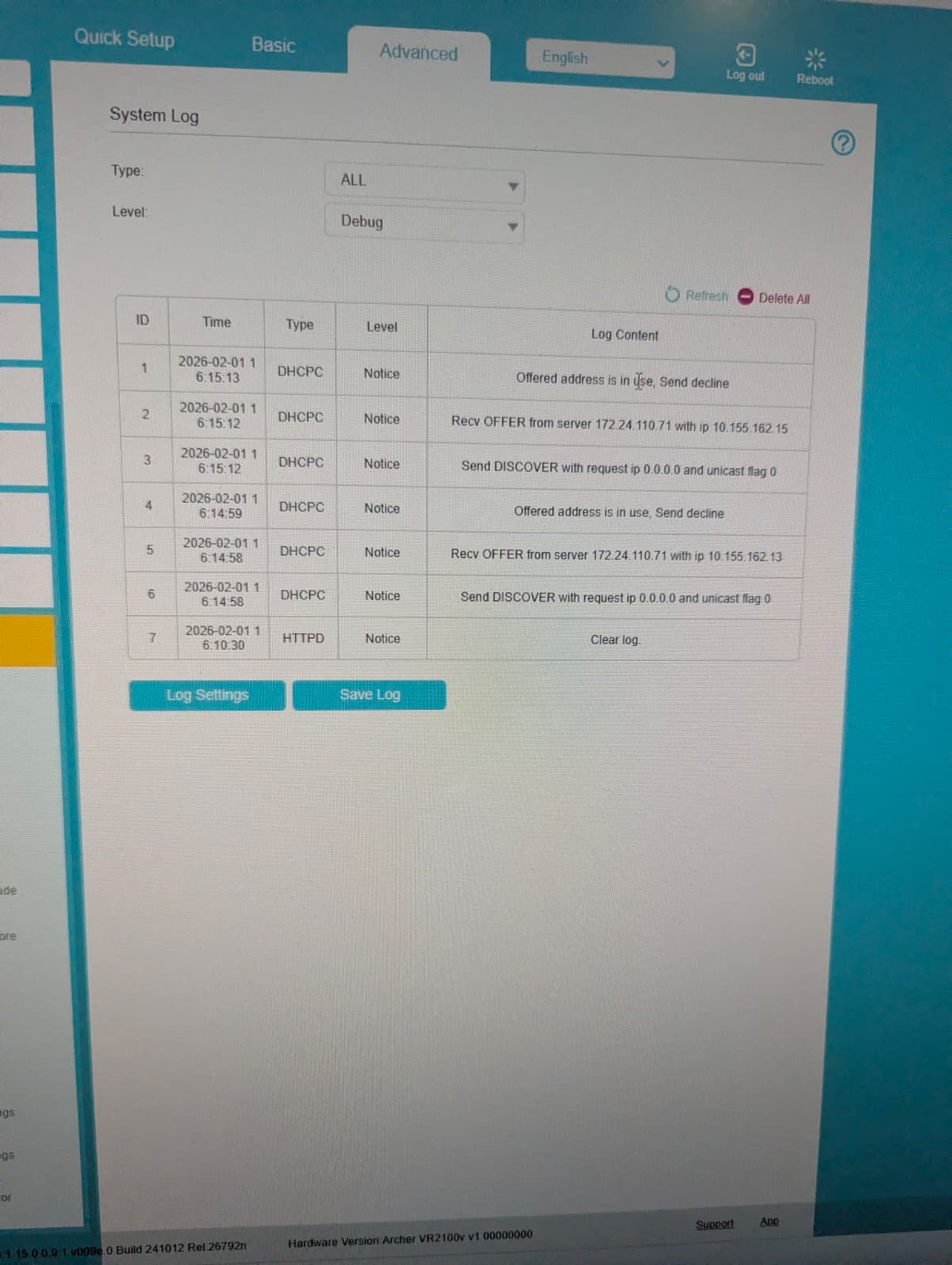
One day it stopped getting IP and now states that IP that it got offerd from ISP DHCP server is in use.
I tryed older firmware,disableing/enableing other stuff and cant find any fix to the problem?
  0      
  0      
#1
Options
3 Reply
Re:TPLink VR2100v EU wont get IP address for VoIP connection
Wednesday

  @KarloVranjes 


It appears that there's a newer FW release for your modem router - Archer VR2100v(EU)_V1_1.16.0 Build 260124 - here.

Have you considered updating the VR2100v FW and test if that resolves your issue ?

If this was helpful click on the arrow pointing upward to make it blue. If this solves your issue, click the star to make it blue as a "Recommended Solution". Tips:149wubkkfoLmNDjDbiTxx4ZU8mpcMA5CJt
  0  
  0  
#2
Options
Re:TPLink VR2100v EU wont get IP address for VoIP connection
Yesterday

  @terziyski 

I have tryed with this new Firmware but problem still persists.
Same thing happens.Rejects IP saying its in use.

  0  
  0  
#3
Options
Re:TPLink VR2100v EU wont get IP address for VoIP connection
Yesterday

  @KarloVranjes 


So this was working before, but one day stopped. Now you say it doesn't work neither with older or with the latest firmware.

Probably it's good idea to troubleshoot this issue with your ISP at this point.

If this was helpful click on the arrow pointing upward to make it blue. If this solves your issue, click the star to make it blue as a "Recommended Solution". Tips:149wubkkfoLmNDjDbiTxx4ZU8mpcMA5CJt
  0  
  0  
#4
Options